188
3.4 STARTING/STOPPING THE ENGINE
[STARTING THE ENGINE]
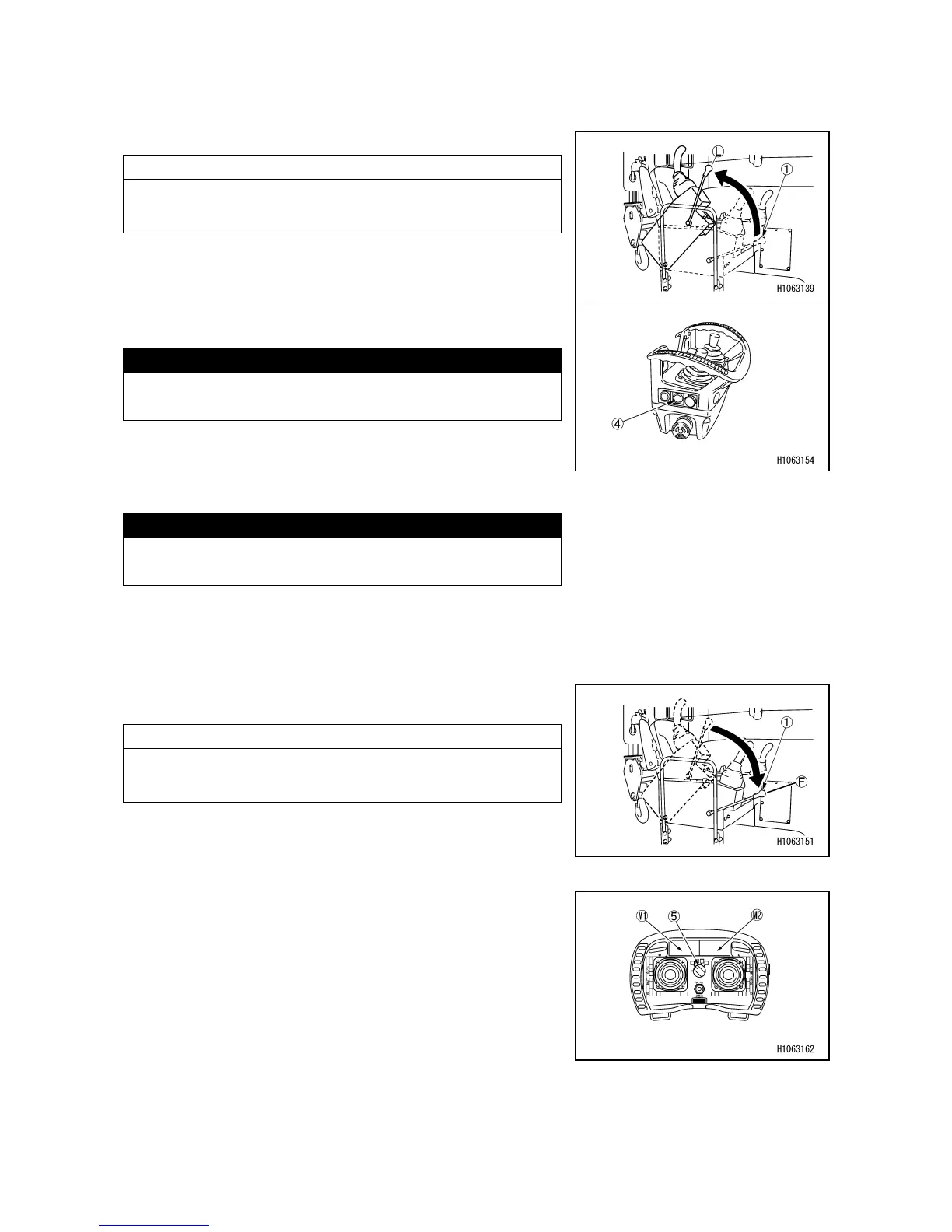
1. Raise the lock lever (1) to the lock position (L).
NOTES
Engine does not start unless the lock lever (1) is in lock
position (L).
2. Pressing the engine start/stop switch (4) when the
engine is stopped will allow the engine to start.
CAUTION
To start the engine, press and hold the engine
start/stop switch (4) until it starts.
[STOPPING THE ENGINE]
Pressing the engine start/stop switch (4) when the engine
is running will allow the engine to stop.
CAUTION
To stop the engine, press and hold the engine
start/stop switch (4) until it stops.
3.5 OPERATION AFTER ENGINE IS STARTED
3.5.1 OPERATION BEFORE WORK
Before operating with controller, set the lock lever (1) to
free position (F).
NOTES
Crane operation is not possible unless the lock lever (1) is
in free position (F).
3.5.2 SWITCHING OPERATION MODE
Each press of the operation mode selector switch (5)
changes the operation mode.
Each press of the operation switch also changes the
screen accordingly. For the display (M1 and M2), refer to
“OPERATION 3.3 INDICATIONS OF DISPLAY”.
• Crane mode (white)
• Outrigger (F) mode (Blue)
• Outrigger (R) mode (Orange)
• Travel mode (red)



 To Next Page