402
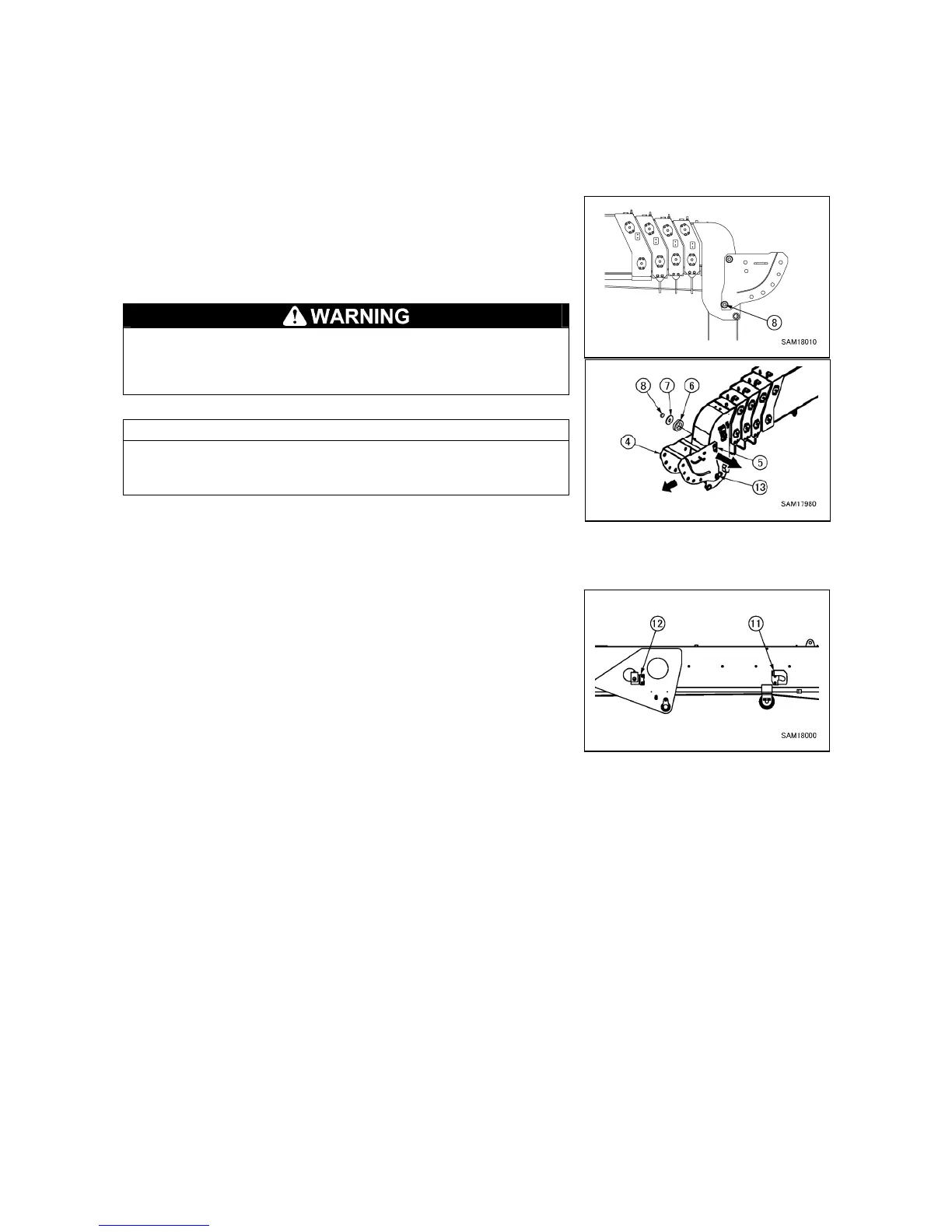
4.3.2 REMOVING BRACKET
First of all, check that the searcher hook boom is removed.
If the searcher hook boom is mounted, remove it referring to “4.3.1 Removing searcher hook boom”.
[Removing searcher hook bracket]
1. Tighten the nut (8) on the tip side of the head pin (13).
2. Remove the nut (8), the plate (7) and the collar (6) on the tip
side of the point pin (5) and pull out the point pin (5) to remove
the searcher hook bracket (4).
The searcher hook bracket (4) will fall when the point pin (5)
is pulled out; be sure to support the bracket and pull the pin
out slowly.
NOTES
The searcher hook bracket (4) should be hung from the head pin
(13) by its design; remove by pulling it out toward you.
3. Tighten the nut (8) you loosened in step 1.
[Removing stowage bracket]
1. Loosen two bolts of the stowage bracket A (11) and remove
them from the main boom.
2. Loosen two bolts of the stowage bracket B (12) and remove
them from the main boom.



 To Next Page