277
[3] CHECKING OF RECEIVER
Perform the following inspections.
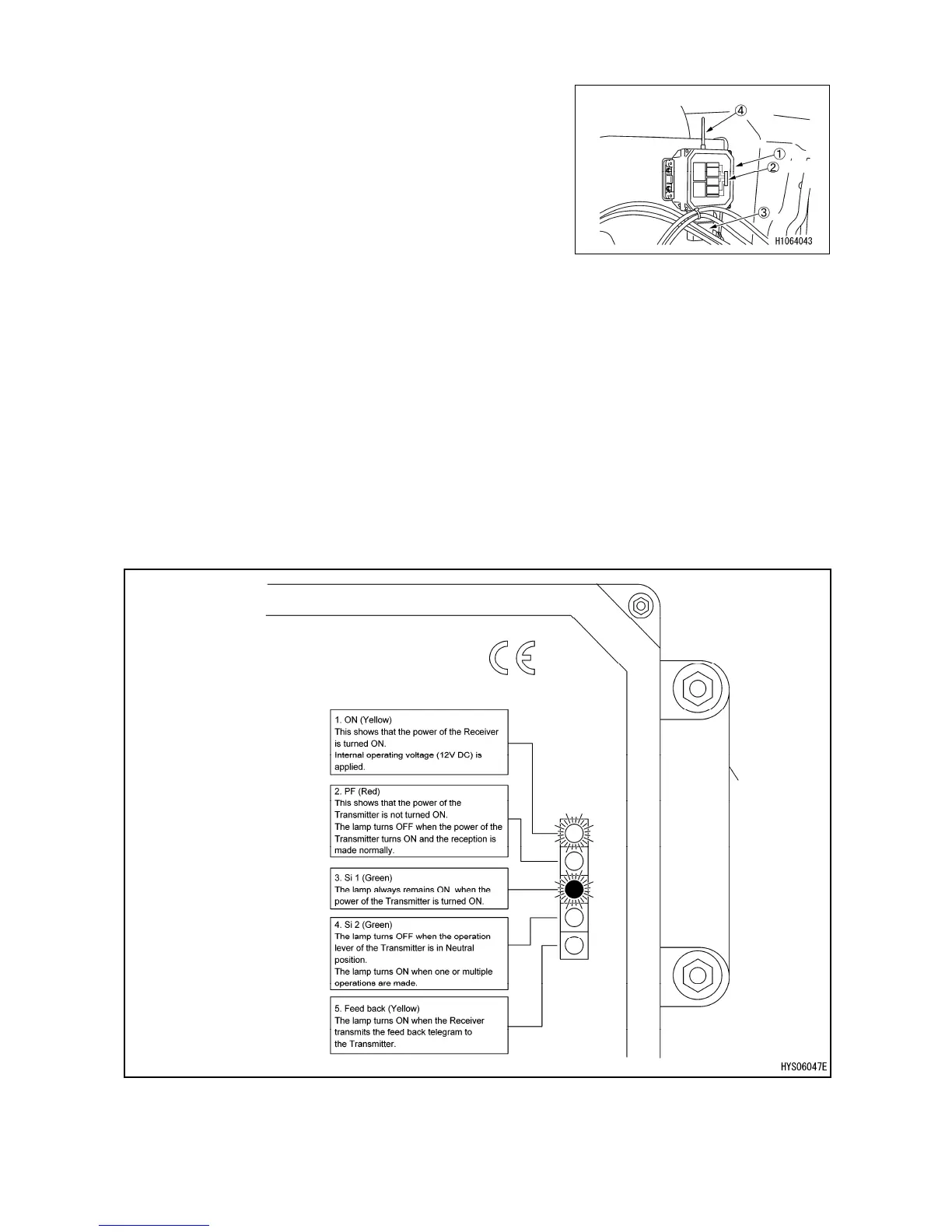
• Check the control box (1), monitor LED (2), connector
(3) and antenna (4) for oily dirt.
Scrub away any dirt with a clean cloth.
• Check the control box (1), monitor LED (2), connector
(3) and antenna (4) for cracks, damage, looseness, etc.
If cracks, damage or looseness is found, repair
immediately.
Cracks or damage to the Receiver may allow water to
enter inside, causing a malfunction and creating a
serious hazard.
• Operate “ON/OFF” of the main starter switch and check that the power of the Receiver is turned
ON or OFF.
LED ON (yellow) on the uppermost part of the monitor LED (2) comes ON.
• When pressing theremote controller power ON/OFF switch (3) of the transmitter twice and
operating the power to the “ON” position, check that two locations of the monitor LED (2) shown
in the figure below come ON.



 To Next Page