373
5. HANDLING MONITOR AND MOMENT LIMITER
Do not perform any work with the override switch on.
If you perform, it will result in dropping of hoisted load, breakage of the boom and the fly jib,
and crane overturn causing a serious accident resulting in death or serious injury.
CAUTION
In this section, only the equipment with the fly jib specification, different from the standard
specification is described.
See “Operation 1.5 Moment limiter (overload detector)” for the devices that are not described in
this section.
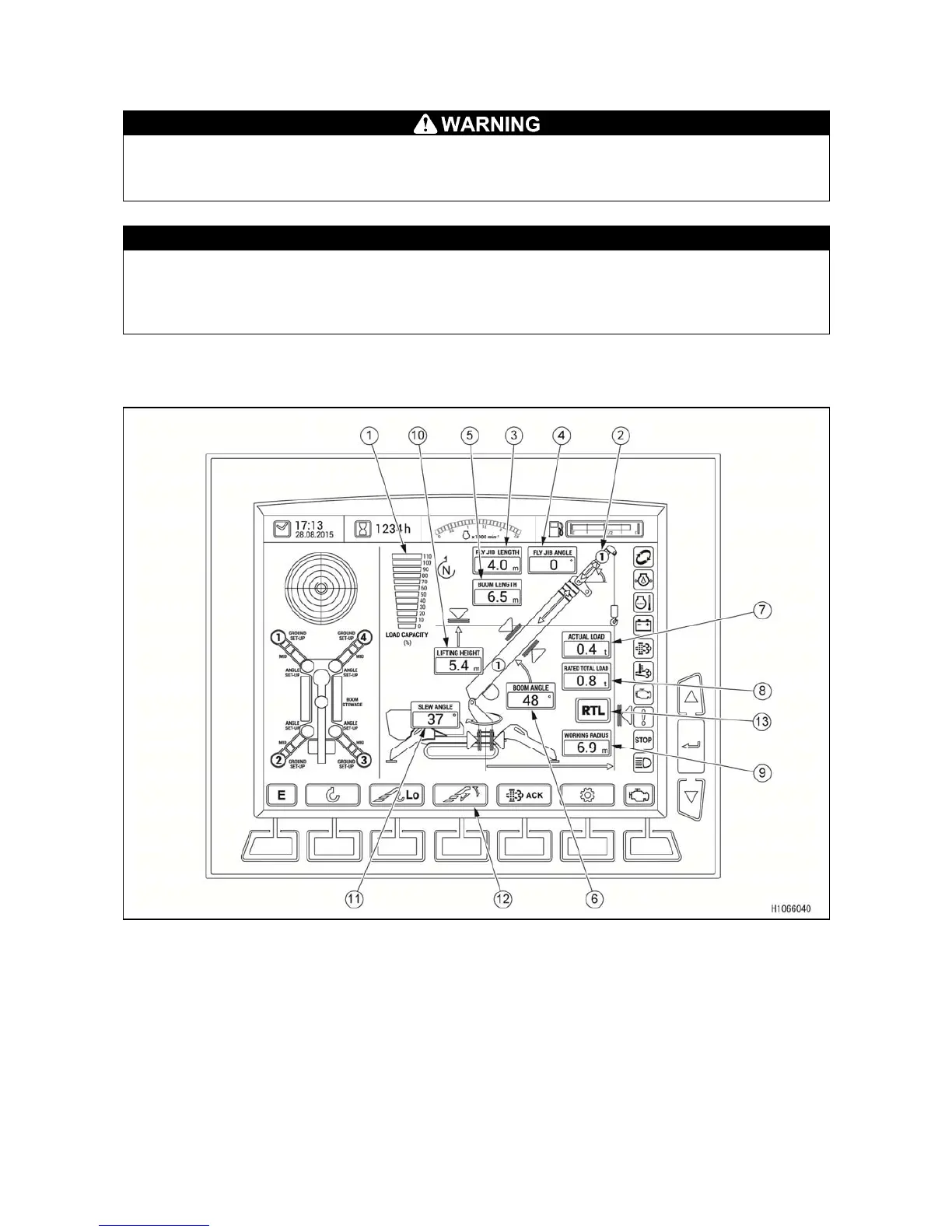
5.1 NAME OF MONITOR DISPLAY
5.1.1 MONITOR DISPLAY IN FLY JIB MODE
(1) Load capacity ratio display
(2) Number of fly jib boom section display
(3) Fly jib length display
(4) Fly jib angle display
(5) Boom length display
(6) Boom angle display
(7) Actual load display
(8) Rated total load display
(9) Working radius display
(10) Lifting height display
(11) Slew angle display
(12) Boom/fly jib operation selector switch
(13) Rated total load display



 To Next Page