229
10. HANDLING REMOTE CONTROLLER BATTERY
NOTES
The battery used for the Transmitter is an exclusive battery.
10.1 REPLACEMENT TIMING OF BATTERY
When the transmitter battery status bar illuminates in red
followed by an alarm signal sound, immediately replace the
battery with a charged one.
If the battery is not replaced, the Transmitter will stop in a
few minutes.
10.2 REPLACEMENT METHOD OF BATTERY
Replace the battery of the Transmitter in the procedure
described below.
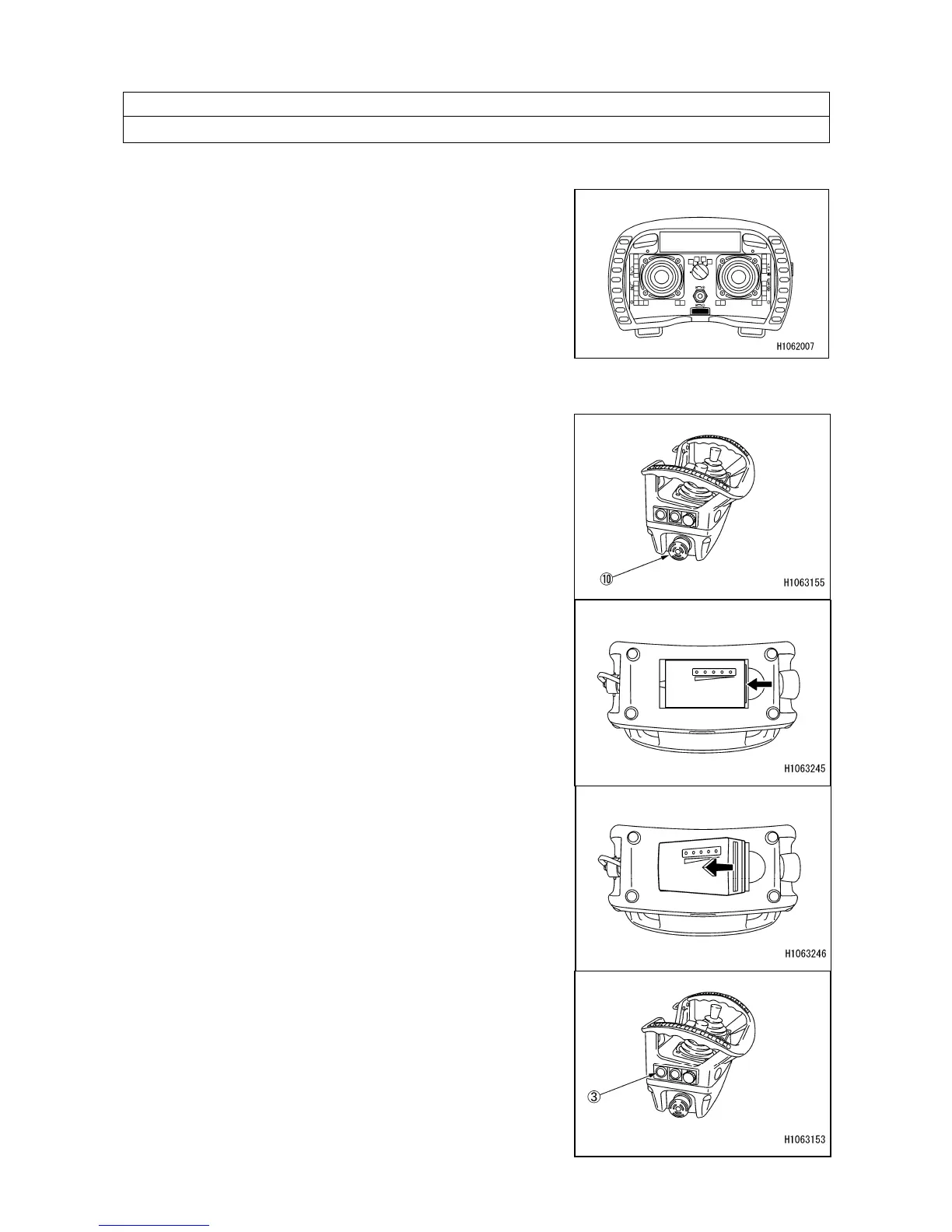
1. Turn “OFF” the power of the Transmitter.
Pressing the Emergency stop/Remote controller power
OFF switch (10) will turn “OFF” the power.
2. Lift the battery upward while pushing it. The battery
comes off.
3. Insert a charged battery into the Transmitter while
pushing it.
4. Make sure that the power turns “ON” when you press
the Remote controller power ON/OFF switch (3).
Press the remote controller power ON/OFF switch (3)
twice, and verify that communication with the receiver is
established.



 To Next Page