286
[3] INSPECTION OF OUTRIGGER MODE OPERATION
1. Turn “ON” the main starter switch on the machine
side.
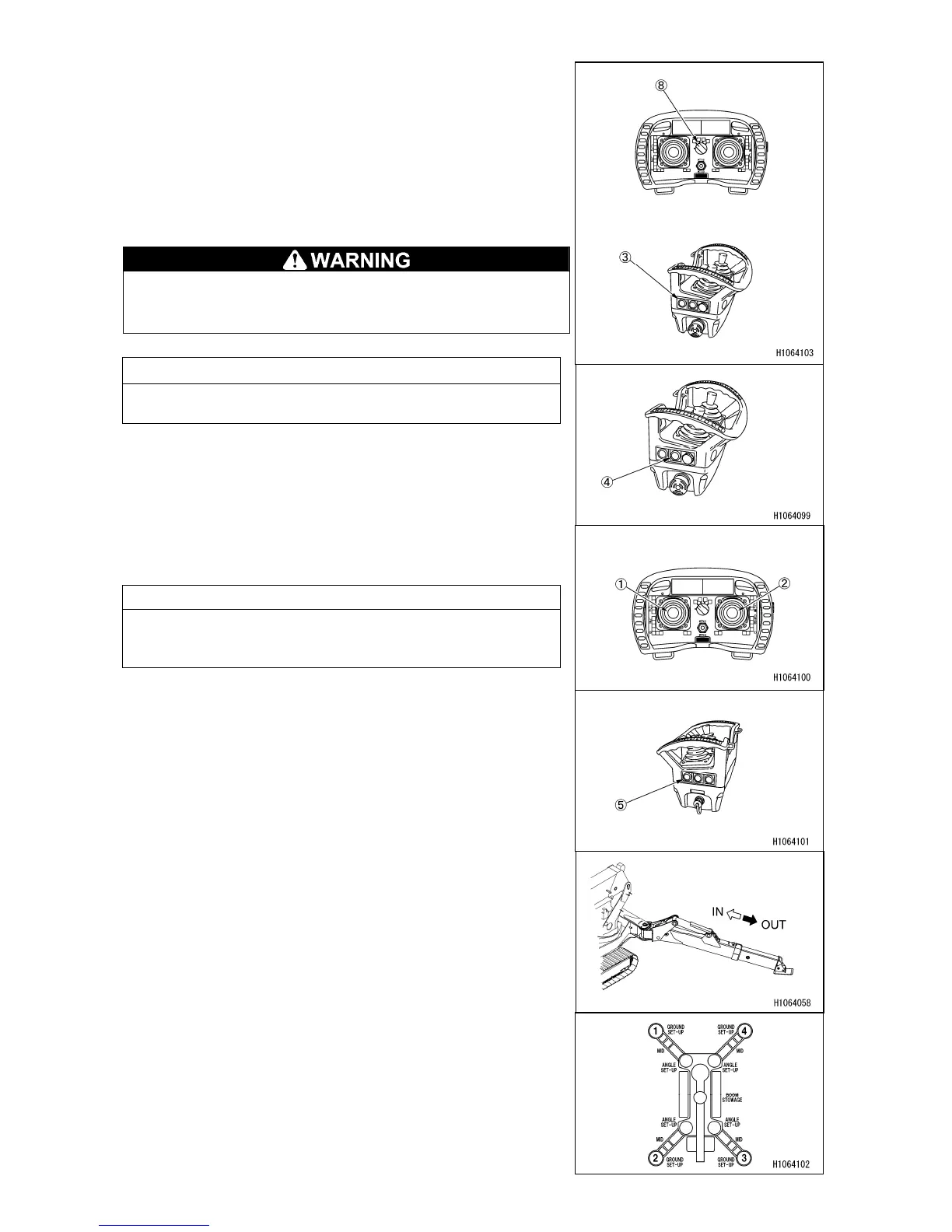
2. Press the “start/stop radio control button” (3) of the
transmitter twice to turn the power “ON”.
3. Using the mode selector switch (8) of the
transmitter, set the operation mode to the
“Outrigger mode”.
When operating the outriggers, perform the steps 1 to
3 above and be sure to check that the outrigger mode
is set.
NOTES
There are two types in “Outrigger mode”: forward (1.4
Outrigger) and backward (2.3 Outrigger).
4. Push the Engine start/stop switch (4) to start the
engine.
5. Operate the operating levers (1, 2) to the “Extend” side
and “Retract” side and check that the outrigger
corresponds to the operation levers.
NOTES
Slowly push the operation levers (1, 2) up and down and
check that the outrigger operates at a speed responding
to an operation amount of the operation levers.
6. Press the speed/outrigger switch (5) to change from the
outrigger retraction to extension/stowage. Also, check
that the monitor display changes accordingly at this
time.
7. Operate the operation levers (1, 2) to the “Extend” and
“Retract” side, and check that the outrigger
corresponds to the operation levers.
8. Perform the checks above for all outriggers for forward
(1.4 Outrigger) and backward (2.3 Outrigger).



 To Next Page