208
[If a power plug is not connected]
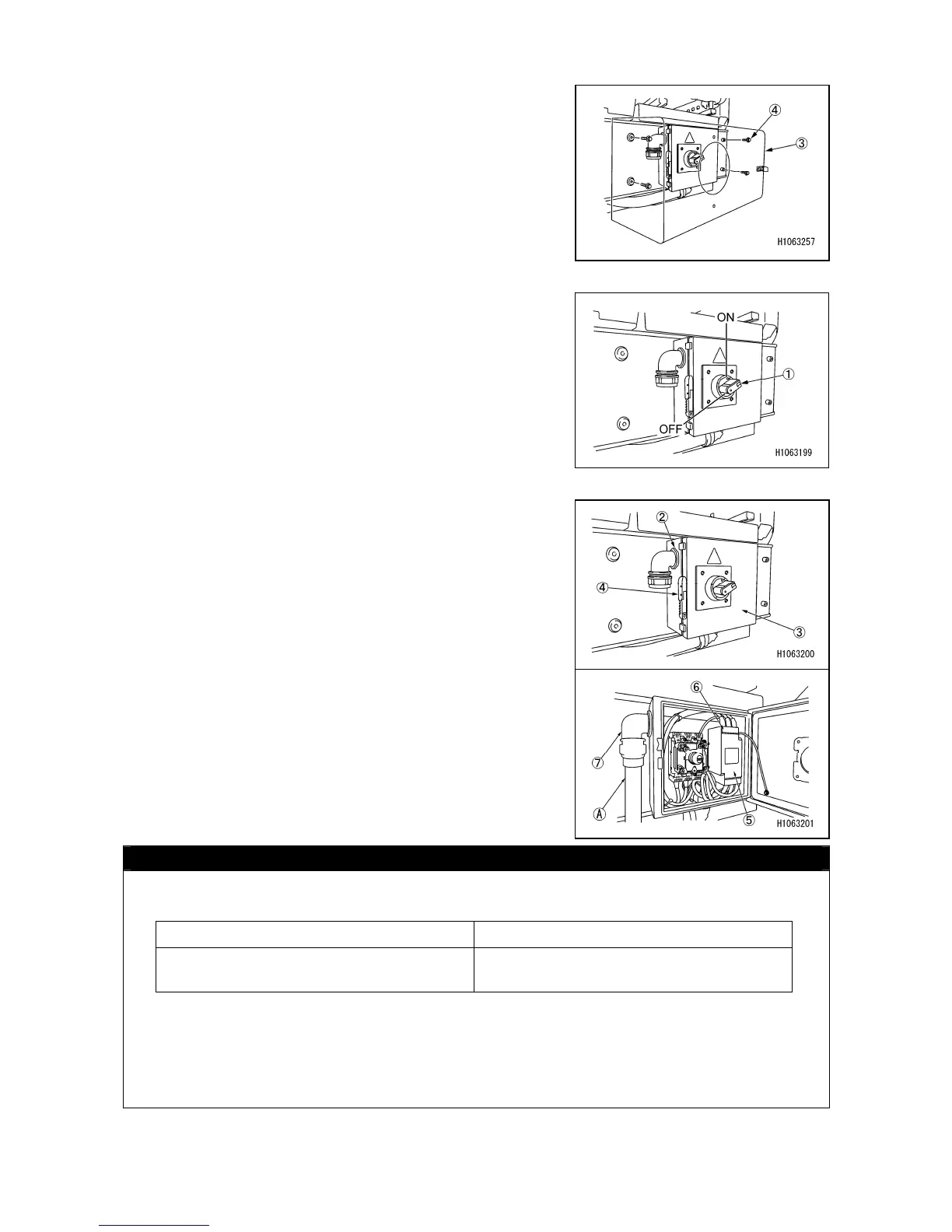
1. Remove the box (3). The box is attached from the inside
with 4 bolts (4).
2. Check that the breaker on the power supply equipment
side and the power supply box breaker switch (1) is in
the “OFF” position.
3. Pull the handle (4) toward you to unlock, and open the
door (3) of the power supply box (2).
4. Inside the power supply box, remove the cover (6) for
the breaker switch pedestal (5).
5. Insert the applicable cabtire cable (A) into the cable
hole of the cable gland (7) under the power supply box,
and connect it to the breaker switch block (5).
CAUTION
• The length of a cabtire cable varies with cable specifications. Any cable length should
conform to values listed below.
• Be sure to connect the grounding cable (8) of the cabtire cable to the ground point.
As to the other three cables (9) except the grounding cable, they are for the inverter
drive, and can be connected to any terminals, “L1, L2 and L3”.
Motor voltage (V) Cable spec. (sq)
380, 400 14



 To Next Page