3 PROGRAM SETTINGS Chapter B: SETTINGS
52 Planmeca ProOne Technical manual
• Self diagnostic (P2510)
If required, you can test that the movement motors and limit sensors of the X-ray unit
function correctly.
On the
Testing programs
display, select
Self diagnostics (P2510).
The
Self
diagnostics
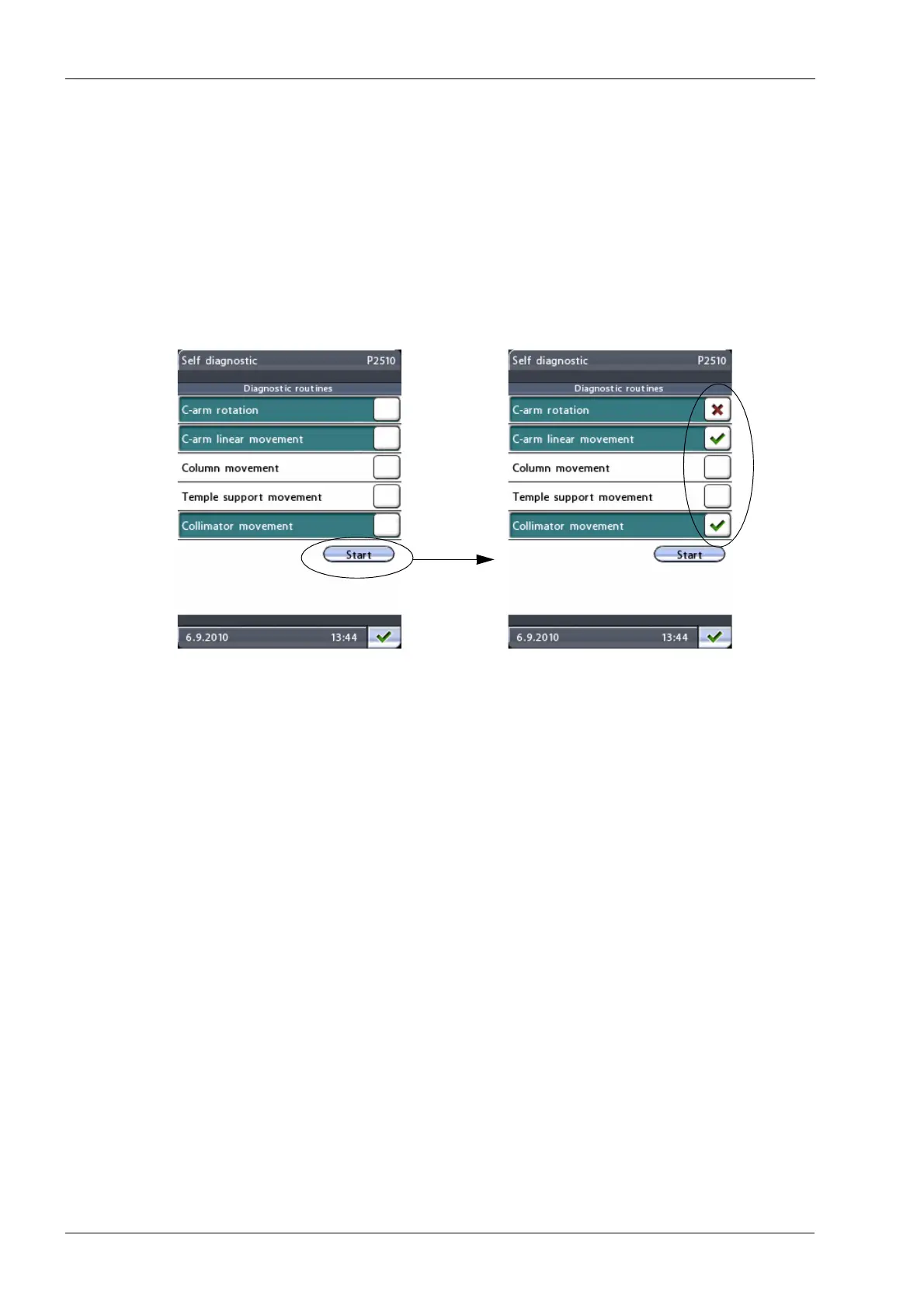
display (P2510) will be shown. First select the function(s) that you wish to
test. The selected function(s) will be highlighted.
Then select
Start
. The testing program starts and the C-arm, column, temple supports
and/or collimator start moving. The test results will be displayed as follows: green
check mark = pass, red cross = fail.
• Beam check (P2520)
You can perform a beam check to check the position of the X-ray beam on the sensor.
Refer to section 1.10 "Step 7: Taking beam check exposure" on page 111 for a
detailed description on how to perform a beam check.
• QA exposure (P2530)
You can take a QA exposure to check the image quality of the X-ray unit.
Refer to Planmeca Publication Number 10016248 (Image Quality Monitoring
Instructions for Planmeca Digital X-ray Units) for a detailed description on how to take
a QA exposure.
Exit the
Testing programs (P2500)
display by touching the green check mark button in the
bottom right corner of the display.
Functions to be tested selected
Test results shown














 To Next Page