Chapter F: PARTS REPLACEMENT AND REPAIR 4 C-ARM AND UPPER ARM PARTS REPLACEMENT
Technical manual Planmeca ProOne 159
4.3.1 Filament definition
The X-ray tube filament definition must be performed when the Power Supply Unit (PSU)
assembly and/or tube head is replaced.
The tube head must be cold when the filament definition is performed.
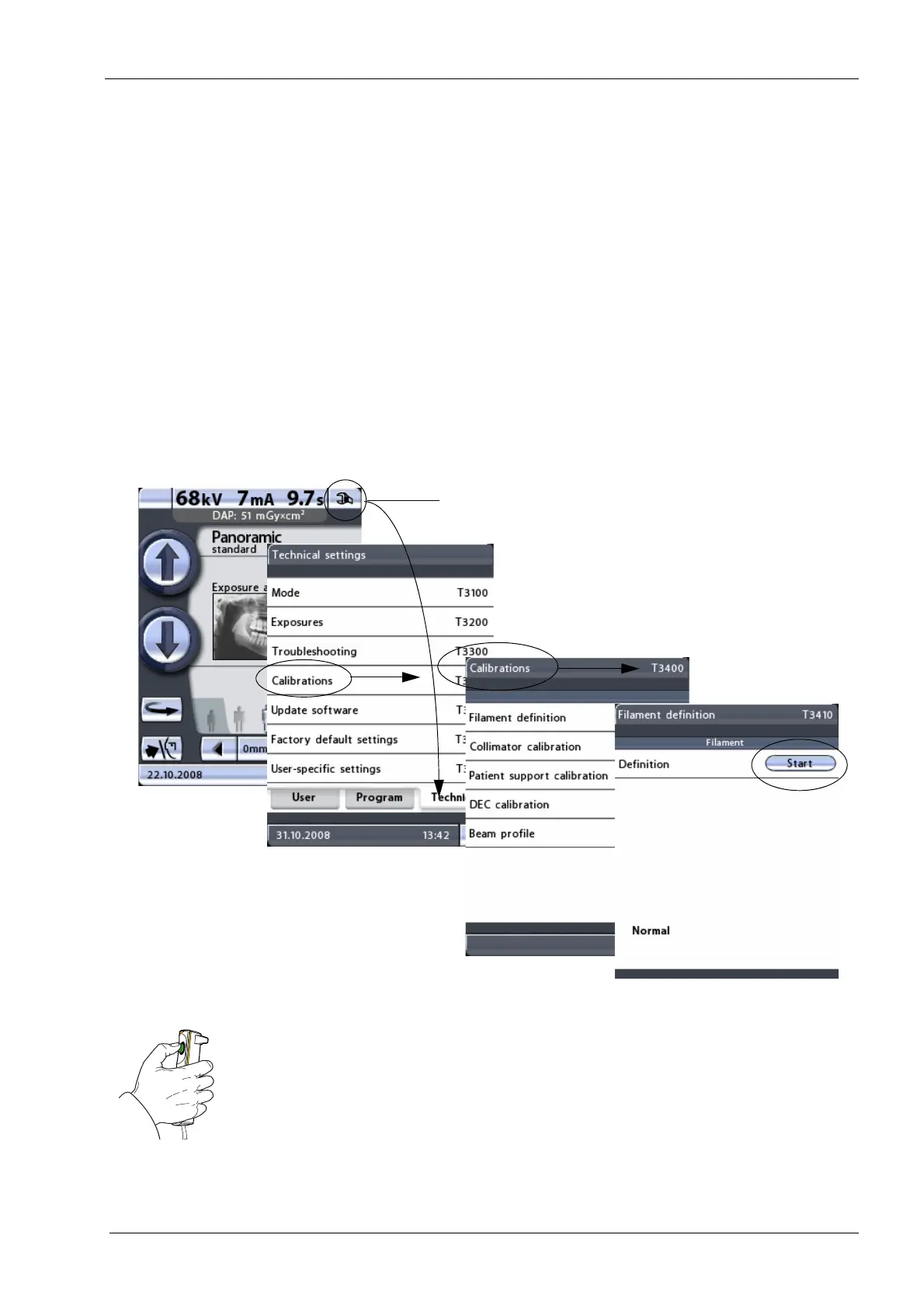
First touch the service spanner icon on the main display. The main display is the display
that is shown when the X-ray unit is switched on. Select the option Calibrations (T3400) on
the
Technical setting
s display. On the next display, select the option Filament definition
(T3410). The
Filament definition
(T3410)
display will be shown.
You need a password to gain access to the technical settings. The password needs to be
entered each time the X-ray unit is switched on. The password is 1701.
Touch the Start button on the
Filament definition
(T3410)
display.
Take an exposure. Press and hold down the exposure button until the series of exposures
is completed, i.e. until the word
Normal
appears on the display.
Radiation is generated when the exposure button is pressed. Protect yourself from
radiation.
Exit the
Filament definition
display by touching the green check mark button in the bottom
right corner of the display.














 To Next Page