Loading Media
42 QL-30/60 User Guide
Winding up the Liner in Peel-Off mode
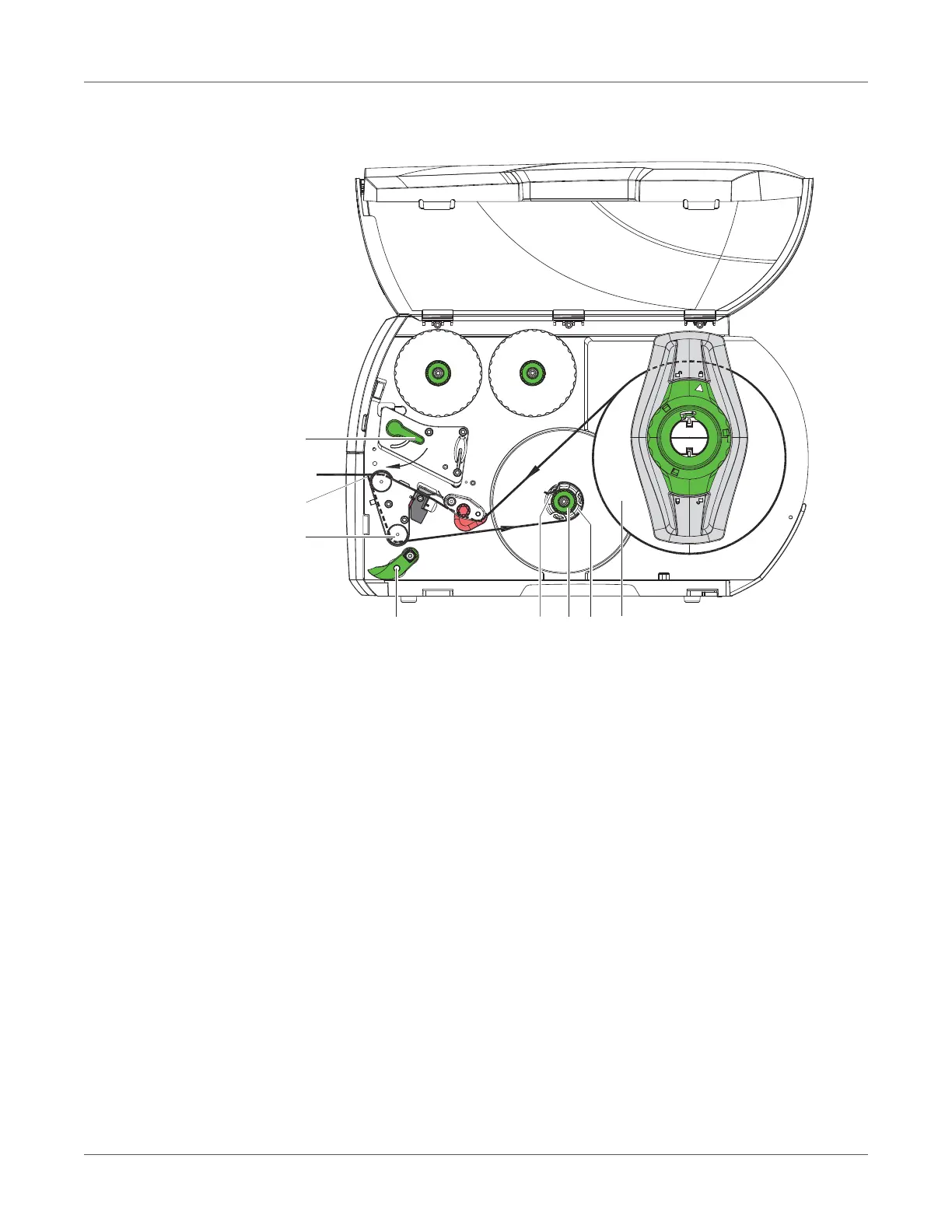
Figure 11: Guidance of the material in peel-off mode
In Peel-Off mode, the labels are removed after printing, and only the liner is wound up internally.
1 Lift the pinch roller (4) off the rewind assist roller (3).
2 Remove labels from the first 100 mm of the liner.
3 Guide liner to the rewinder (7) around the dispense plate (2) and the rewind assist roller (3).
4 Hold rewinder (7) firmly and turn knob (6) clockwise until it stops.
5 Push liner under a bracket (5) of the rewinder (7) and align the outer edge of the strip to the
media roll (8).
6 Turn knob (6) counterclockwise until it stops.
The rewinder is fully spread, thus gripping the liner firmly.
7 Turn rewinder (7) counterclockwise to tighten the liner.
8 Position the pinch roller (4) centrally to the liner.
9 Swing the pinch roller (4) against the rewind assist roller (3).
10 Turn lever (1) clockwise to lock the printhead.
The label roll is loaded for use in peel-off mode.



 To Next Page