Loading Media
QL-30/60 User Guide 43
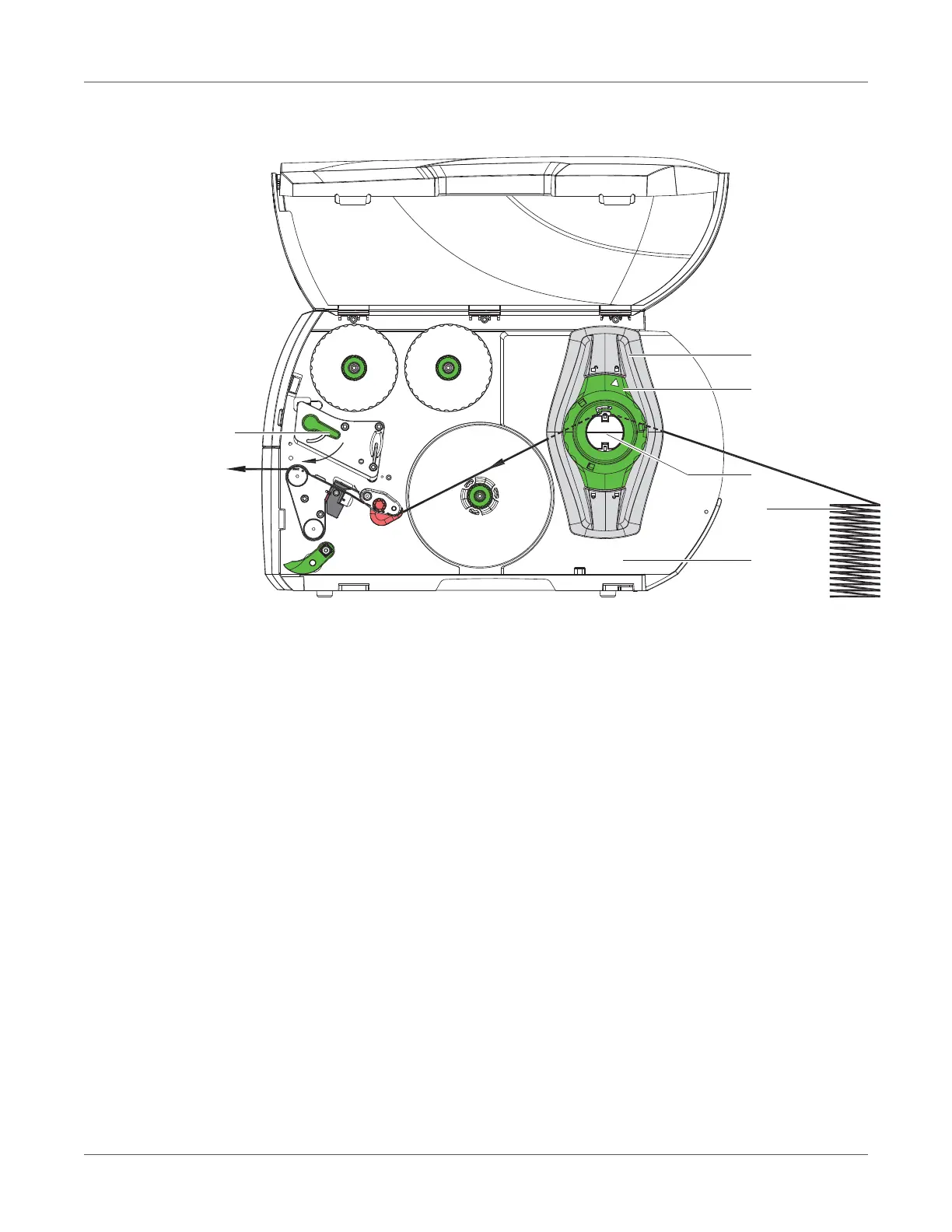
Loading Fanfold Media
Figure 12: Feed path of fanfold media
1 Turn ring (2) counterclockwise, so that the arrow points to the unlock symbol, and thus
release the margin stop (1).
2 Move the margin stop(s) (1) in such a position that:
• QL-30, QL-60, QL-30P, QL-60P - the media can pass between the margin stop and the
chassis.
• QL-30M, QL-60M, QL-30MP, QL-60MP - the media can pass between the two margin
stops.
3 Position media stack (4) behind the printer. Ensure that labels on the strip are visible from
above.
4 Guide the media strip over the roll retainer (3) to the print unit.
5 Move the margin stop (1) against the media strip until chassis (5) and margin stop (1) or
both margin stops touch the media strip without clamping or bending it.
6 Turn ring (2) clockwise, so that the arrow points to the lock symbol, and thus fix the margin
stop (1) on the roll retainer (3).
7 Insert media strip into printhead. See “Inserting the Media Strip into the Printhead” on page
38.
8 Set the label sensor. See “Setting the Label Sensor” on page 39.



 To Next Page