Alteon Application Switch Operating System Application Guide
Basic IP Routing
Document ID: RDWR-ALOS-V2900_AG1302 115
5. Enable, apply, and verify the configuration.
Examine the resulting information. If any settings are incorrect, make the appropriate changes.
6. Save your new configuration changes.
Using VLANs to Segregate Broadcast Domains
In Figure 10 - Example Topology Migration, page 112, devices that share a common IP network are
all in the same broadcast domain. If you want to limit the broadcasts on your network, you could
use VLANs to create distinct broadcast domains. For example, as shown in the following procedure,
you could create one VLAN for the client trunks, one for the routers, and one for the servers.
To segregate broadcast domains using VLANs
Note: This procedure uses the configuration in Figure 10 - Example Topology Migration, page 112
as its baseline.
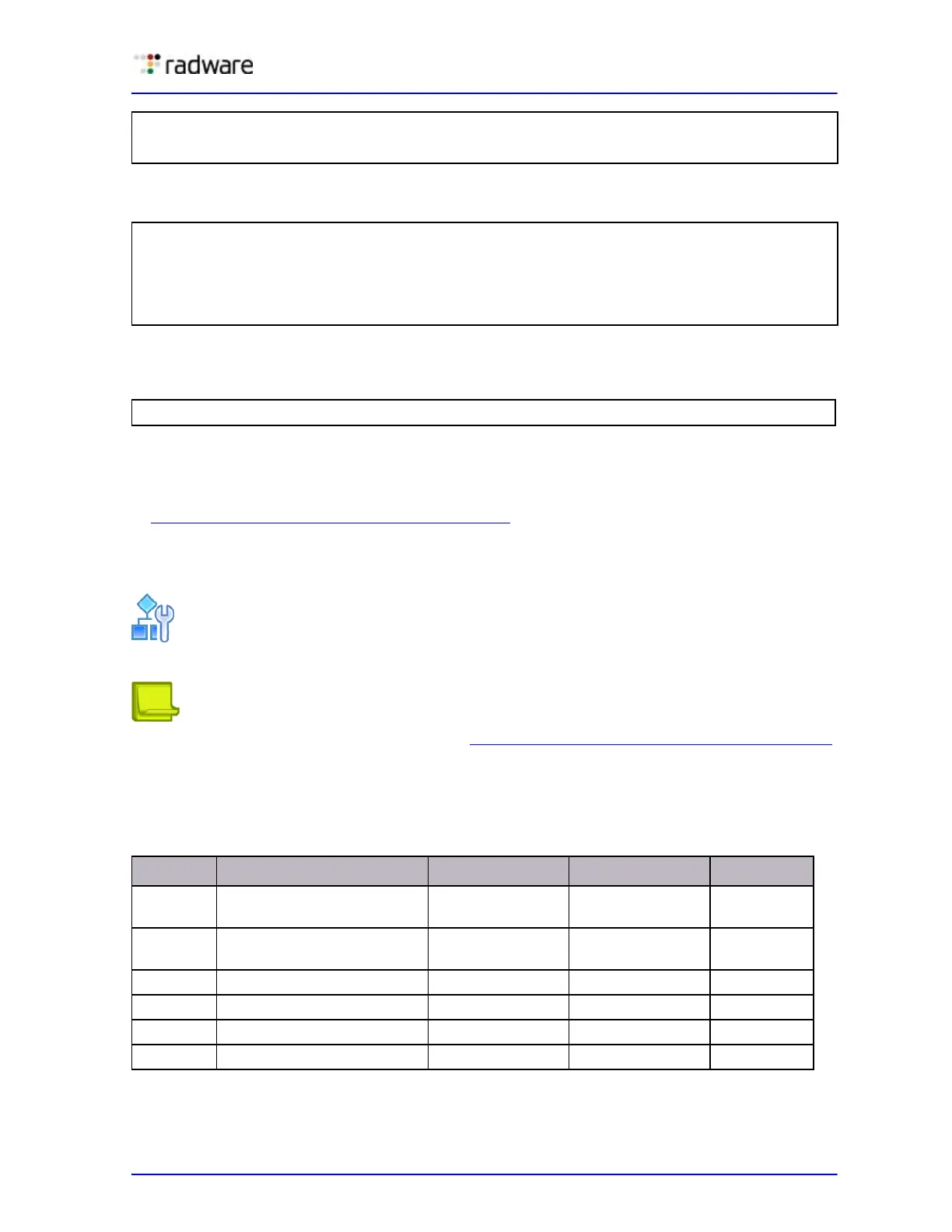
1. Determine which ports and IP interfaces belong to which VLANs. Table 16 includes port and
VLAN information used in this example:
>> Default gateway 2# addr 205.21.17.2
(Assign address for secondary router)
>> Default gateway 2# ena
(Enable secondary default gateway)
>> Default gateway 2# /cfg/l3/fwrd
(Select the IP Forwarding Menu)
>> IP Forwarding# on
(Turn IP forwarding on)
>> IP Forwarding# apply
(Make your changes active)
>> IP Forwarding# /cfg/l3/cur
(View current IP settings)
>> IP# save
(Save for restore after reboot)
Table 16: Subnet Routing Example Optional VLAN Ports
VLAN Devices IP Interface Port VLAN #
1 First Floor Client
Workstations
211
Second Floor Client
Workstations
321
2 Primary Default Router 1 3 2
Secondary Default Router 1 4 2
3Common Servers 1453
Common Servers 2 4 6 3



 To Next Page