Alteon Application Switch Operating System Application Guide
High Availability
Document ID: RDWR-ALOS-V2900_AG1302 513
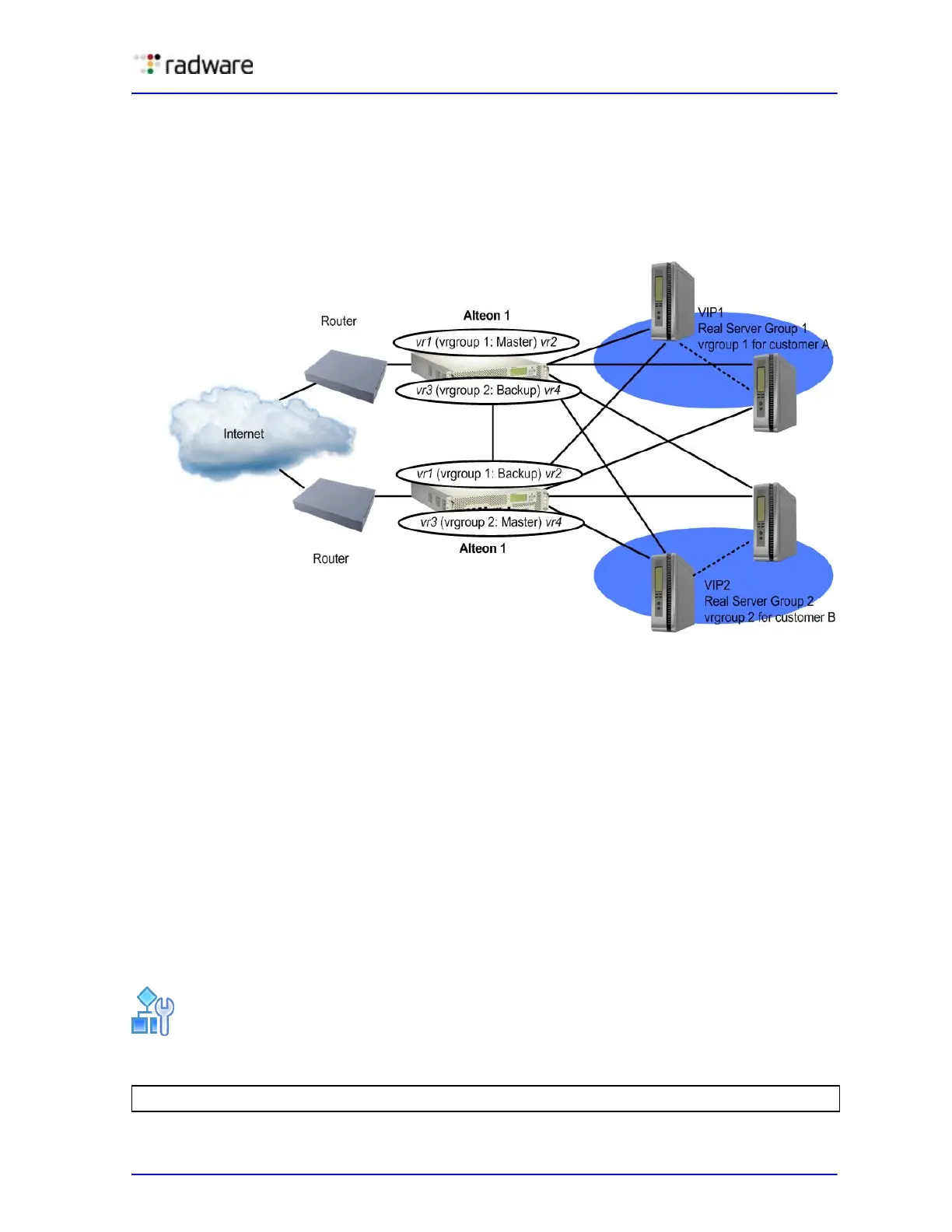
• Customer A's traffic load balances across real servers in Real Server Group 1.
• Customer B's traffic load balances across real servers in Real Server Group 2.
Each Alteon is configured with vrgroup 1 for Customer A, and vrgroup 2 for Customer B.
Because each vrgroup is tracked independently of the other, vrgroup 1 can fail over to its equivalent
vrgroup 1 on the other Alteon while not affecting the VRRP state of vrgroup 2.
Figure 76: Service-Based Virtual Router Groups Configuration
Characteristics of Service-Based Virtual Router Groups (vrgroups)
The following are characteristics of virtual router groups:
• Physical Alteon-based VRRP groups must be disabled (/cfg/l3/vrrp/group dis)
• Up to 16 vrgroups can be configured on a single Alteon. Each vrgroup can contain up to 64
virtual routers assigned with a virtual router number from 1 through 1024. Each virtual router
can be configured as a virtual interface router or a virtual service router.
• Virtual routers that become members of a vrgroup assume the priority tracking parameters
configured for that vrgroup.
• When one member of a master vrgroup fails, the priority of the vrgroup decreases, and all the
members of that vrgroup change from master to backup. This is done by configuring tracking on
the service-based virtual router group.
• You cannot use an IPv6 vrrp group with more than 90 VRs.
Server-Based Virtual Router Group Commands
The following are procedures for server-based virtual router group commands.
To access the vrgroup menu
>> Main# /cfg/l3/vrrp/vrgroup <vrgroup # 1-16>



 To Next Page