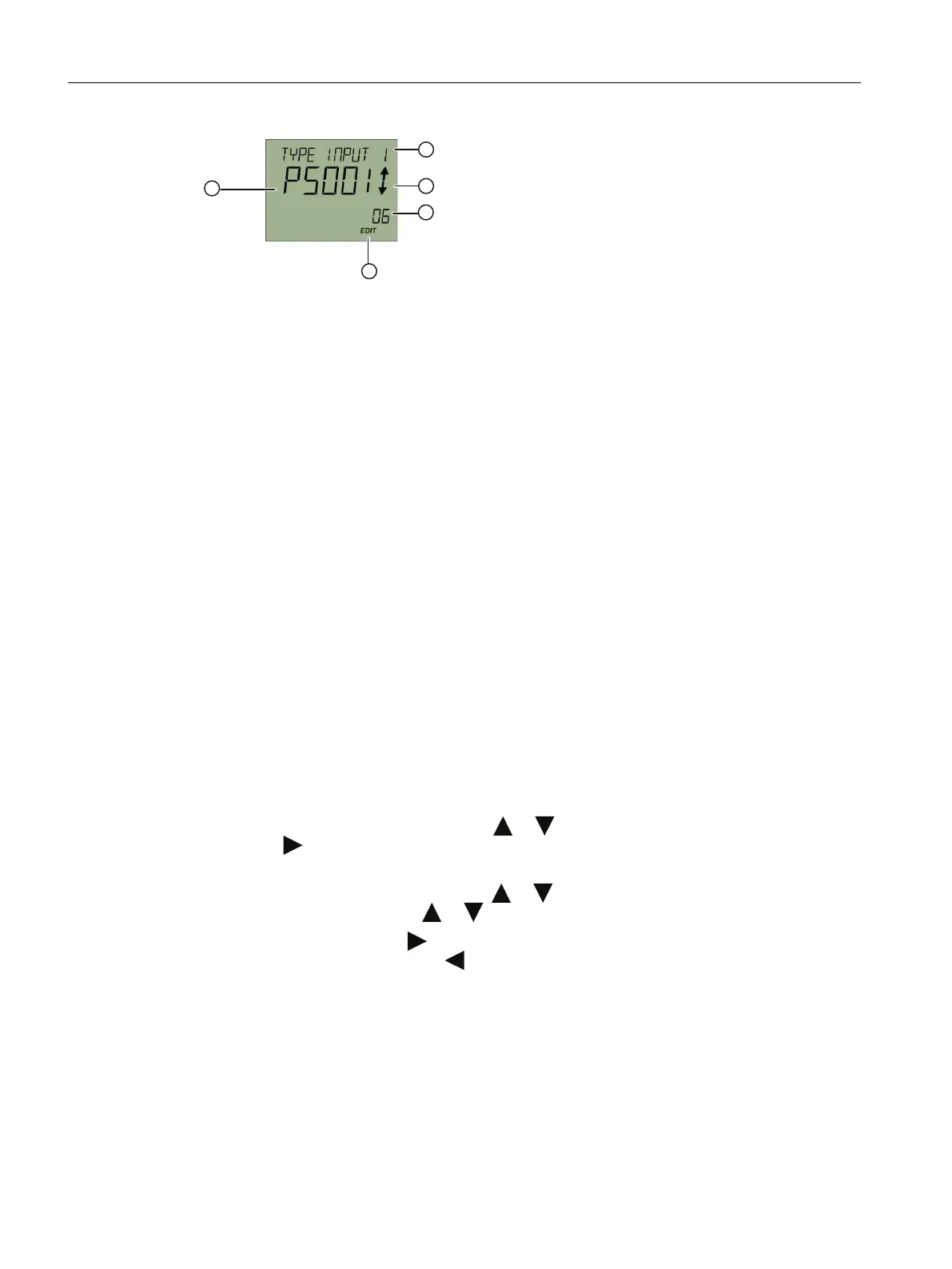
① Name of parameter and, if availa‐
ble, unit (alternating)
④ "EDIT" symbol (ashing)
② Enumeration arrows (for enumera‐
tions only)
⑤ Parameter value
③ Parameter ID
Figure 7-5 Example of edit view
For parameters with an associated unit, the parameter name and unit are displayed as
alternating values in ①. Example: Lower range value in °C.
See also
Disabling button lock (Page 94)
Changing parameter values
Requirement
The device is not write-protected.
For information on write protection, refer to section Locking the device (Page 65).
Procedure
1. Navigate to the parameter view (Page 60).
2. Select the desired parameter with the or button.
Use the button to conrm.
You are in the edit view.
3. Change the parameter value with the or button.
To navigate faster, keep the or button pressed.
4. Save the change with the button.
Or, cancel the change with the button.
Operating
7.1 Local operation
SITRANS TS100/TS200/TS300/TS500/TSinsert/TSthermowell
64 Operating Instructions, 08/2020, A5E47810090-AA



 To Next Page