399
Appendix
113.2 InterconnectionofKacoPowadorinverters
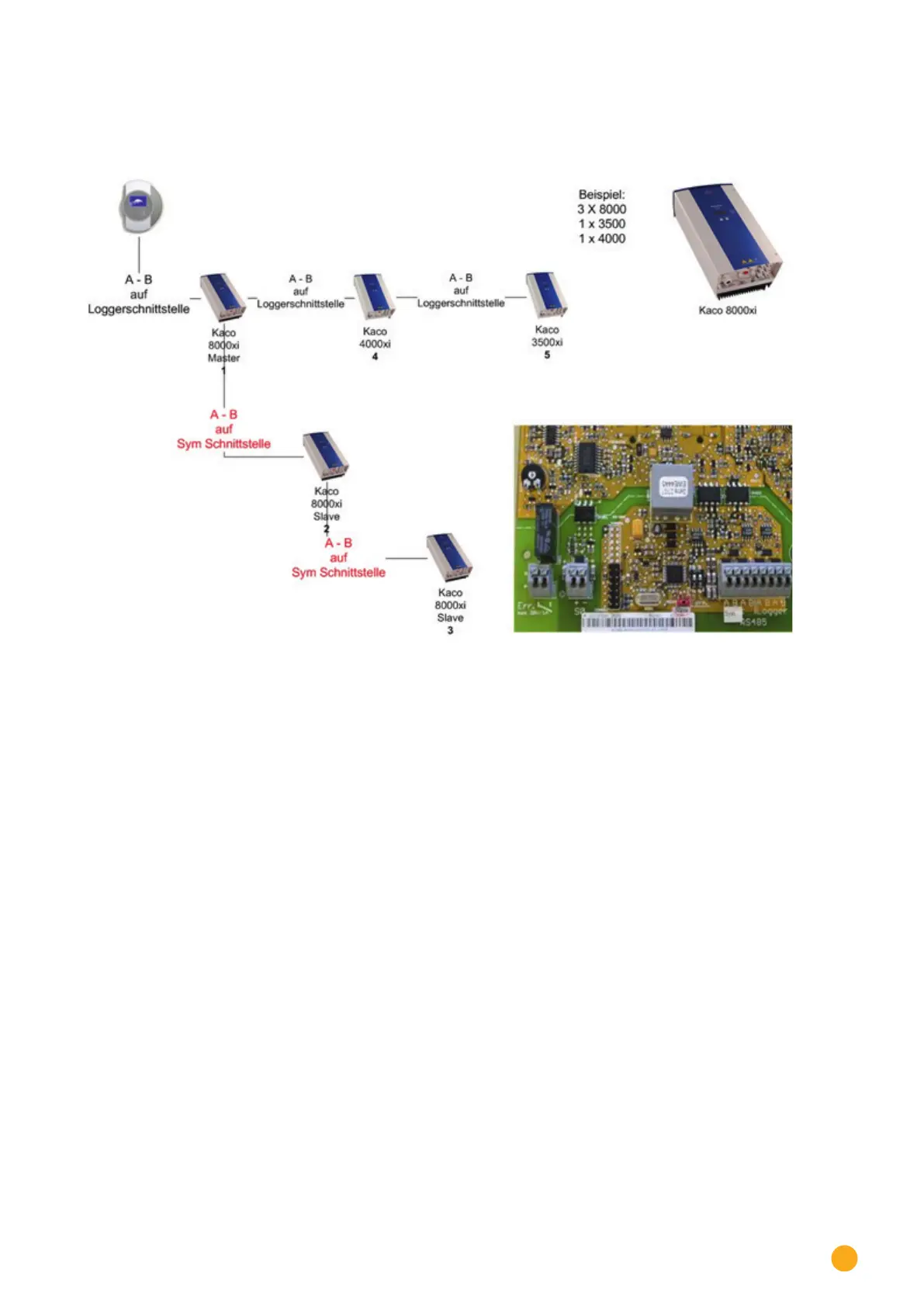
Fig.: Interconnection of Kaco Powador inverters
Instructions for Powador 6400xi and 8000xi
•
Interconnection of Powador 6400Xi and 8000xi:
► Set 1 inverter as „Master“, 2 as „Slaves“;
Read the labeling on the inverter circuit board!
► Clamp the Solar-Log™ data cable to the „LOGGER“ terminal strip on the Master inverter.
► Also connect the inverters to each other through the „SYM“ terminal strip
► Connect any additional inverters through the „Logger“ terminal strip
► On the inverter operating display:
Set the communication addresses, numbering consecutively
► On the inverter operating display: Switch „SYM Bus“ to active
•
Powador 6400Xi and 8000xi stand-alone mode:
► Set the inverter to „Slave“, irrespective of labeling on the circuit board
► Clamp the Solar-Log™ data cable to the „SYM Bus“ terminal strip
► On the inverter operating display:
Switch „SYM Bus“ to inactive
► On the inverter operating display: Set the communication addresses, numbering consecutively



 To Next Page