OnAir 2000M2 Digital Mixing Console
5-8 Master Functions SW V 4.0 Date printed: 12.11.03
5.6.2 Save a Snapshot to Memory
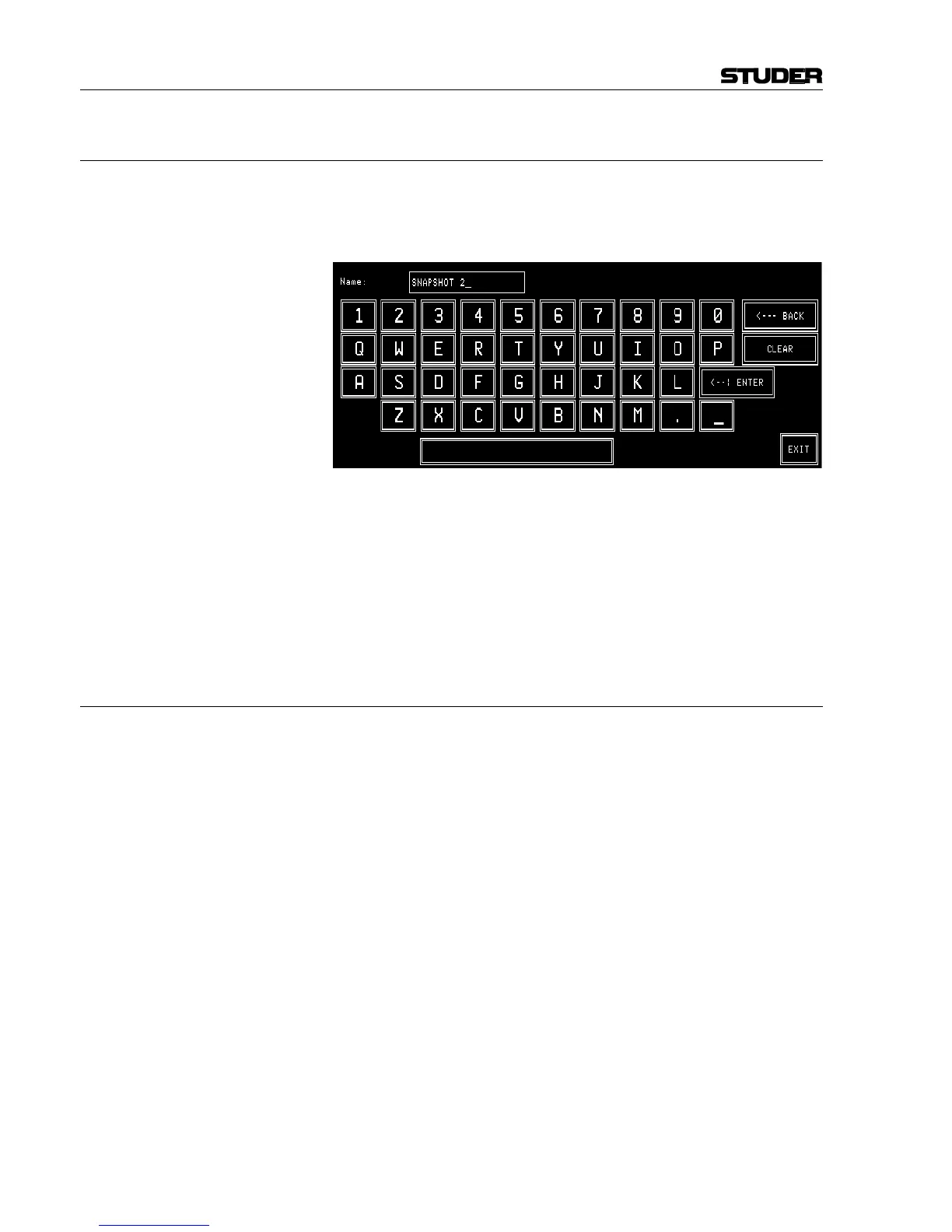
Saving a snapshot is done by touching a snapshot field, followed by SAVE
MEM. The keyboard page appears where the snapshot name can be en-
tered or edited (max. 20 characters). If the existing name is to be kept, just
touch the <--¦ ENTER field.
CLEAR is used to clear the text field for entering a new name with the
keyboard.
<--- BACK is used to delete one character to the left of the cursor.
EXIT is used to leave the keyboard page without saving the new name.
When touching <--¦ ENTER, the keyboard page is left and the snap-
shot data are saved.
Note: Global snapshots can be saved by the system administrator only. Logged-
in users only can save their private snapshots.
5.6.3 Delete a Snapshot from Memory
When saving a snapshot, the previously saved snapshot data are overwrit-
ten. A snapshot can be deleted, too, without overwriting it with new data.
For deleting a snapshot from the console's internal flash memory, the de-
sired snapshot has to be selected. The selected field is highlighted. After
touching the DELETE MEM field a dialog box appears. If it is confirmed,
the snapshot will be permanently removed from the memory, and the name
within the selected field is cleared.



 To Next Page