·
"Set Value" to assign a constant value to a variable, e.g. to reset a counter, raise
an alarm or trigger something attached to a variable where "Force Writing" is true.
·
"Execute Script" allows to execute a script and provides additional parameter
"Execute on every Xth Event" so that it is possible to execute the script only for e.g.
every third timeout.
OnMappingReceived
The action for this event is executed EVERY TIME the mapping is received (regardles of
value changes).
When a script action is executed, the variables used in the mapping will already have
been updated with the values from the CAN message.
Do NOT execute complex scripts at this event if the mapping is received very often!
Monitor the performance on the device with a realistic cycle time of all CAN messages.
Monitor the cycle time of transmit messages (the CAN stack has to wait until the
received action is over before taking care of other tasks like sending out transmit
mappings).
If you should see any "Event Options" for this event - ignore them like the PClient does.
Possible actions that can be assigned are
·
"No Action" which is the default
·
"Set Value" to assign a constant value to a variable, e.g. to reset a counter, raise
an alarm or trigger something attached to a variable where "Force Writing" is true.
·
"Execute Script" allows to execute a script and provides additional parameter
"Execute on every Xth Event" so that it is possible to execute the script only for e.g.
every third timeout.
The following settings can be made for each variable added to the mapping:
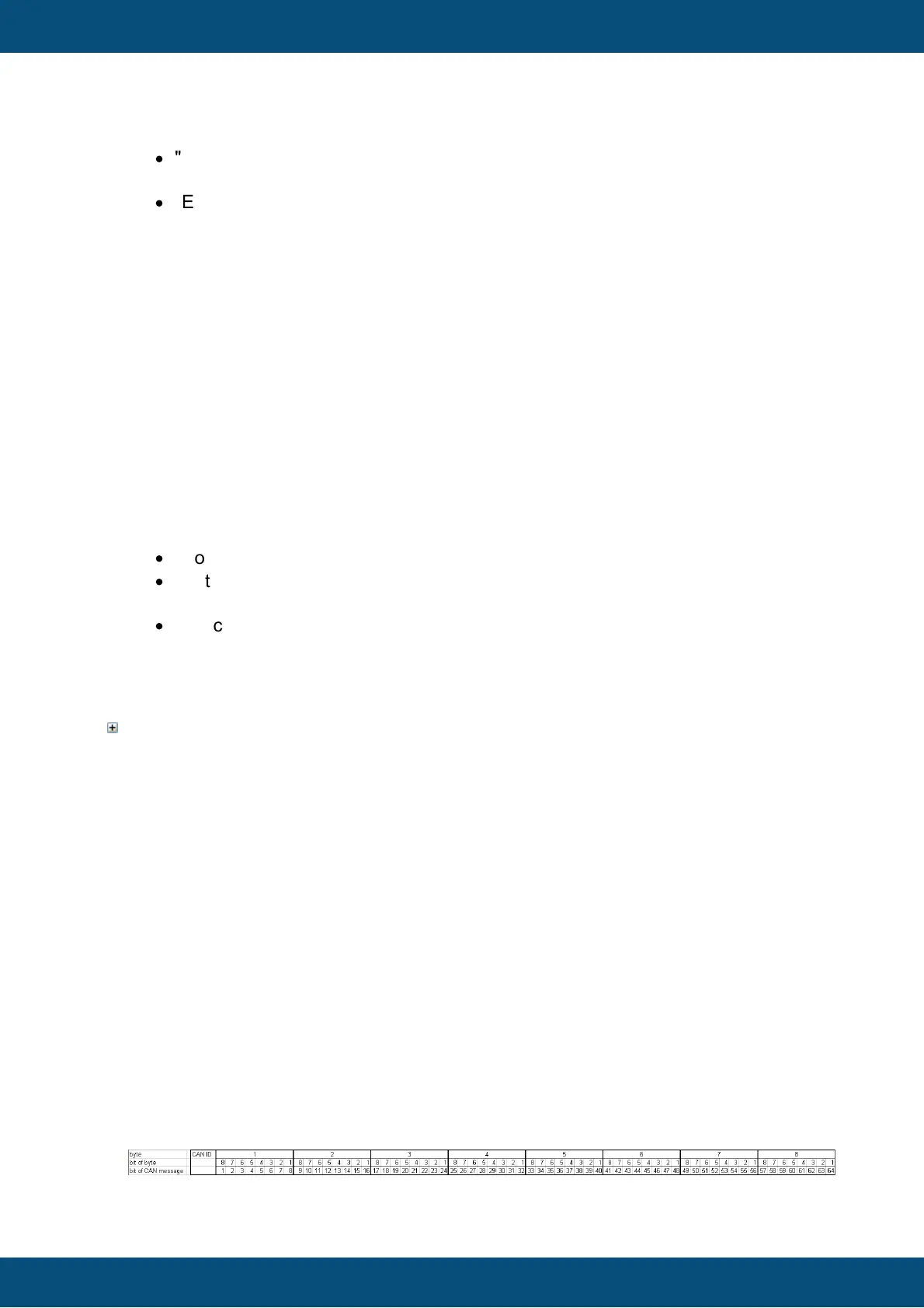
Byte Bit Position
Position is shown as byte#:bit# where byte 1 is the byte closest to the CAN identifier and
bit 1 is the least significant bit of a byte. I.e. full CAN message starts with byte 1 directly
behind the CAN ID and ends with byte 8. In a byte with value 1 bit 1 is set, in a byte with
value 128 bit 8 is set.
These enumeration scheme matches the one used in J1939 standard documents so that
you can directly copy the position. Engine coolant temperature is defined as the first byte
- so set start position to 1:1.
Alternatively one can type the bit position directly: 1 refers to the bit closest to the CAN
identifier and 64 is the bit at the end of the CAN message.
Warning: This input does not always behave as expected when typing position by hand.
Finally the displayed "byte:bit" value is relevant.
The mapping is filled correctly if there are no gaps i.e. the whole message gets filled with
values.
Please refer to the following image for byte and bit enumeration within a CAN message.
This enumeration is valid for little and big endian variables since it only refers to the CAN
message itself.



 To Next Page