EasyManua.ls Logo

Topcon OPUS A6G2 - Page 336

Topcon OPUS A6G2
800 pages
Print Icon
To Next Page IconTo Next Page
To Previous Page IconTo Previous Page
Loading...
336
OPUS Projektor Manual
CAN
Properties
values / Range
Default values
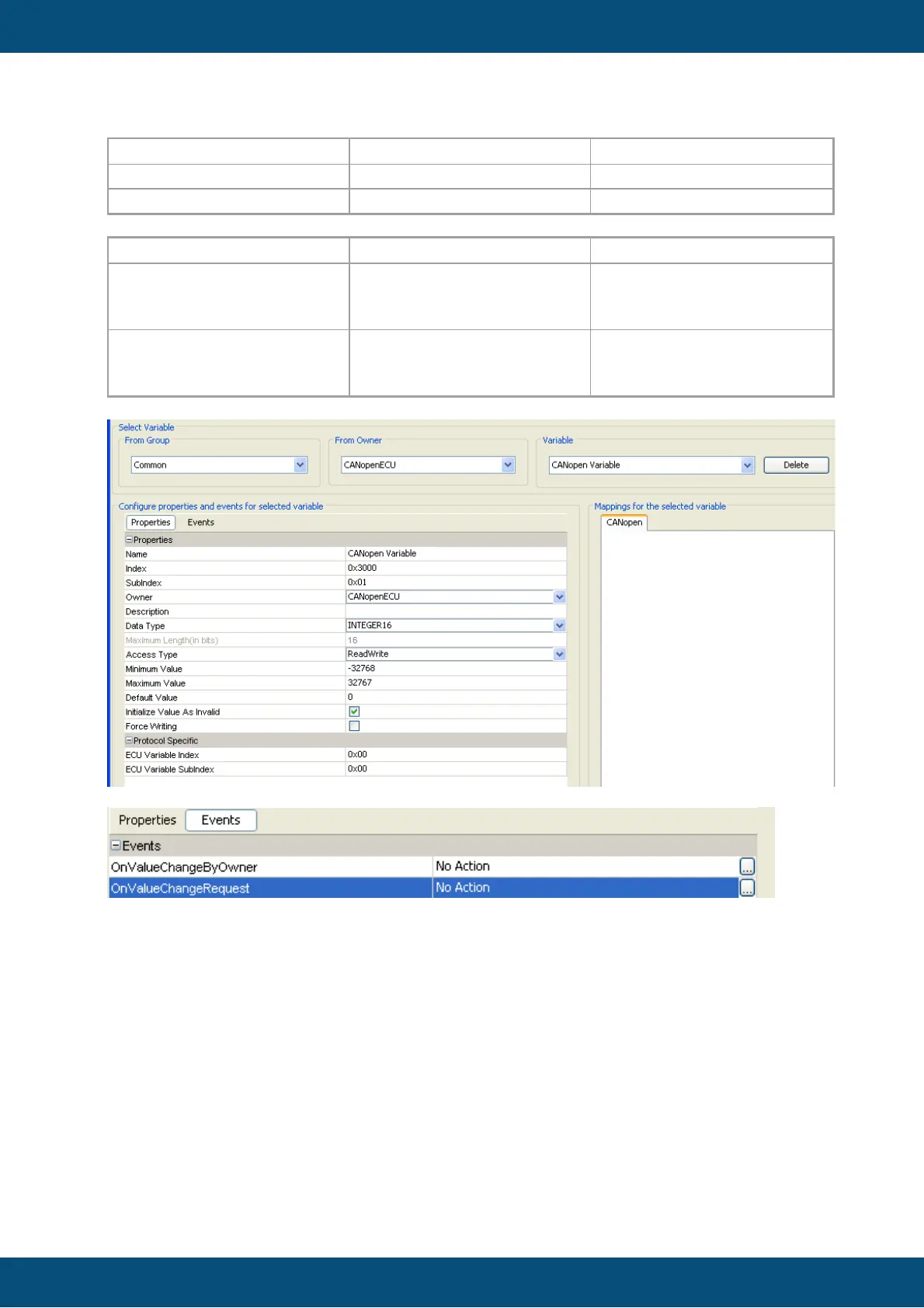
ECU Variable Index
0x0-0x9FFF
0x0
ECU Variable Subindex
0x0-0xFE
0x0
For the new CANopen Device, events can be configured:
Events
Options (1)
actions (2)
OnValueChangeByOwner
Sound pattern
Set Value
Scale Value
Execute Script
OnValueChangeRequest
Sound pattern
Set Value
Scale Value
Execute Script
Configure the SDO Communication
Once the CANopen protocol instance and CANopen ECU are created, all variables are
available from the SDO communication as defined in the CIA 301 CANopen Standard
For example:
According, the user 's defined a alarm with number 1. To display, the alarm on device,
following CAN message will be sent.
[601|8| 22 30 24 01 01 80 00 00 ]
als Response from SDO Server, the message is sent:
[581|8| 60 30 24 01 00 00 00 00 ]
SDO Client /Server of PClient


Table of Contents