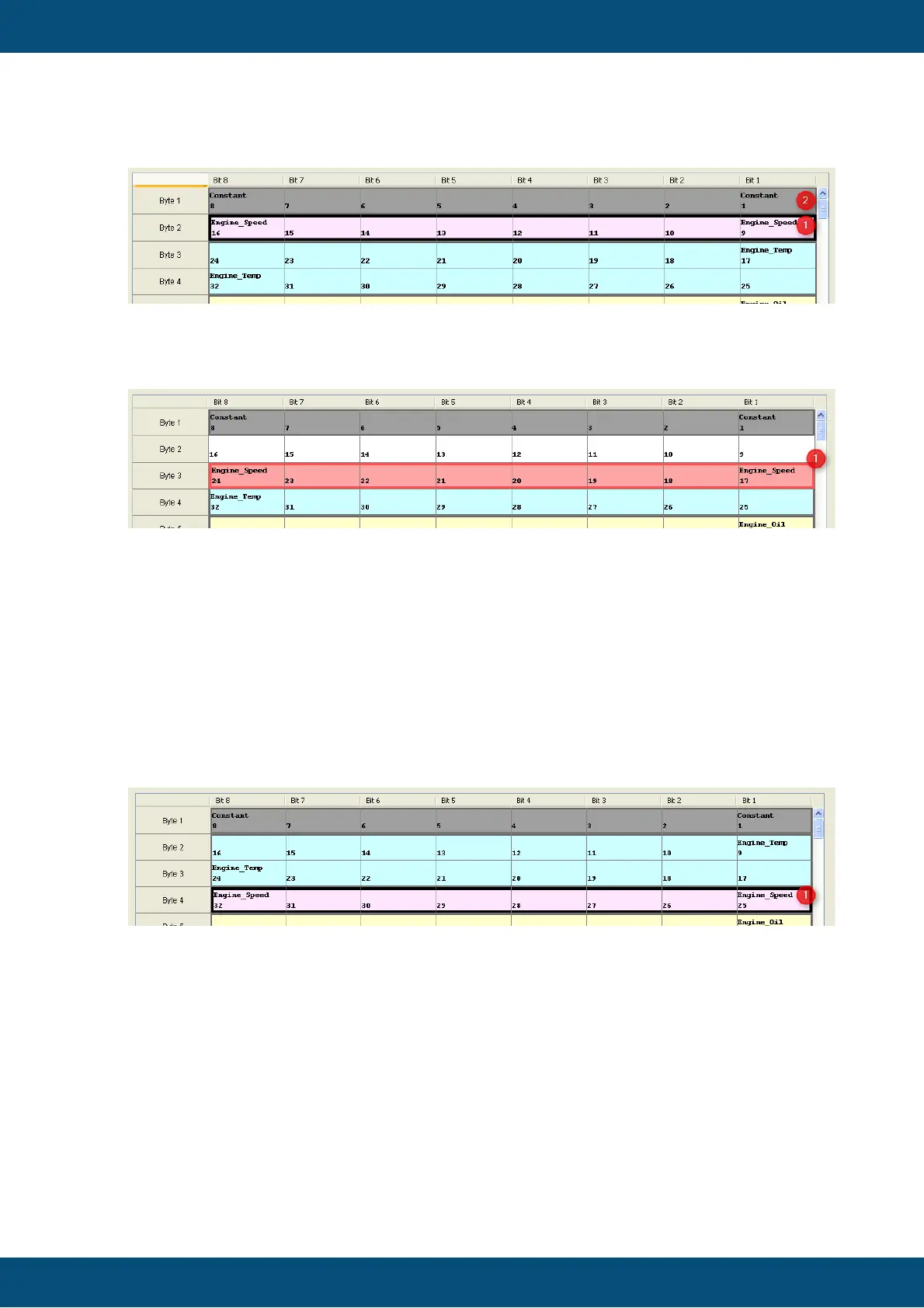
After dropping the variable "Engine_Speed" at "Bit 9" they switch the position
Now you can move the variable "Engine_Speed" to "Bit 17". If you try this you will get
following picture (1):
The variables "Engine_Speed" and "Engine_Temp" can not switch their positions,
because variable "Engine_Temp" has a length of 16 bits but the gap (Bit 9 - Bit 16) is
only 8 bits.
For that reason the moved variable "Engine_Speed" is turned to red color, which
means that the current position of the variable is not valid. If you try to drop the variable at
"Bit 17",
the variable will go back to its last valid position at "Bit 9".
If you drop the variable "Engine Speed" at "Bit 25", "Engine Speed" and
"Engine_Temp" will switch their positions (1).
Note:
Every time if the moved variable(s) can not be dropped on the current mouse position
the variables will be turned to red color to demonstrate that the current position is invalid.
The variable(s) can only be moved if the gap is big enough to switch the variables.
If you want to move the variables e.g. to add a gap you have to select all variables and
move them together.
If you want to delete some variables from the VCM table, you can select (1) them and
then drop them outside of the table.



 To Next Page