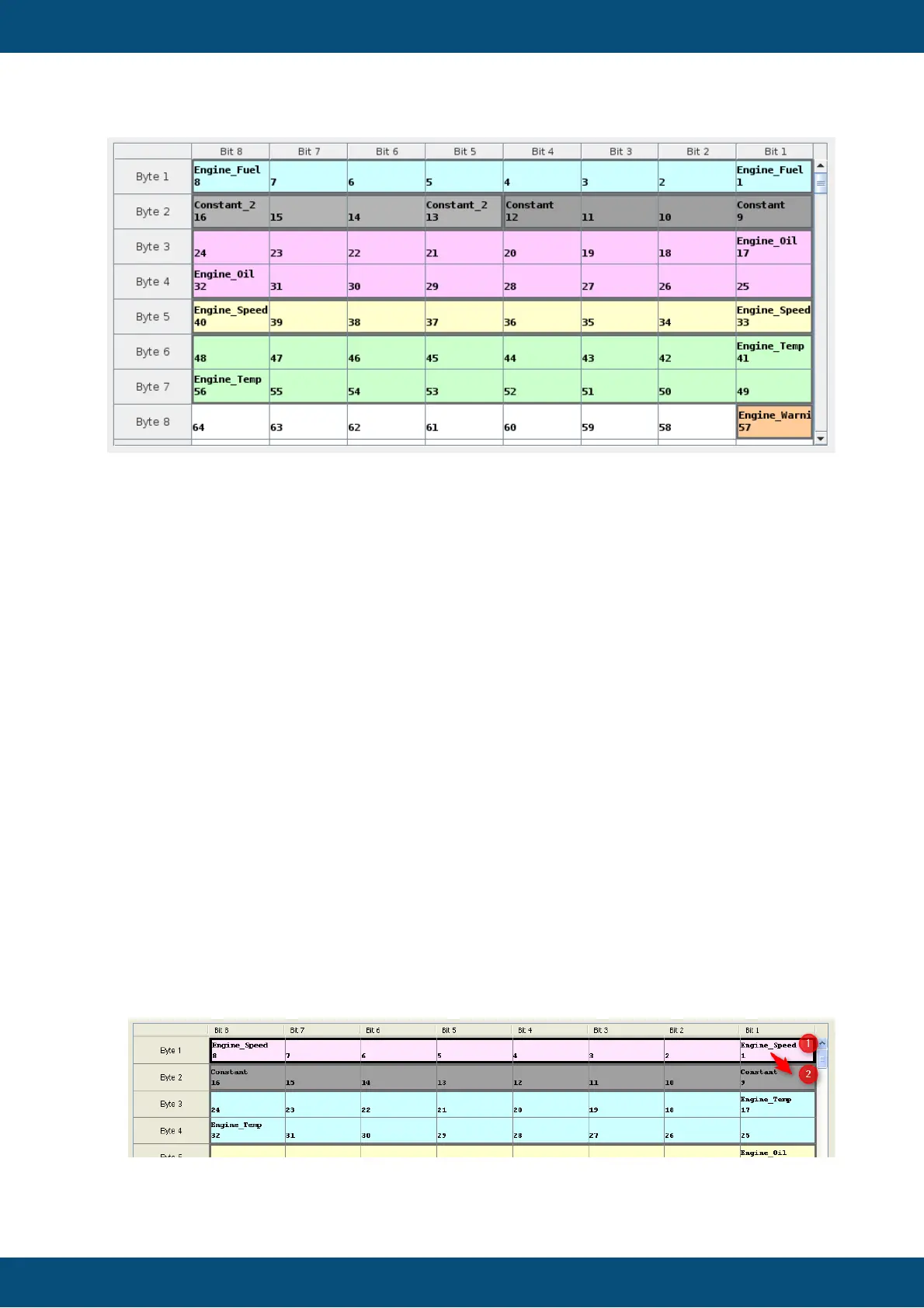
- The column titles shows the bit number of the current byte and the row titles shows the
appropriate byte.
- The table starts in the upper right corner with bit index 1, which represents the first bit
of a mapping.
- At the end and start bit the name of mapped variable / constant is shown.
- Each mapped variable has its own color. Altogether there are 16 colors for variables
and 4 grey colors for constants.
- Each variable (when selected) can be moved or removed at the table.
- Selected variables are shown with a bold black border and the color is lightly
highlighted.
- It is possible to select several mapped variables by selecting the first one and then
press "Shift" and selecting afterwards another variable.All variables between are
selected too.
- Selected variables are a variable block which can only be moved together.
- As long as you stay at the view "Visual CAN Mapping" all add, remove, move steps
and property changes can be reverted. If you want to undo the last step you can press
"Ctrl + z" or "Ctrl + y" to redo the last step.
To move a variable via drag and drop, you can drag the first bit of the of a variable ("Bit
1" "Engine_Speed") and then move the mouse to "Bit 9")
If you drop the variable on "Bit 9" the variable "Engine Speed" and the "Constant"
switch their positions.



 To Next Page