The Absolute Min Value can also be changed through the JavaScript function
setProperty.
Max Value Variable Reference
When selecting a variable for this property, the value of the variable controls the Max Value
of that object.
This property is supported by the following objects:
·
Arched Bargraph
·
Linear Bargraph
·
Meter
·
Numeric Field
Default value: None
Possible Values: Any integer variable
The Absolute Max Value can also be changed through the JavaScript function
setProperty.
Target Value Variable Reference
When selecting a variable for this property, the value of the variable controls the Target
Value of that object.
This property is supported by the following objects:
·
Arched Bargraph
·
Linear Bargraph
Default value: None
Possible Values: Any integer variable
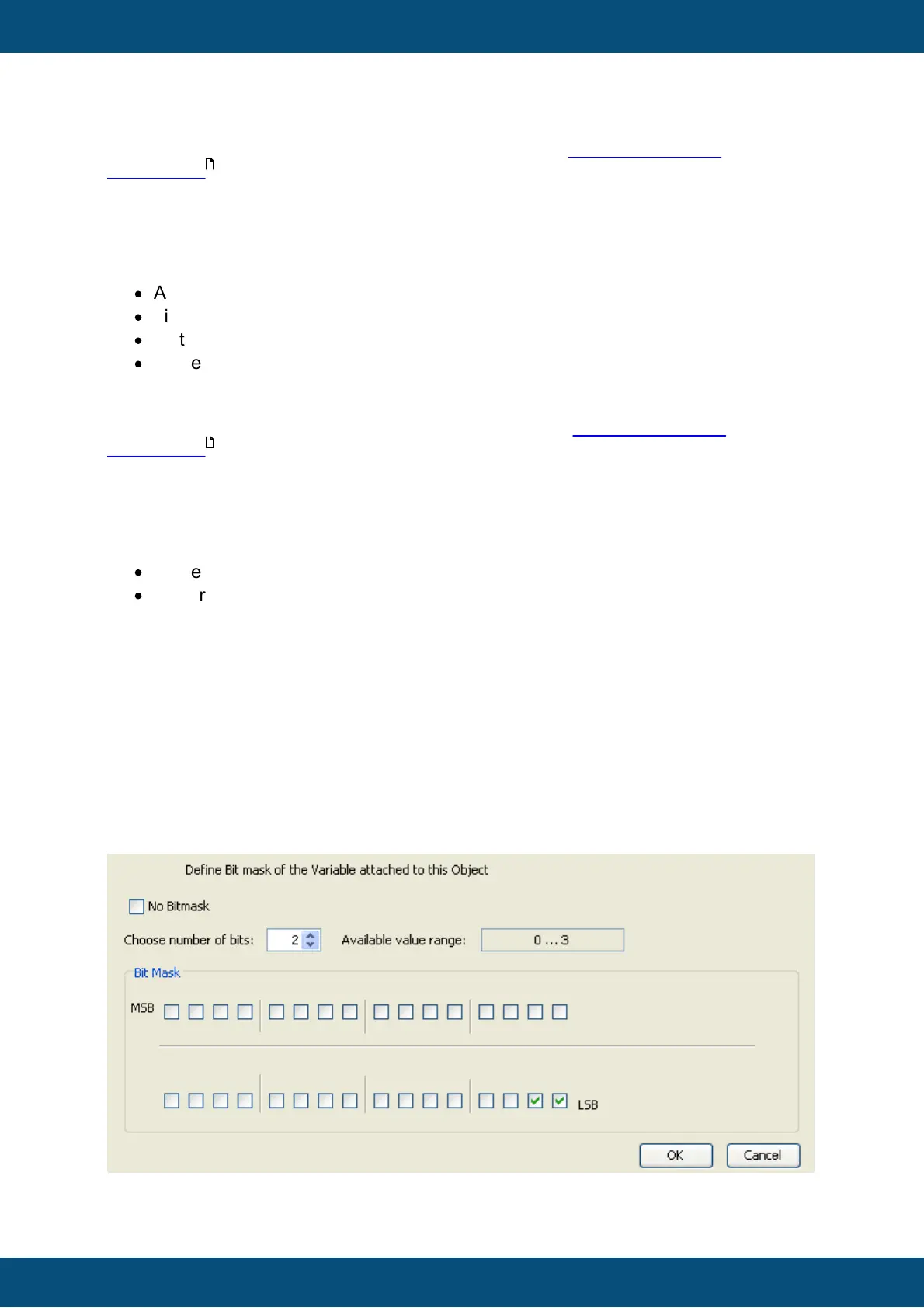
Bit Mask
With this property a Bit Mask can be applied to the incoming variable value. This makes it
possible to only pass certain bits from the variable's value to the object.
For example: A 16Bit variable is referenced to the object but only the value 0 or 1 from the
last bit is of interest for the object. In this case a mask of 0x1 can be set, if the last 4Bits
shall be used, the mask 0xf can be set.
When changing the property by clicking on the ... button besides the bit mask value, a
dialog will appear that makes it easy to set the mask. The number of bits and their position
can be chosen in that dialog.
Default value: 0xffffffff (no bit mask)



 To Next Page