44
OPUS Projektor Manual
User Interface
A new object will be created if it can be created as a child object at that place. Otherwise a
"forbidden" symbol will be displayed.
Symbols from the Symbol Library can be dropped
·
on objects in the Page Editor
·
in the project tree
JavaScripts from the Project Tree can be dropped
·
on objects in the Page Editor
·
on Page nodes in the project tree
·
on the Project name in the project tree
Variables from the Variable View can be dropped
·
on objects in the Page Editor
·
in the project tree
Images from the Image Library can be dropped
·
on objects in the Page Editor
·
in the project tree
Images from the Image Pool can be dropped
·
on objects in the Page Editor
·
in the project tree
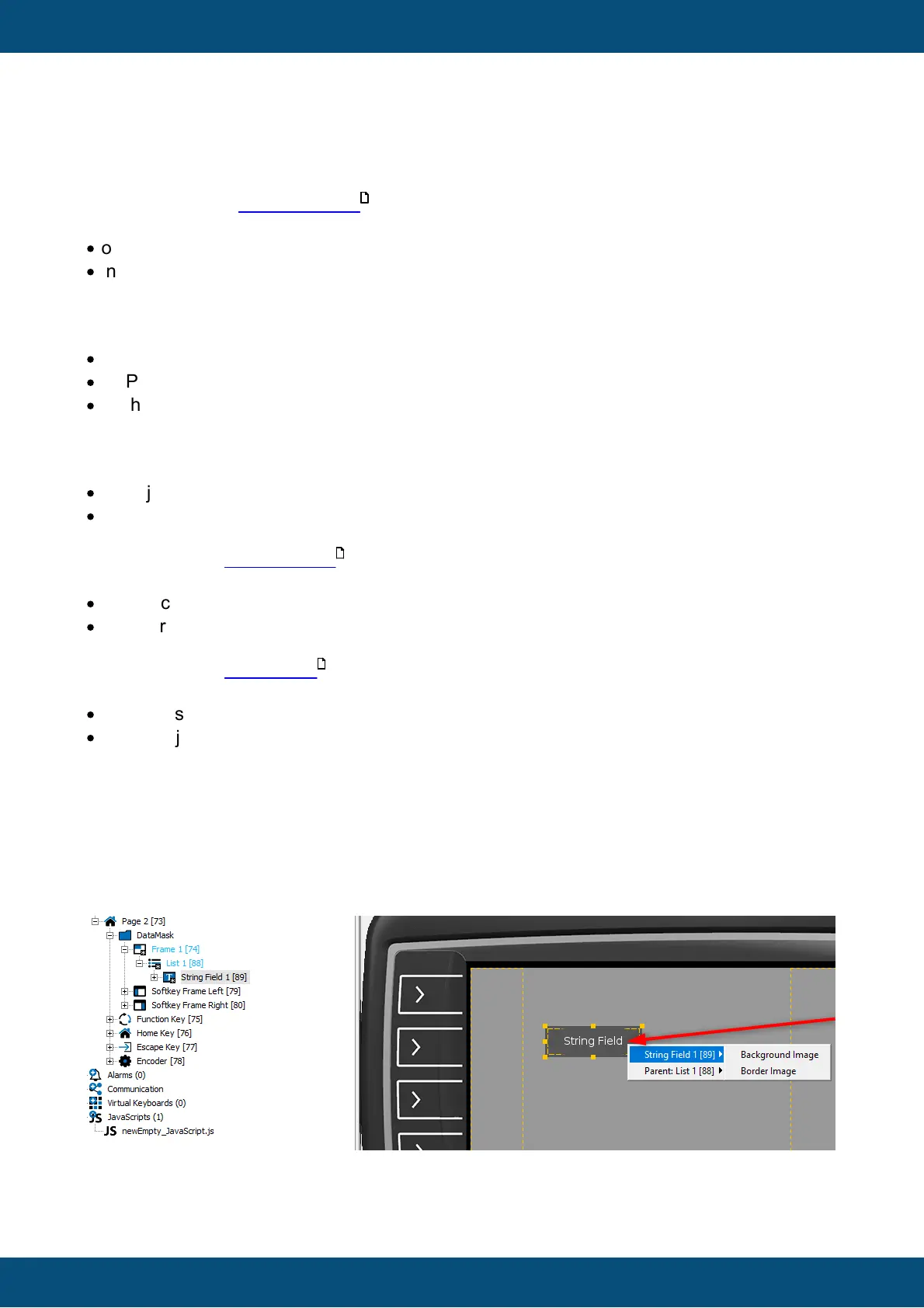
For variables, symbols, images and scripts, there is a two-level context menu when they are
dropped somewhere. Because of the tree-like structure of the objects, it is not always obvious
where the dragged element should be placed, e.g. with a List object containing a String Field.
A symbol could be placed into the String Field or into the List object.
In the first level the user can select in which object the symbol should be used. In the second
level the user can specify in which way the symbol should be added to the object.
135
46
54



 To Next Page