The LED properties allow to configure the behavior of the multi color LED when entering
the selected page.
LED Options
This property defines the behavior of the LED when entering the page.
Default value: LED off
Possible values:
·
LED off (LED is off when entering page)
·
Always On (LED is always on on that page)
·
Blinking (LED is blinking)
Notes:
·
The LED behavior can also be controlled via the variables in the LEDs variable
group. This provides more customization possibilities.
·
The settings made in this property will be overwritten by the values set to the
variables in LEDs variable group.
Led Color
Define the color that the multi color LED emits when on or blinking.
Default value: Yellow (255, 255, 0)
Possible values: Any 24Bit RGB color
Blink Pattern
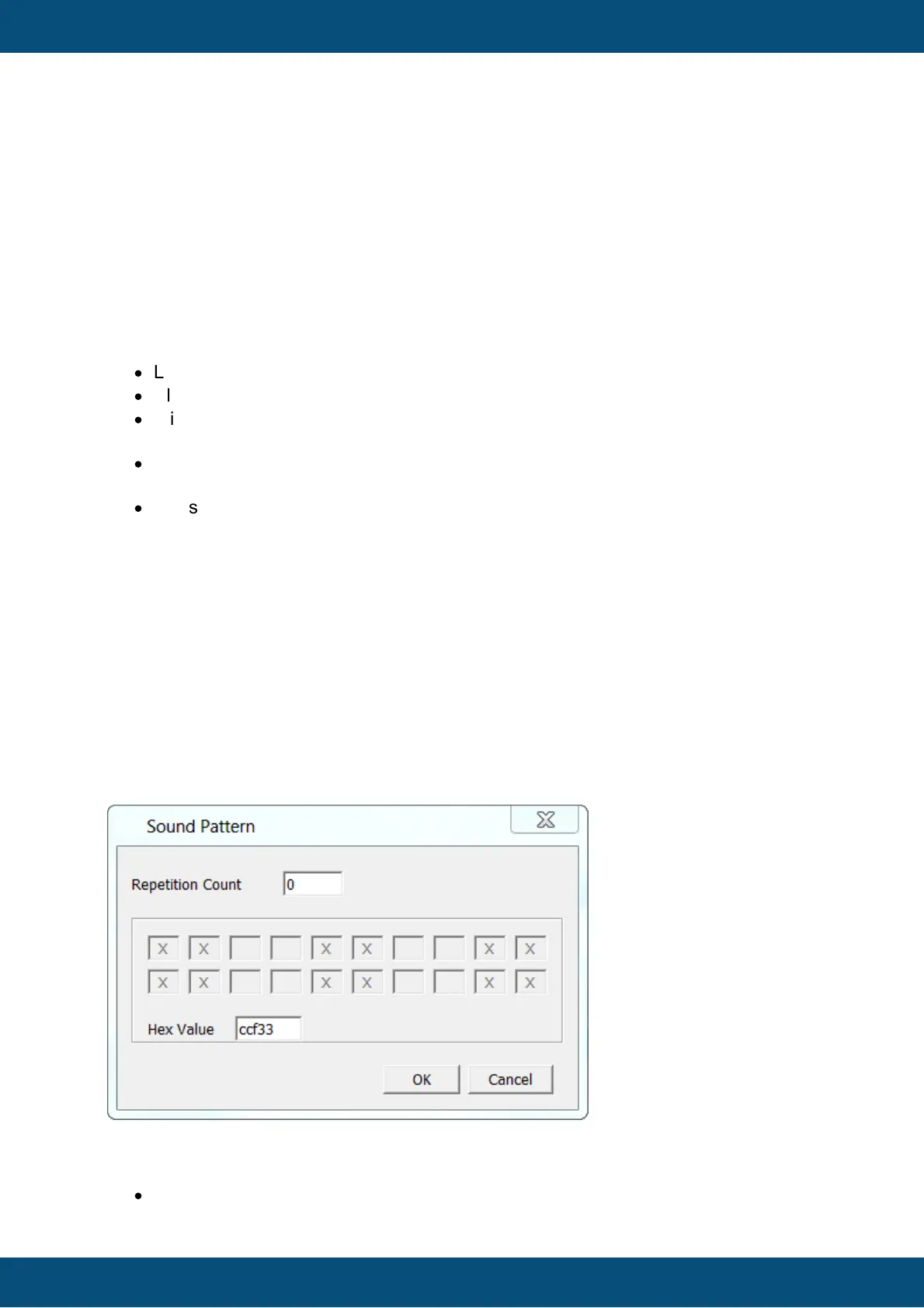
If the LED Options property is set to Blinking, a blink pattern can be configured.
A blink pattern consists of the number of of repetitions and a bit coded pattern of on/off
states. In the dialog that pops up when changing this property, the pattern can be defined
by clicking on the boxes.
Each box represents 100ms of LED on or off.
In the screenshot above the blink pattern 0xccf33 was defined. In binary this is
11001100111100110011
·
100ms ON



 To Next Page