53
OPUS Projektor Manual
User Interface
Close All Other Categories - closes all tabs but the one that was right-clicked on
Note that the Favourites and Search Tabs cannot be closed that way. The Search tab closes
when the search field is emptied, the Favourites tab is removed when no images are selected
as favourites.
Images can be dragged and dropped on objects in the Page Editor or in the project tree. See
Drag and Drop for details.
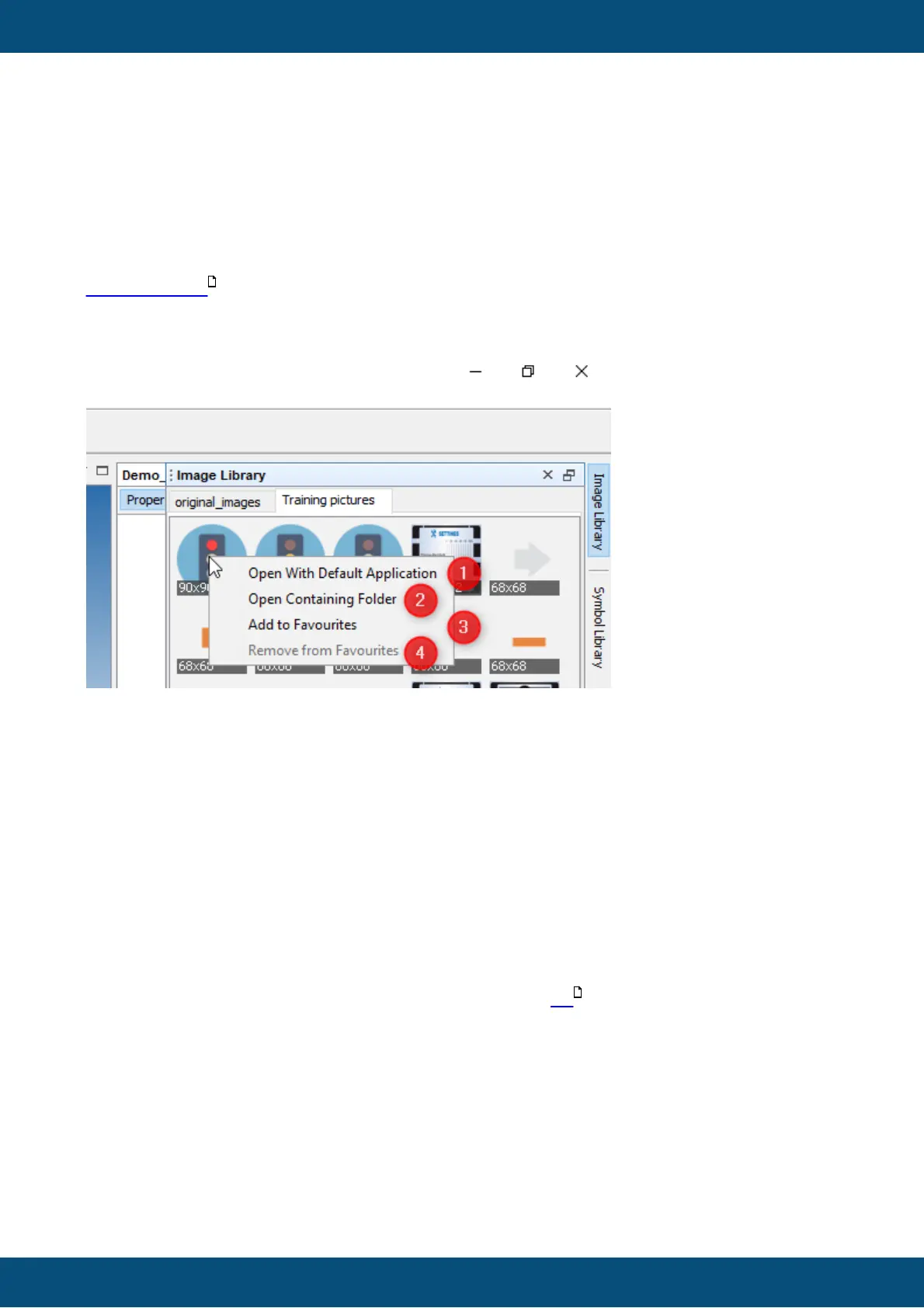
The preview image symbols provide a context menu which can be accessed with a right-click.
Open With Default Application (1) will open the current image with the application that is
set as default in the PC operating system.
Open Containing Folder (2) will open the OS file manager with the current image folder.
Add to Favourites (3) will create a new tab called Favourites, where images can be
collected that are used often.
Note that the images are not copied, there is no actual Favourites folder on the file system,
the images are linked and only exist in their respective image folders.
To remove an image from the Favourites tab, right-click and select Remove from
Favourites (4). This entry is only available in the Favourites tab.
The images in the Favourites tab and the opened folder tabs will still be available after closing
and re-opening the program.
It is possible to select several images at once, to create a list with them. To do this, press
the CTRL key and click on the images you want to put in the list.
The images will be marked with a yellow overlay. They also get a number which represents
the order in which they will be put into the list.
43
477



 To Next Page