EasyManua.ls Logo

Topcon OPUS A6G2 - Page 619

Topcon OPUS A6G2
800 pages
Print Icon
To Next Page IconTo Next Page
To Previous Page IconTo Previous Page
Loading...
619
OPUS Projektor Manual
Device Software Update
Legend:
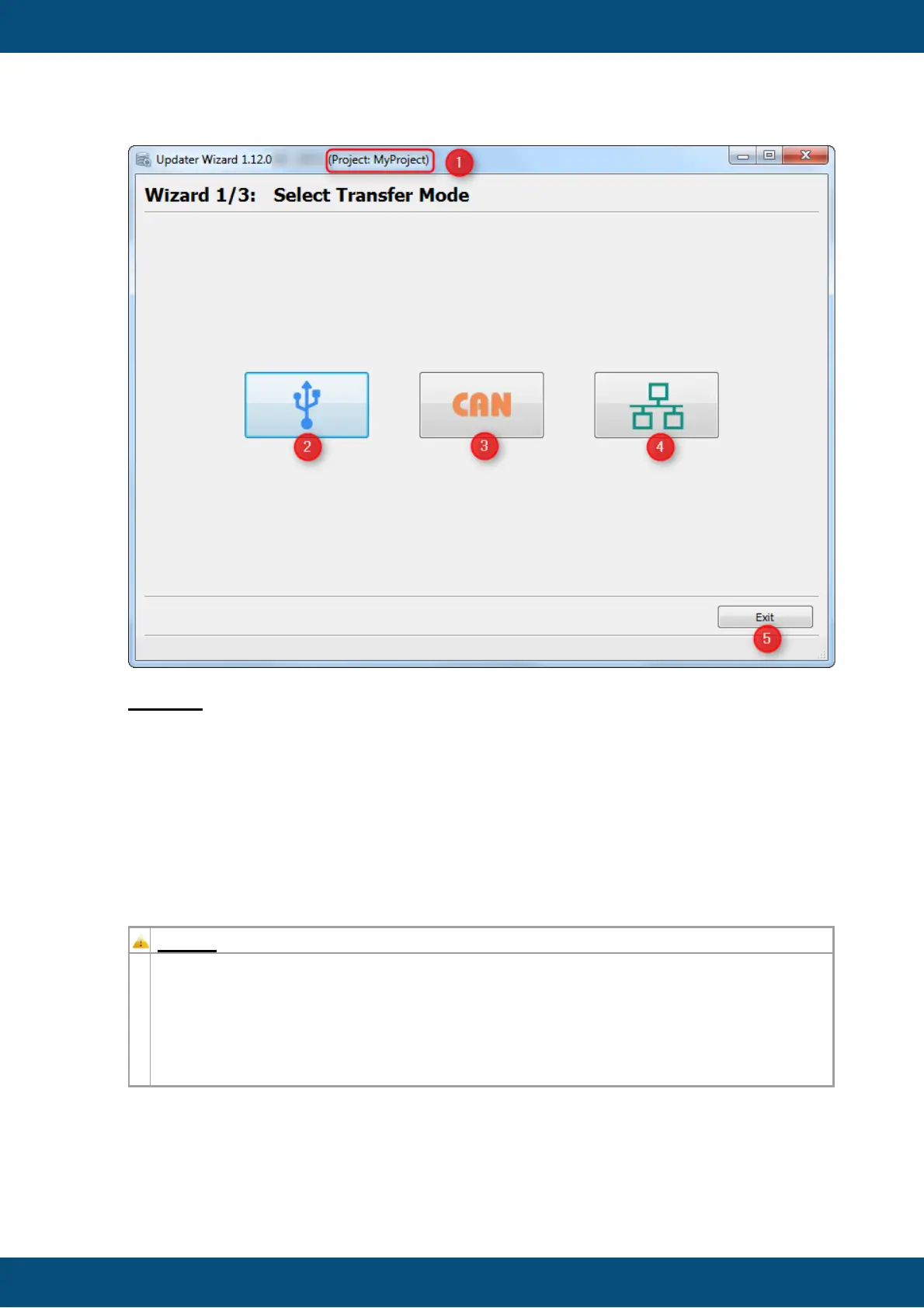
(1) The application title shows you the name of the project which will be transferred
(Please do always check if the correct project is chosen)
(2) Start USB update
(3) Start CAN update
(4) Start Ethernet update
(5) Exit application
First we will start with the USB update mode.
NOTE:
The Start Page (Wizard 1/3) will only be shown the first time you opened the
Updater.
Once a transfer via CAN/Ethernet or USB has successfully finished, the Start Page
will be skipped the next time you open the Updater and it will start with the mode you
have selected the last time. You can always go back in the dialog to change to a
different mode.
USB Update

Table of Contents