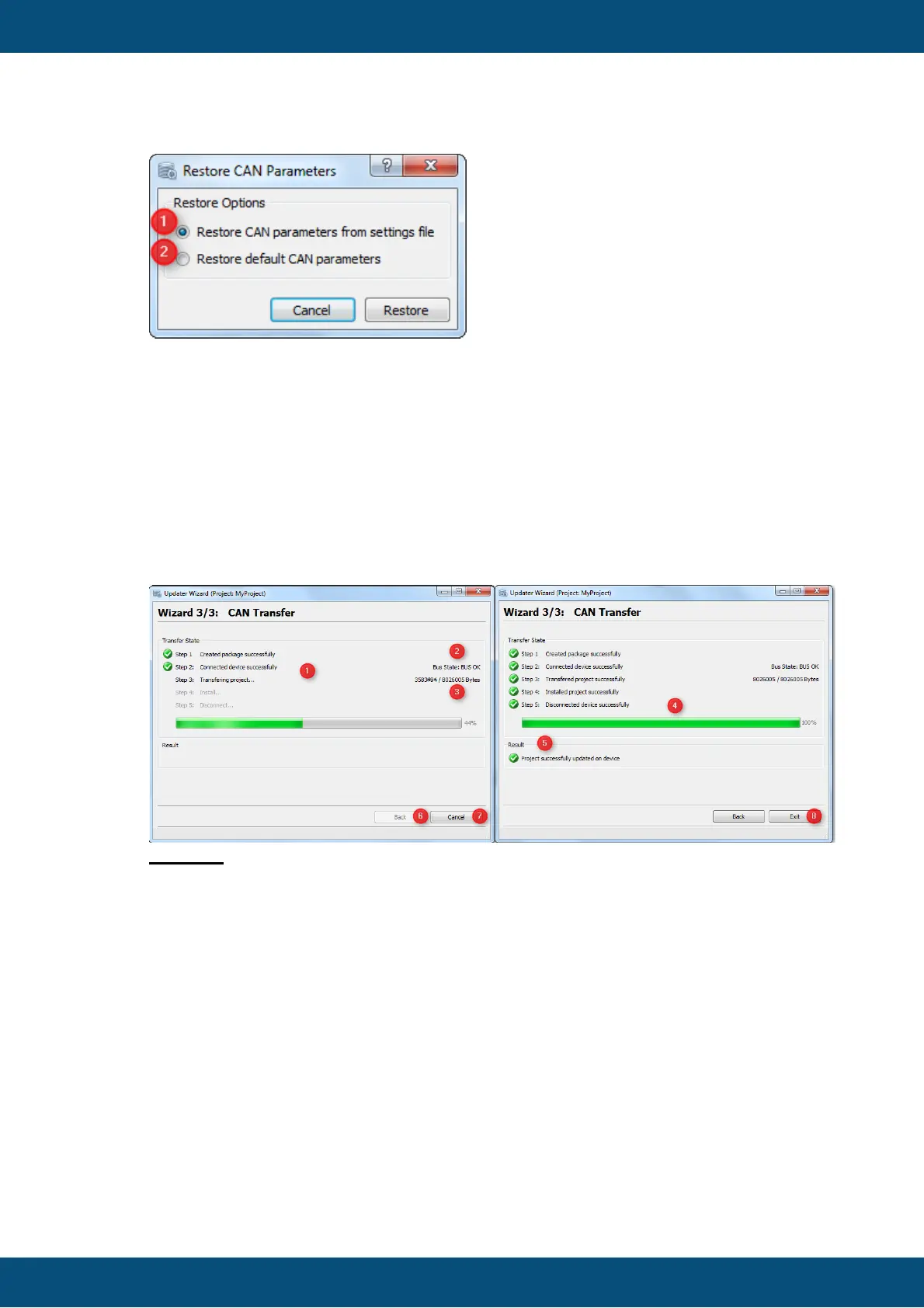
You can choose between 2 options:
(1) Restore CAN parameters from settings file. This option can be used to restore the
last working CAN settings. The settings will be restored from the HostSettings.ini file.
(2) Restore default CAN parameters. This option can be used to restore the factory
default CAN settings. Could be reasonable if the device was updated with the latest
OS.
The CAN Transfer Page shows the current transfer progress and if the current transfer
finished successfully or with an error.
Legend:
(1) On the left side you can see the current step which is permformed. Last Step with
black font color => current performed step (here Transferring Project), grey font color
steps which have not be performed yet.
(2) Shows the current CAN BUS State (States are: BUS_OK, BUS_LIGHT,
BUS_HEAVY and BUS_OFF)
(3) Transferred Bytes and Project Package size. (4) Progress bar with transferred
bytes in percentage.
(5) Shows the result of the Transfer. If the transfer fails, an error code and error
message are shown.
(6) Back button which is disable during active transfer. When transfer finishes, the
button is enabled.
(7) Exit/Cancel button. During transfer button is renamed to "Cancel". When the
transfer finishes, the button is renamed to "Exit".



 To Next Page