707
OPUS Projektor Manual
Miscellaneous
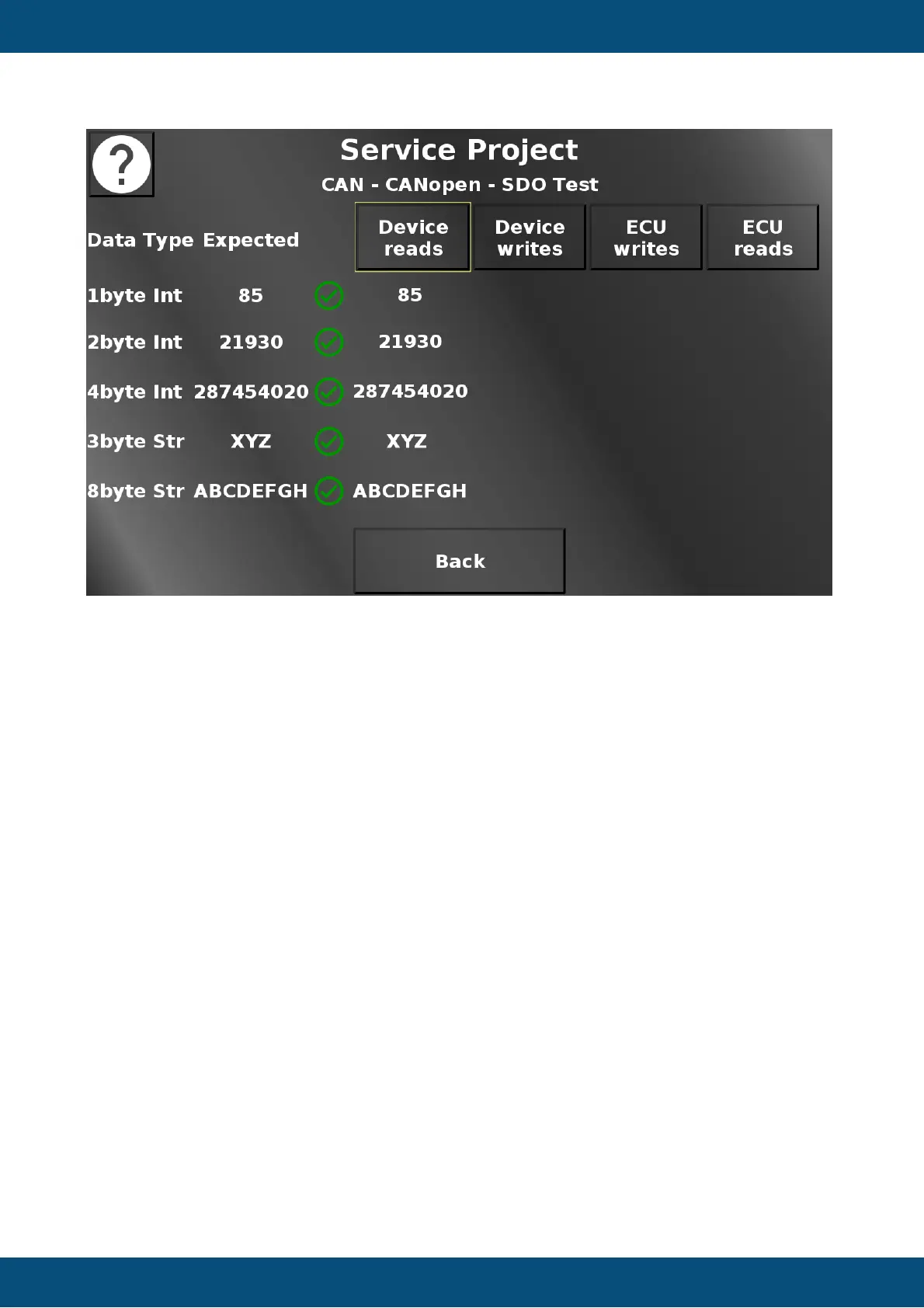
In this screen different SDO functionalities can be tested.
Device reads means that the OPUS device will ask the ECU (aka CAN port 2) for some data
values. If the communication is successful, the values in the Expected column should be the
same as in the ask ECU column. The check boxes show if the values match. Create a CAN
trace to see the communication process.
Device writes means that the OPUS device will send a write request to some variables
belonging to the ECU (aka CAN port 2). If the communication is successful, the values in the
Expected column should be the same as in the Device writes column. The check boxes show
if the values match. Create a CAN trace to see the communication process.
ECU writes means that the ECU (aka CAN port 2) writes some variables in the OPUS device.
If the communication is successful, the values in the Expected column should be the same as
in the ask ECU writes. The check boxes show if the values match. Create a CAN trace to see
the communication process.
ECU reads means that the ECU (aka CAN port 2) reads some variables from the OPUS
device. If the communication is successful, the values in the Expected column should be the
same as in the ECU reads column. The check boxes show if the values match. Create a CAN
trace to see the communication process.
Back returns to the CANopen menu.
Service Project -> CAN -> CANopen -> PDO Test


 To Next Page
 Loading...