GENERAL
M6060, M7060, WSM
G-33
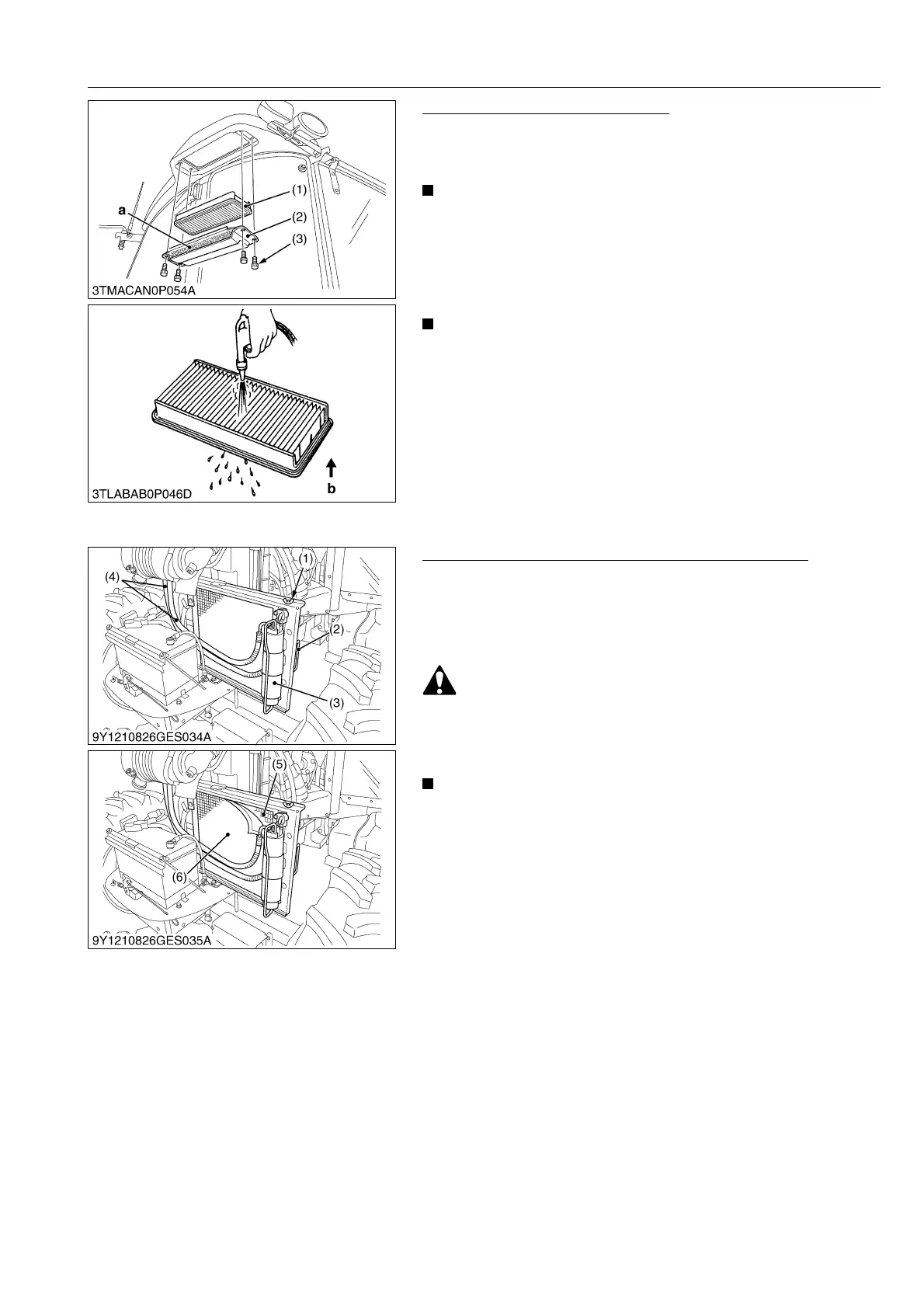
Cleaning Air Filter (CABIN Model)
Fresh Air Filter
1. Remove the knob bolts (3) and pull out the fresh air filter (1).
2. Blow air from the opposite direction to the filter's normal air flow.
• If the filter is very dirty :
Dip the filter in lukewarm water with mild dish washing
detergent.
Move it up and down as well as left and right to loosen dirt.
Rinse the filter with clean water and let it air-dry.
• Attach the filter and cover as shown in the left illustration.
• Do not use gasoline, thinner or similar chemicals to clean
the filter as damage to the filter may occur.
• If may also cause an unpleasant odor in the cabin when the
system is used next.
• Do not hit the filter. If the filter becomes deformed, dust
may enter into the air-conditioner, which may cause
damage and malfunction.
9Y1210828GEG0032US0
Checking Air Conditioner Condenser (CABIN Model)
1. Loosen the wing nut (1).
2. Hold the handle (2), slide out the air conditioner condenser
assembly (5).
3. Remove the air conditioner condenser screen and check air
conditioner condenser to be sure it is clean of debris.
• Be sure to stop the engine before removing the screen.
• The condenser and receiver become hot while the air
conditioner is running. Before checking or cleaning them,
wait long enough until they cool down.
• Do not hold the air conditioner receiver or the air
conditioner pipes when sliding out the condenser for
cleaning.
9Y1210828GEG0033US0
(1) Fresh Air Filter
(2) Cover
(3) Knob Bolt
a : Air Inlet Port
b : Air Conditioner Air Flow
(1) Wing Nut
(2) Handle
(3) Receiver
(4) Air Condenser Hose
(5) Condenser
(6) Air Conditioner Condenser Screen



 To Next Page