10.5 Motion Parameter Details
10.5.3 Monitor Parameter List
10-53
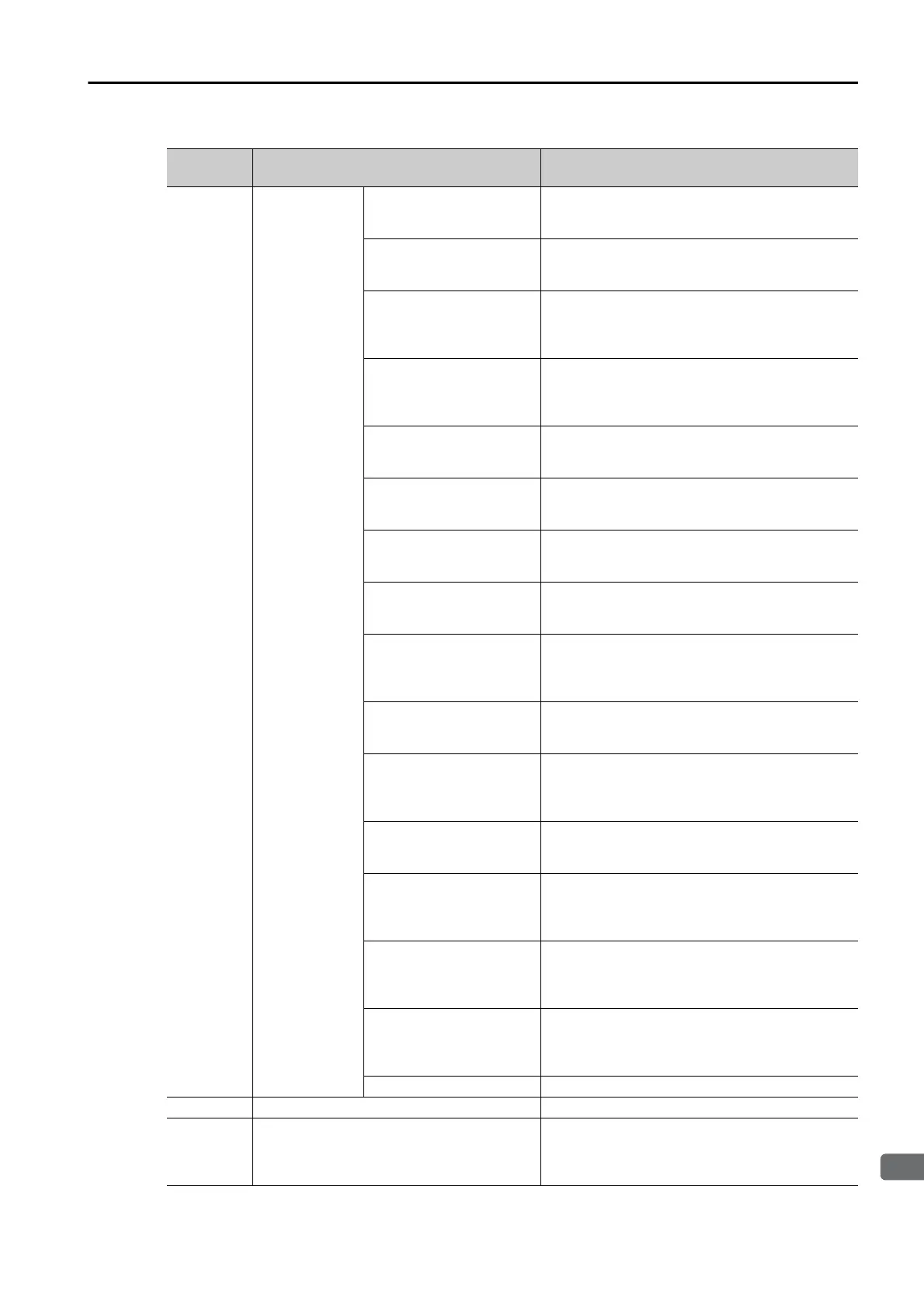
IW0F
Auxiliary Input
Data Option
Selection Moni-
tor
Bit 0: Motor Speed
ON when Motor Speed is selected for Auxiliary
Input Data Option Selection (OW0F) and
the data is being normally reported.
Bit 1: Torque Reference
ON when Torque Reference is selected for Auxil-
iary Input Data Option Selection (OW0F)
and the data is being normally reported.
Bit 2: Encoder Count PG1
ON when Encoder Count PG1 is selected for
Auxiliary Input Data Option Selection
(OW0F) and the data is being normally
reported.
Bit 3: Frequency Refer-
ence
ON when Frequency Reference is selected for
Auxiliary Input Data Option Selection
(OW0F) and the data is being normally
reported.
Bit 4: Analog Input A2
ON when Analog Input A2 is selected for Auxiliary
Input Data Option Selection (OW0F) and
the data is being normally reported.
Bit 5: Main Bus Voltage
ON when Main Bus Voltage is selected for Auxil-
iary Input Data Option Selection (OW0F)
and the data is being normally reported.
Bit 6: Alarm Code
ON when Alarm Code is selected for Auxiliary
Input Data Option Selection (OW0F) and
the data is being normally reported.
Bit 7: Warning Code
ON when Warning Code is selected for Auxiliary
Input Data Option Selection (OW0F) and
the data is being normally reported.
Bit 8: Multi-Function Out-
put Terminal
ON when Multi-Function Output Terminal is
selected for Auxiliary Input Data Option Selection
(OW0F) and the data is being normally
reported.
Bit 9: Analog Input A3
ON when Analog Input A3 is selected for Auxiliary
Input Data Option Selection (OW0F) and
the data is being normally reported.
Bit A: Multi-Function Input
Terminal
ON when Multi-Function Input Terminal is
selected for Auxiliary Input Data Option Selection
(OW0F) and the data is being normally
reported.
Bit B: Analog Input A1
ON when Analog Input A1 is selected for Auxiliary
Input Data Option Selection (OW0F) and
the data is being normally reported.
Bit C: Encoder Count PG2
ON when Encoder Count PG2 is selected for
Auxiliary Input Data Option Selection
(OW
0F) and the data is bein
g normally
reported.
Bit D: Monitor data set in
F6-23
ON when Monitor Data Set in F6-23 is selected
for Auxiliary Input Data Option Selection
(OW0F) and the data is being normally
reported.
Bit E: Monitor data set in
F6-24
ON when Monitor Data Set in F6-24 is selected
for Auxiliary Input Data Option Selection
(OW0F) and the data is being normally
reported.
Bit F Reserved
IW
10 – Reserved
IW
11 Output Frequency
Reports the output frequency from the Inverter.
Unit: According to the O1-03 Inverter parameter.
You can check the current unit setting in the Unit
monitor parameter (IW06).
Continued on next page.
Continued from previous page.
Register
No.
Name Description






 To Next Page