Radio Test Instruments
Subject to Export Control, see Cover Page for details.
7-38
[Trace] Soft Key
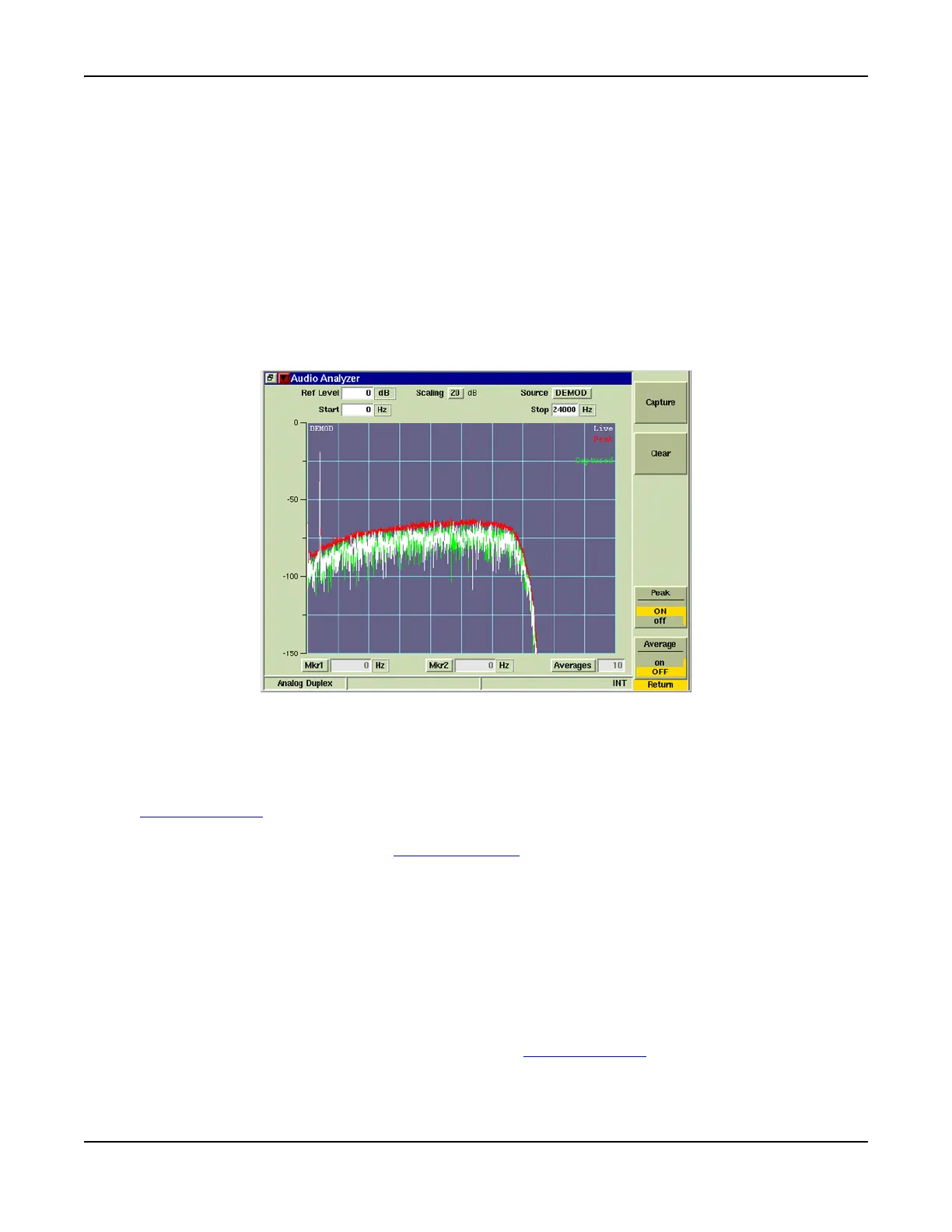
The [Trace] Soft Key accesses trace display control functions to allow users to obtain average
and peak measurements and to capture traces being displayed on the Audio Analyzer Tile. Fig.
7-42 shows a Live trace, Peak trace and Captured trace displayed on the Audio Analyzer Tile.
Trace Color
Trace types being displayed on the graph are listed in the upper right corner of the graph
field. The traces are color-coded to identify trace types. Fig. 6-6 shows a Live trace, Peak
trace and Captured trace displayed on the Audio Analyzer.
● Live traces are White.
● Peak hold traces are Red.
● Averaged traces are Yellow.
● Captured traces are Green.
Fig. 7-42 Audio Analyzer Trace Soft Keys
[Capture] Soft Key
When [Capture] is selected the current trace is held on the display and the [Clear] soft key
appears. To resume normal sweep operation select the [Clear] soft key. The [Clear] soft key
disappears until [Capture] is pressed again. The [Capture] Soft Key is accessed by pressing the
[Trace] Soft Key
.
A captured trace can be saved by pressing the HOLD Key, then selecting the [Save As] Soft Key.
Refer to Chapter 3, section titled Store/Recall Tile for additional information on saving and
storing files.
[Clear] Soft Key
Clears the current captured trace and resumes display of Live trace. This soft key is only visible
when a trace is in “Captured” state.
[Peak Hold] Soft Key
When [Peak Hold ON] is selected, the maximum value at each frequency point is displayed to
produce the RED Max Hold trace (refer to Fig. 7-42). This trace is cleared by selecting [Peak
Hold OFF]. Peak Hold must be reset (toggled ON/OFF) when Average readings are Enabled/
Disabled. The white Live trace is also displayed and can be averaged depending on the current
setting. This soft key is accessed by pressing the [Trace] Soft Key
.













 To Next Page