Analog Duplex System
Subject to Export Control, see Cover Page for details.
8-34
AF SNR Hum & Noise
The AF SNR Hum & Noise reading measures the receiver of the radio under test. AF SNR
Hum & Noise is a measurement of the level of the audio signal that is demodulated by the
radio when the Test Set sends a modulated signal versus when the signal is not modulated.
To use the AF SNR Meter to obtain Hum & Noise measurements:
1. Connect the transmitter of the Test Set to the radio under test.
2. Connect the demodulated audio of the radio under test to on of the Test Set’s Audio In
Connectors.
3. Add modulation at the desired level to the Test Set.
4. Press the [Hum & Noise Ref Lock] Soft Key
to obtain a reference lock of the audio in the
signal received by the Test Set.
5. Remove the modulation from the Test Set’s transmitted signal.
6. The Test Set displays the AF SNR Hum & Noise measurement relative to the level of the
audio in the signal when the Test Set was being modulated.
[Hum & Noise Ref Lock] Soft Key
Sets a reference lock to the current Hum & Noise Meter reading. This soft key is only available
when Hum & Noise SNR is selected on the [SNR Meter] or [AF Meter] Soft Key.
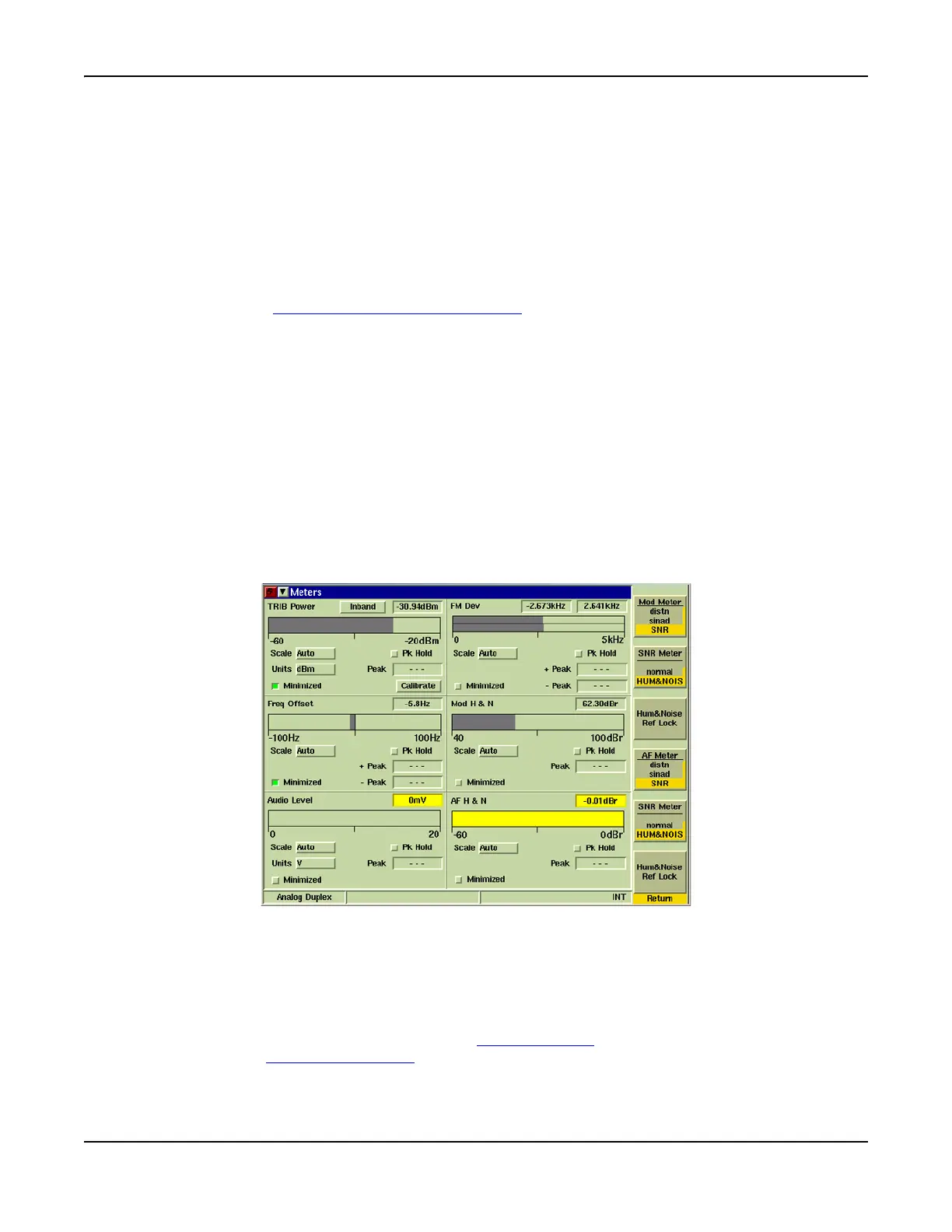
Sets a reference lock to the current Hum & Noise Meter reading. When the [Hum & Noise Ref
Lock] Soft Key is pressed, it zeroes out the current reading on the corresponding Hum & Noise
Meter. Fig. 8-27 shows the Mod H&N Meter after the SNR Meter [Hum & Noise Ref Lock] Soft
Key was pressed.
This soft key is only available when Hum & Noise SNR is selected on the [SNR Meter] or [AF
Meter] Soft Key.
Fig. 8-27 Analog Duplex Meters Tile - Zeroing Hum & Noise Meter
[INC/DEC] Soft Key
Opens a soft key sub-menu that increments or decrements a specific setting.
[INC Gen Freq] / [DEC Gen Freq] Soft Key
Each press of the soft key causes the RF Generator frequency to increment or decrement by
the value set in the Freq Inc field on the Generators Tile
. This soft key is accessed by
pressing the [INC/DEC] Soft Key
.













 To Next Page