WinScript Live Timecode (SMPTE/EBU) Page 46
External (SMPTE/EBU) Timecode Settings
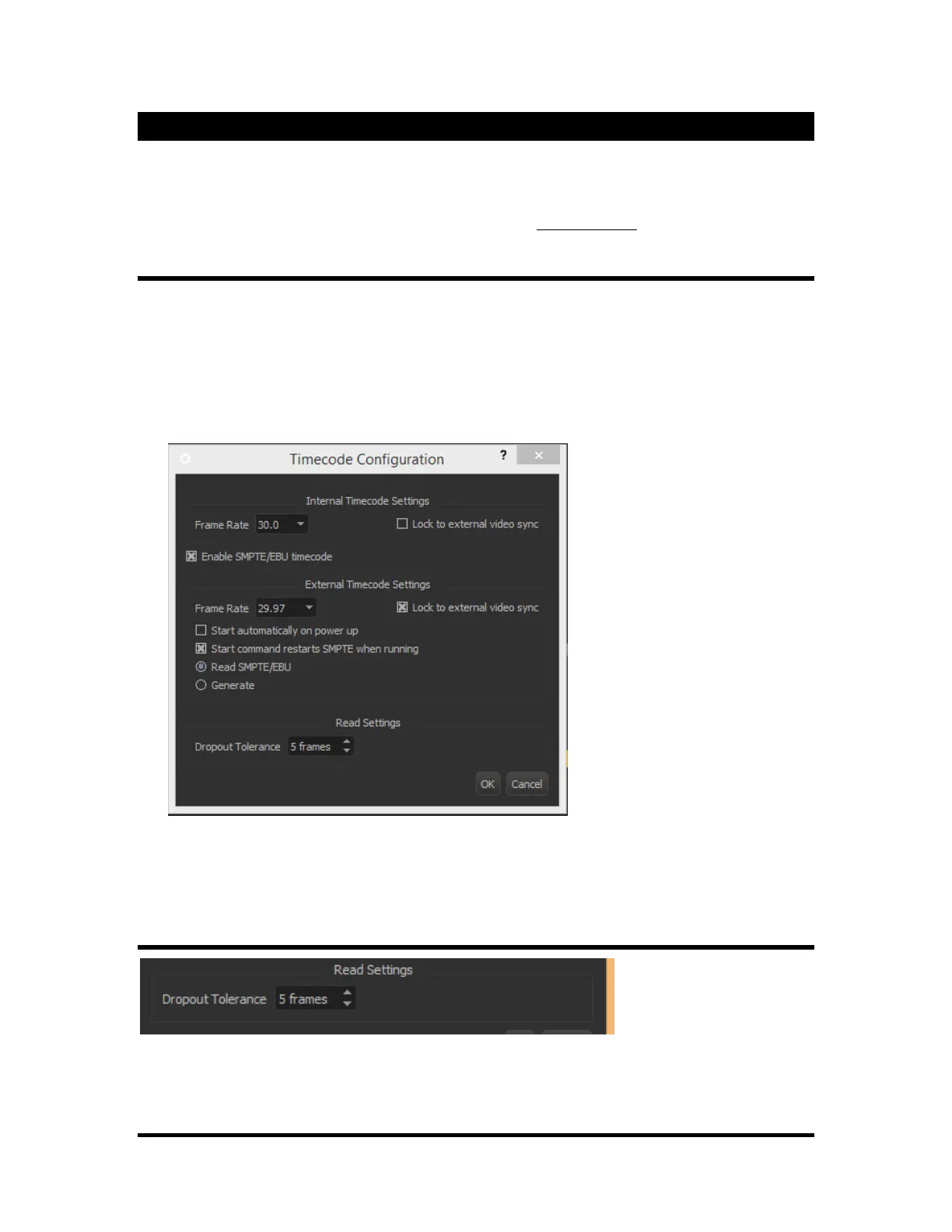
Linear Timecode (LTC) in the form of SMPTE/EBU can be used to synchronize multiple devices to a
single running timecode. The Show Controllers contain a LTC reader or generator. Once configured,
sequences can be locked to this LTC instead of the above mentioned “Internal Clock”. For more
information on configuring an individual sequence’s clock, see Sequence Clock on page 14.
General Settings
• Enable SMPTE/EBU Timecode: Allow the LTC to be configured for any usage.
• Start Automatically on Power Up: In generate mode, start the timecode running as soon as the
show is loaded. In read mode, allow timecode to be read as soon as the show is loaded.
• Start Command Restarts SMPTE when Running: When checked, a “Start Timecode”
command sent either through external ASCII control, front panel press or sequence command will
cause the timecode to start at the beginning.
The frame rates available for LTC are 23.976, 24, 25, 29.97, 30D (drop frame), and 30fps. When
“Lock to External Video Sync” is selected, 23.976, 25, and 29.97 fps are available. A yellow LED on
the front and rear of the unit indicates when the show controller is receiving an incoming sync signal.
Read Settings
When reading external LTC, it is possible for the timecode to skip or “dropout” a few frames. This
“Tolerance” level indicates at what point the show controller will register a “dropout”.



 To Next Page