Install and Administer Trunks
Add TN1654 DS1 Converter (r only)
690 SI Installation and Upgrades
June 2004
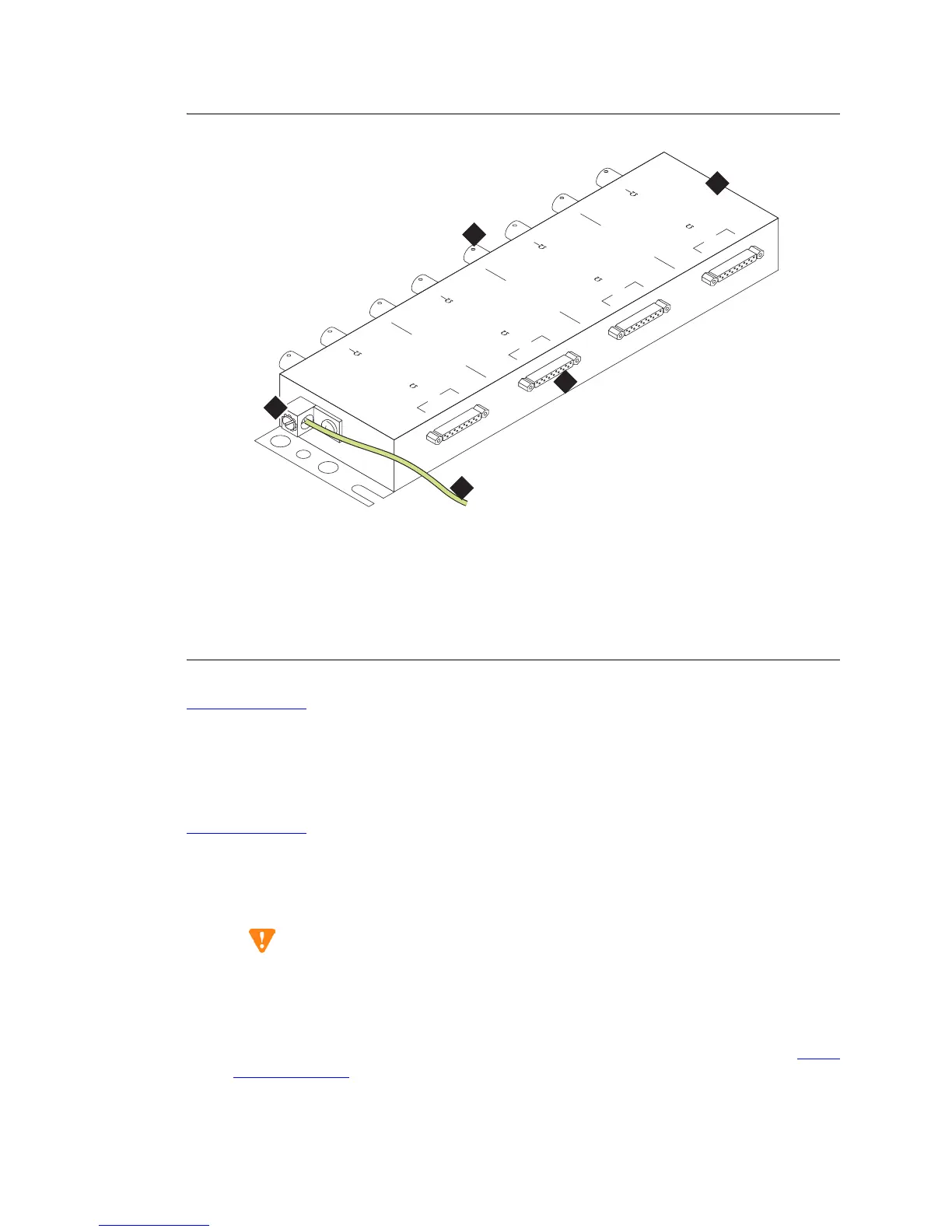
Figure 282: 127A BALUN Coaxial Adapter
Return to Task List
Wiring Off-Premises Stations (TN1654 DS1
Converter)
Return to Task List
The cabling outside the building for off-premises stations is provided by the local telephone company.
The off-premises stations can appear on any of the RJ21X network interfaces provided for the Central
Office (CO) trunks.
CAUTION:
Only an FCC-approved (or equivalent) analog type telephone, for example, a 2500-type,
can be used as an off-premises station. The TN746B and TN2183 Analog Line circuit
packs can be used for off-premises stations.
1 Connect an A25D cable between the RJ21X network interface and a sneak fuse panel. See Install
Sneak Fuse Panels on page 443 for details.
Figure notes
1 127A BALUN coaxial adapter
2 Connect to quad cable (H600-348 or
similar)
3 BCN Connections to E1 network
equipment
4 Single-point ground connection
5
>= 0.75 mm
2
(18 AWG) ground wire
to ground terminal at MDF
h1df127b KLC 012301
127A
1
0
8
0
3
2
3
0
1
A
12
0
T
R
B
120
T
R
C
1
20
T
R
D
1
20
T
R
75
7
5
75
7
5
E1 120/75 BALUN
1
2
3
4
4
5



 To Next Page