Adjuncts and Peripherals
Terminal server installation
796 SI Installation and Upgrades
June 2004
Making the connections
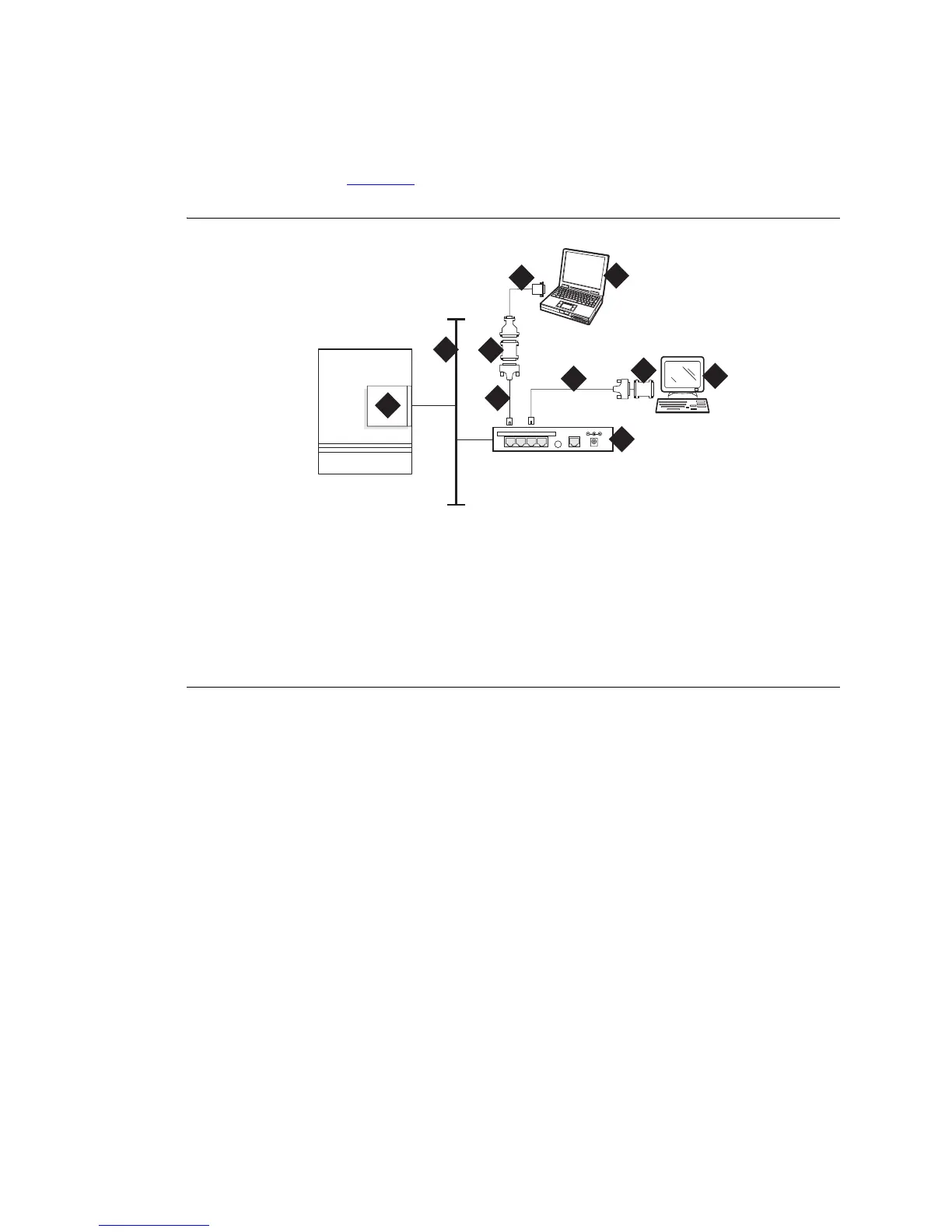
Connect the adjunct to the IOLAN+, using the RJ45-to-DB25 cable and the null modem. You can use a
male/female adapter. See Figure 309
.
Figure 309: Connecting an adjunct to the IOLAN+
Follow these typical steps:
NOTE:
Depending on the adjunct’s connections, you may not need all of these pieces.
1 Connect the null modem adapter to COM1 port on the adjunct.
NOTE:
The null modem is an important element in this setup. Without it, data may not transfer
correctly.
2 Connect the other end of the null modem adapter to the DB25 to RJ45 cable.
3 Connect the RJ45 end to any port on the IOLAN+.
Figure notes
1 C-LAN circuit pack
2 Local area network (LAN)
3 IOLAN+ 104 terminal server
4 Adjunct (system management
terminal or a system printer, for
example)
5 Null modem
6 PC or laptop (for initial administration)
7 DB25-to-RJ45 cable
8 DB25-to-DB9 cable
cydfrcon KLC 021201
1
2
4
DATA CONNECTIONS ONLY - NOT FORTELECOM USE
1234 10BASE-T 5VDC
3
7
7
8
5
5
6



 To Next Page