Adjuncts and Peripherals
Terminal server installation
SI Installation and Upgrades 793
June 2004
Adjuncts and Peripherals
The following sections provide information on the installation of a variety of adjuncts and peripheral
devices. The sections cover:
• Terminal server installation
• Call detail recording (CDR)
• Reliable Data Transport Tool (RDTT) Package
• Printers
• DS1/T1 CPE loopback jack
• Music-on-hold
• Paging and announcement equipment
• Adjunct Information Sources
Terminal server installation
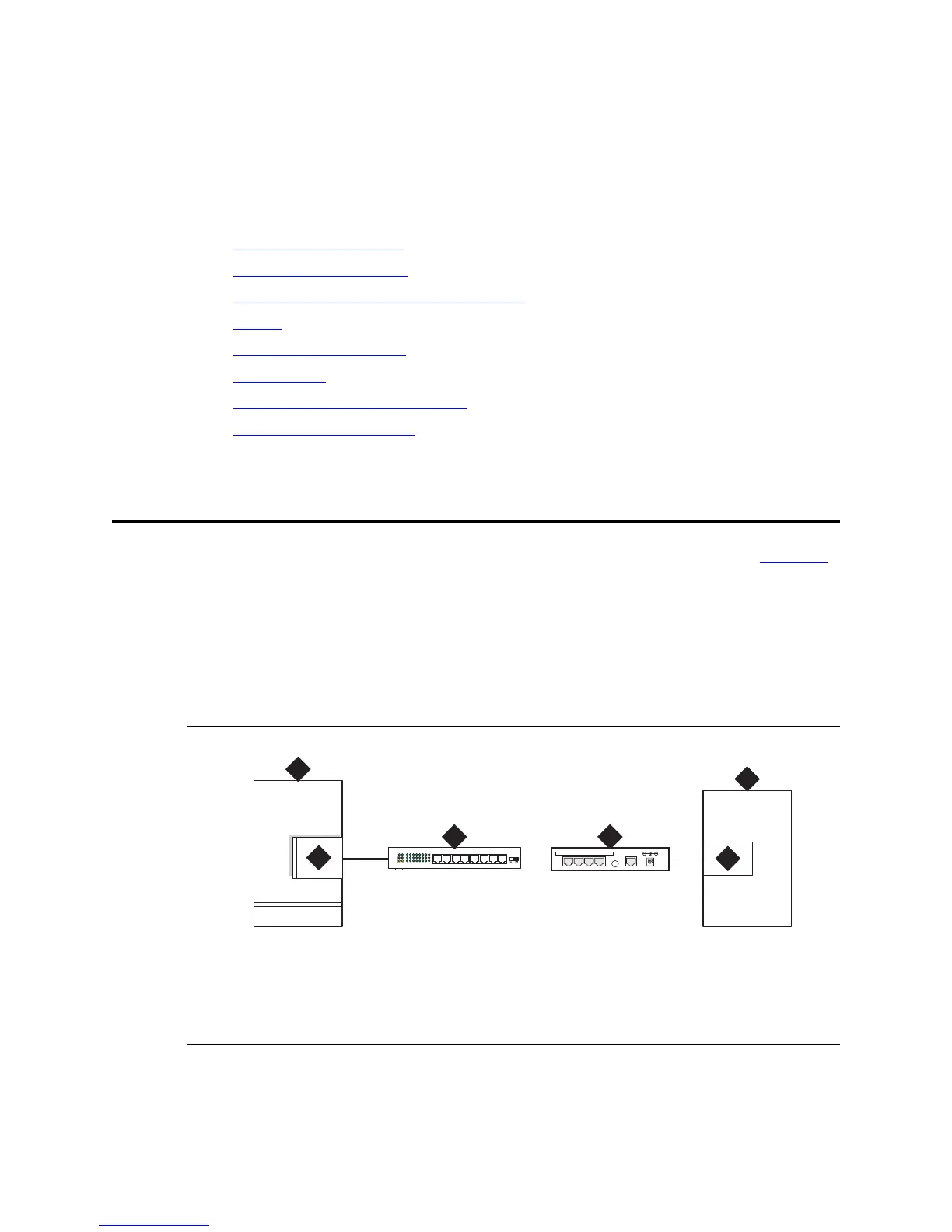
This chapter provides information on connecting adjunct equipment using a terminal server (Figure 307).
Avaya supports the IOLAN+ 104 terminal server.
Any device that does not support a direct TCP/IP connection, but that does support an RS232 interface,
can connect through a terminal server. System printers and some CDR devices use RS232 connections
and can connect through a terminal server.
You can connect up to four adjuncts through one terminal server.
Figure 307: Switch-to-adjunct LAN connectivity through a terminal server
Figure notes
1 switch
2 C-LAN circuit pack
3 10/100Base-T Hub (optional)
4 terminal server
5 serial port
6 CDR adjunct
LAN
1
2
5
6
3
DATA CONNECTIONS ONLY - NOT FORTELECOM USE
1234 10BASE-T 5VDC
4



 To Next Page