Option Switch Settings
Call Detail Recording Option Settings
SI Installation and Upgrades 753
June 2004
.
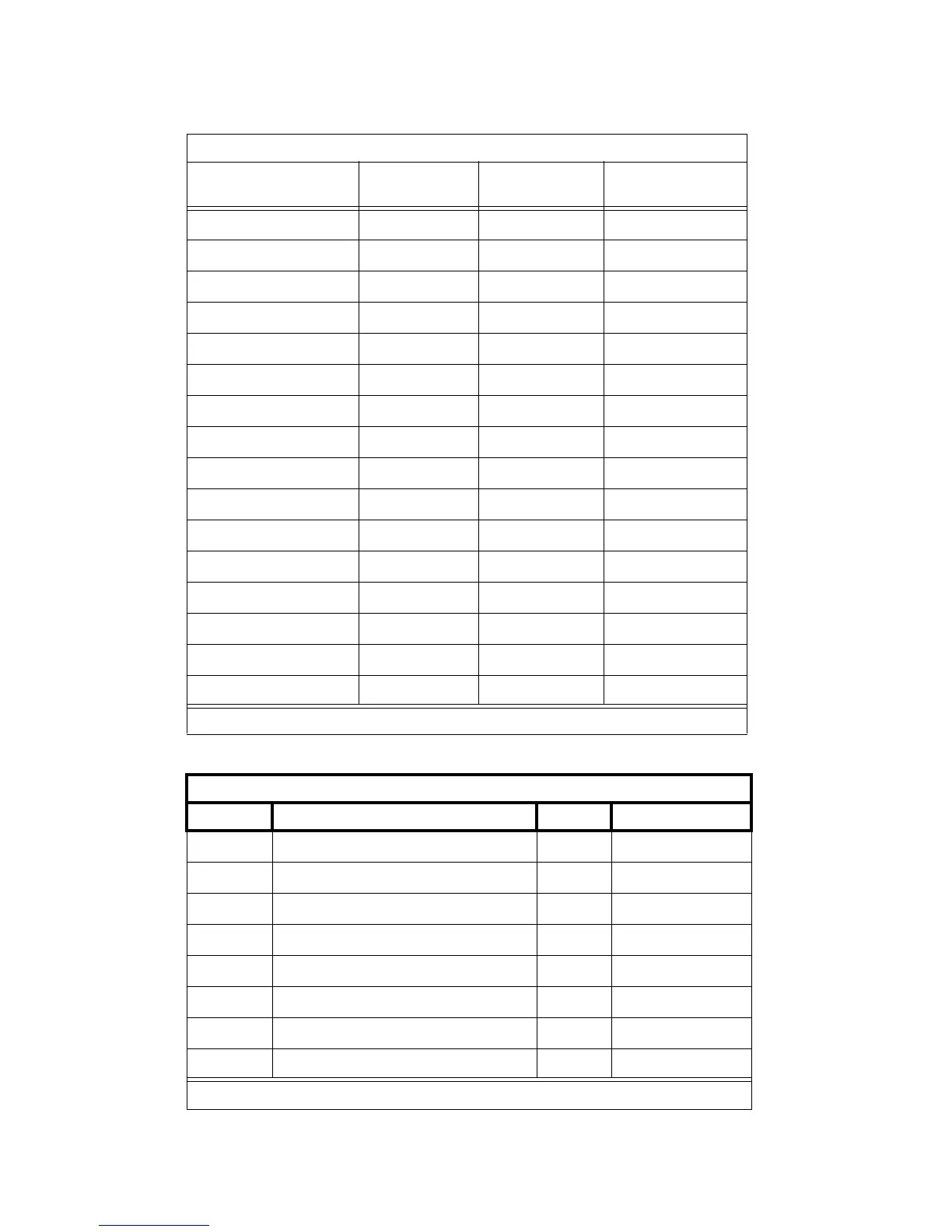
Options for D-Lead and Attention Control Modems
Set Option Display Option
D-Lead
Settings
Attention
Control Settings
Set 300 Speed? 300 Note 1 Note 1
Set 1200 Speed? 1200 Note 1 Note 1
Set 2400 Speed? 2400 Note 1 Note 1
Set 4800 Speed? 4800 Note 1 Note 1
Set 9600 Speed? 9600 Note 1 Note 1
Set 19200 Speed? 19200 Note 1 Note 1
Set AT Control? AT OFF ON
Set CI Lead? CI Note 2 Note 2
Set CI2 Lead? CI2 Note 2 Note 2
Set CH Lead? CH Note 2 Note 2
Set CH2 Lead? CH2 Note 2 Note 2
Set LL Lead? LL Note 2 Note 2
Set REMOTE Loop? REMLOOP Grant Grant
Set RL Lead? RL Note 2 Note 2
Set SIGLS Disc? SIGLS DISC ON ON
Set TM Lead? TM Note 2 Note 2
572 Printer Used with Management Terminal, CDR, and Journal Printer
Function Function Name Menu Menu Status
01 FORM LENGTH 09 11
02 LPI 01 6
03 CPI 01 10
04 LQ or NLQ 01 LQ
05 BUZZER 01 ON
06 FONT 02 FONTCART
07 RESOLUTION 01 144
11 BUFFER 02 N-LINE
1 of 2



 To Next Page