Adjuncts and Peripherals
Wideband endpoints
810 SI Installation and Upgrades
June 2004
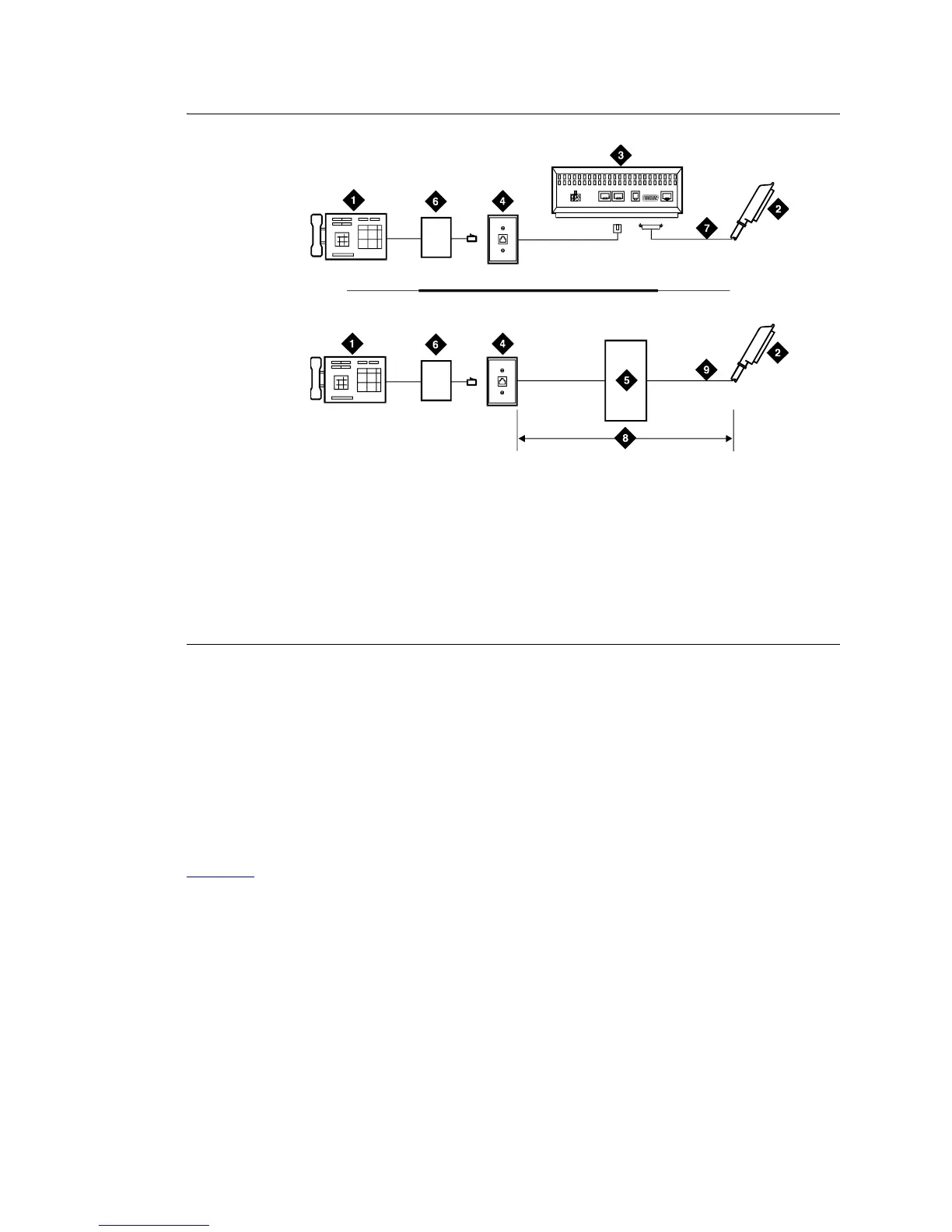
Figure 311: Typical signaling wideband configuration
The bandwidth controller connects directly to the wideband endpoint. The controller typically installs
near the endpoint where they directly connect (usually within a few feet of each other).
• For non-CSU installations, cross the transmit and receive lines so a transmit signal from the
DS1/E1 circuit pack connects to the receive connection on the bandwidth controller and a
transmit signal from the bandwidth controller connects to the receive connection on the DS1/E1
circuit pack.
• For CSU installations, cross the transmit and receive lines between the CSU and the bandwidth
controller.
Figure 312
shows a remote port module. In this configuration, there can be considerable distance between
the bandwidth controller and the wideband endpoint. The maximum distance between elements depends
on the quality of the cables and on the specifications of the wideband equipment.
Figure notes
1 Wideband endpoint (wire per
manufacturer)
2 To DS1/E1 circuit pack
3 Optional channel service unit (CSU)
4 103A or modular wall jack
5 Part of main distribution frame
6 Bandwidth controller
7 H600-307 cable to DTE connector on CSU
8 Distance limit depends on cable type and
bandwidth controller type
9 A25D 25-pair cable (male-to-male)
AUX PORT COM PORT MODEM
DTE
NETWORK
POWER
c
df047 PDH 091396



 To Next Page