MVX250i E, MVX200i E, MVX200 E
DISASSEMBLING
17
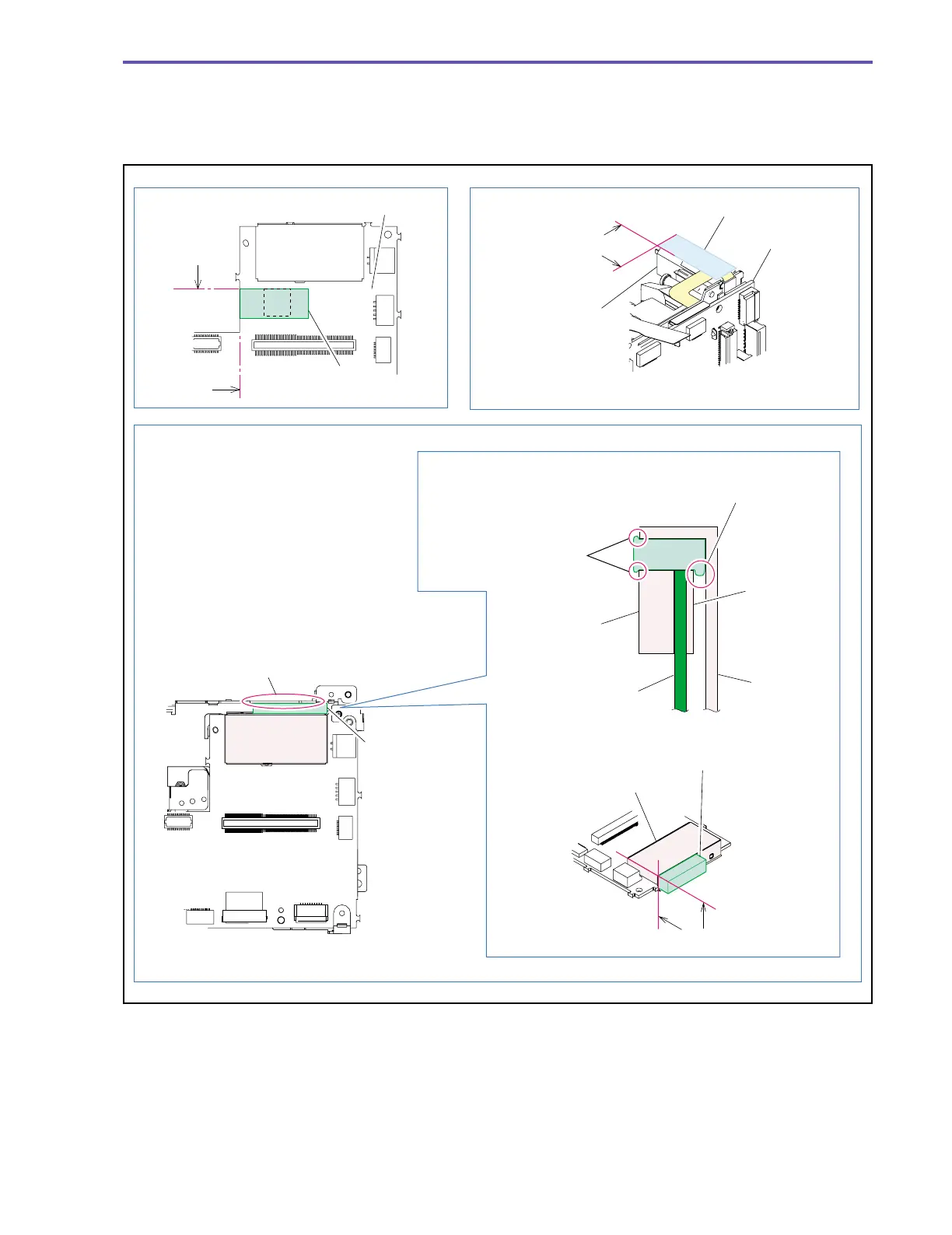
<Note on Reassembling>
(1) Attach the Core Cushion to the position indicated in the figure below.
(2) Attach the Shielding Rubber to the PM Shield as illustrated below.
(3) Secure the flexible cable by attaching the UL Tape to the position indicated in the figure below.
Fig. 14
Note on Reassembling (1)
Note on Reassembling (2)
Note on Reassembling (3)
Recorder
Holder
Shielding Rubber
PM1 Shield
PM1 Shield
PM2 Shield
Shielding Rubber
PM Shield
MAIN P.C.B.
MAIN P.C.B.
The UL tape shall not protrude from
the outline of the Motor.
It is not allowed to attach
the Shielding Rubber in
an overlaying form.
Take care not to let the Shielding Rubber
be sandwiched between the MAIN P.C.B.
and the MAIN Holder.
When attaching the Shielding Rubber, push it
to the part A of the Recorder Holder so that
the MAIN P.C.B. will not be unseated.
UL Tape (9 × 20)
Motor
Core Cushion
MAIN P.C.B.
MAIN P.C.B.
Part A
Top end
of IC
End of P.C.B.
Attachment
reference
Attachment reference



 To Next Page