MVX250i E, MVX200i E, MVX200 E
DISASSEMBLING
26
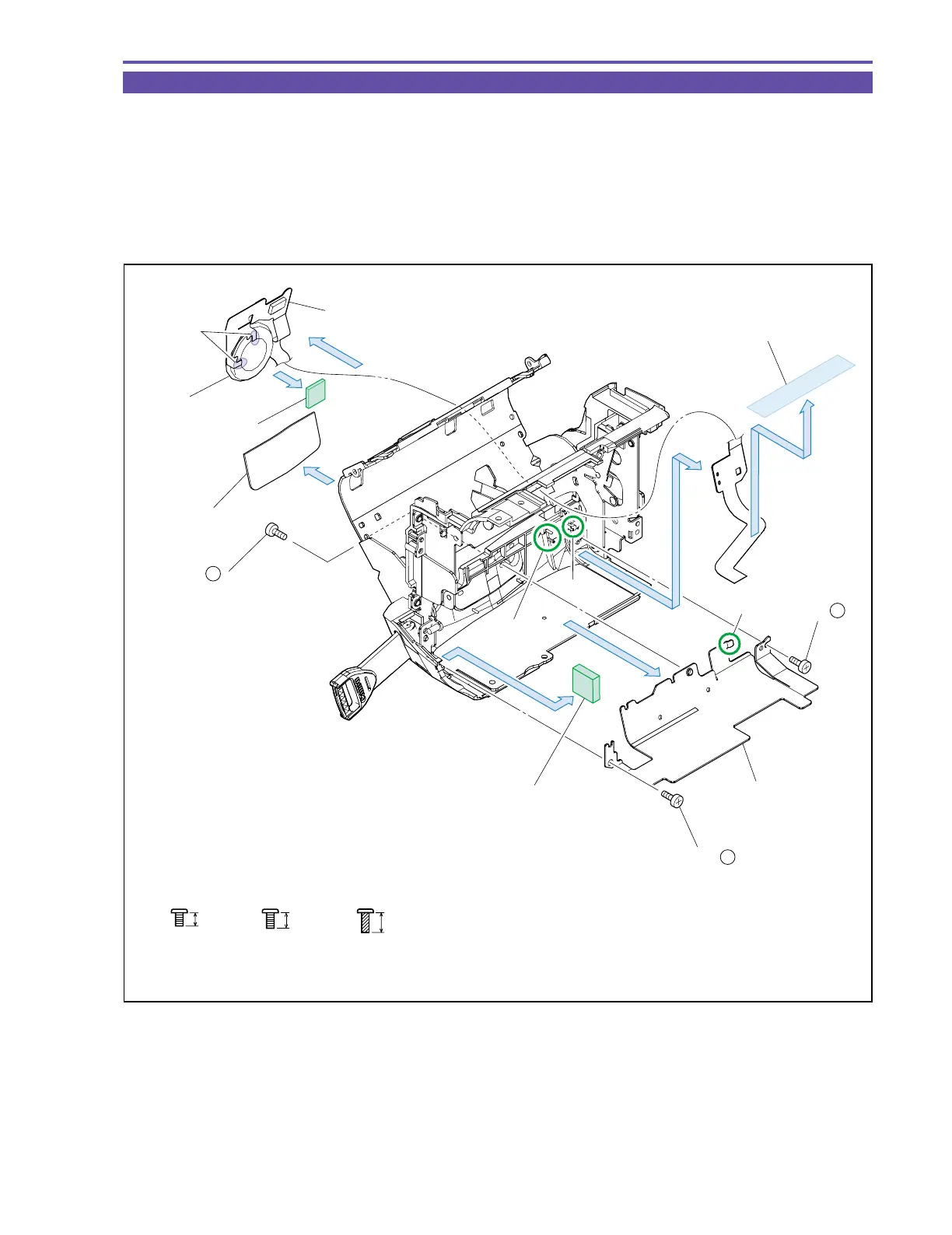
1-19 Disassembly of Left Cover Unit - 2
(1) Open the Cassette Cover, detach the Regulation Sheet, and remove one screw (h × 1), and theL Cover Cushion.
Note : Since the Double Sided Tape has a high strength of adhesion, take care not to flaw the Regulation Sheet when
detaching it.
(2) Remove two screws (d × 1, t × 1), UL Tape and detach the Left Cover Shield.
(3) Disengage the dowels A (two points) and the claw B. Then, demount the Speaker, and the SPEAKER FPC.
(4) Detach the Speaker Cushion.
(5) Remove solder (α) (two points), and separate the Speaker from the SPEAKER FPC.
3mm
Metal
M1.7
d
3.5mm
Metal
M1.7
h
Black
M1.7
(self tap)
4.5mm
t
L Cover Cushion
Dowel A
Claw B
(5) - α
SPEAKER FPC
Speaker Cushion
Speaker
(4)
(3)
(3)
(1)
Regulation Sheet
Left Cover Shield
(2) - d
(1) - h
(2)
(2)
(1)
Claw C
UL Tape (9 × 30)
(2) - t
Fig. 23



 To Next Page