MVX250i E, MVX200i E, MVX200 E
DISASSEMBLING
32
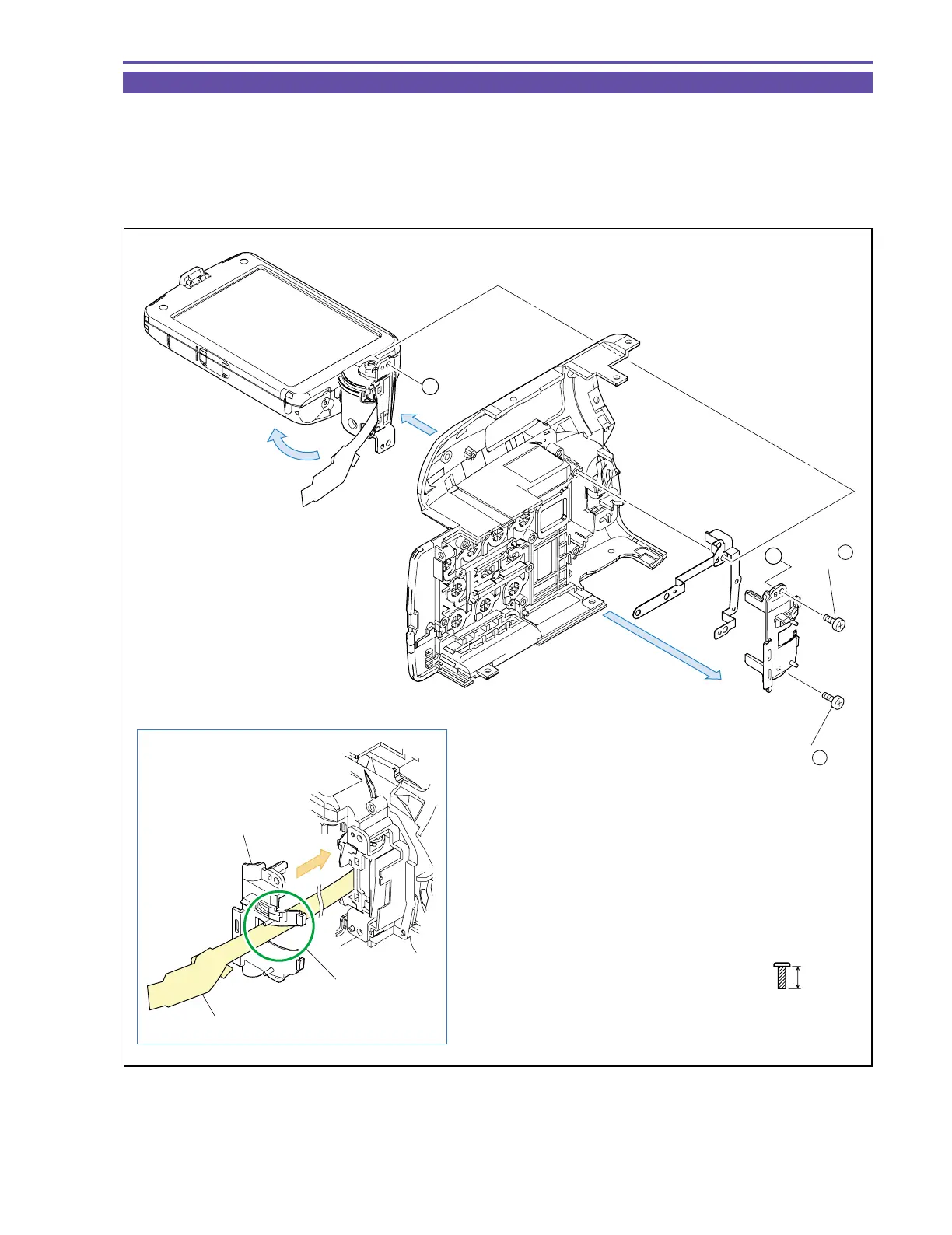
1-23 Disassembly of R-LCD Unit - 3
(1) Remove two screws (f × 2), and detach the Hinge Cover, the GND Plate and the LCD Unit. (Turn the Hinge part of the LCD Unit
through an angle of 90º beforehand.)
<Note on Reassembling>
(1) To the Right Cover Unit, attach the GND Plate, the LCD Unit and the Hinge Cover in that order, and secure then with the screws.
In reassembling, run the LCD FPC through part A of the Hinge Cover.
f
5mm
Metal
M1.7
(self tap)
Note on Reassembling (1)
(1)
(1)
(1)
Right Cover Unit
Hinge Cover
GND Plate
LCD Unit
A
A
Hinge Cover
LCD FPC
Part A
(1) - f
(1) - f
Fig. 29



 To Next Page