MVX250i E, MVX200i E, MVX200 E
DISASSEMBLING
46
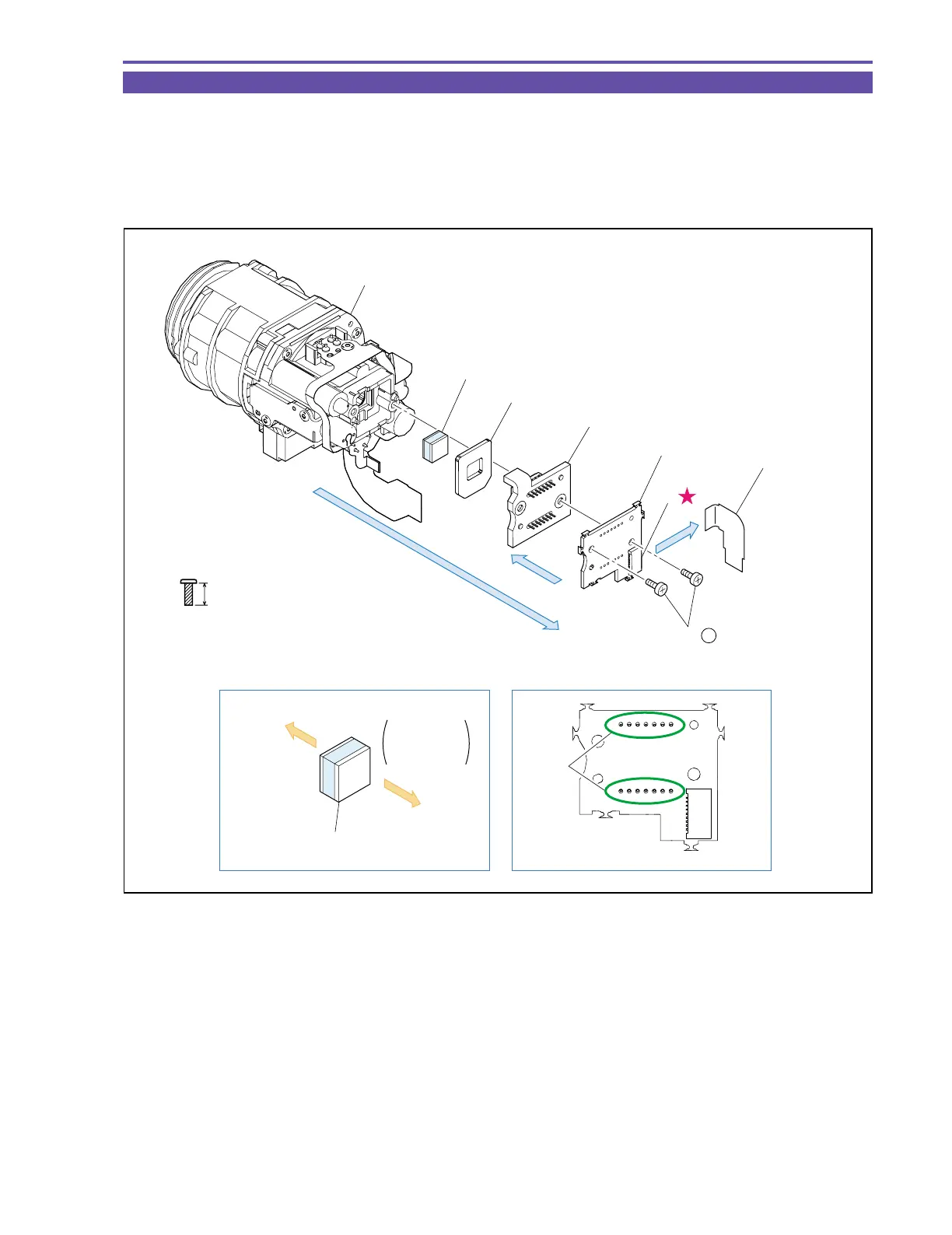
1-35 Disassembly of Camera Unit
(1) Detach the CCD-CAV FPC from the CN1070.
(2) Remove two screws (f × 2), and detach the CCD P.C.B., CCD Ass’y, Rubber, and IR Filter.
(3) Unsolder the parts A, and detach the CCD Ass’y from the CCD P.C.B.
<Notes on Reassembling>
(1) When soldering on the CCD P.C.B., secure the CCD Ass’y and the CCD P.C.B. with two screws (f × 2).
Fig. 43
f
5mm
Metal
M1.7
(self tap)
Face thick
side toward
CCD side
IR Filter
IR Filter
Lens Unit
Lens
Rubber
CCD Ass'y
Parts A
CCD
CCD P.C.B.
CCD P.C.B.
(3)
(3)
(2)
CCD - CAV FPC
CN1070
(1)
(1) - f



 To Next Page