MVX250i E, MVX200i E, MVX200 E
DISASSEMBLING
16
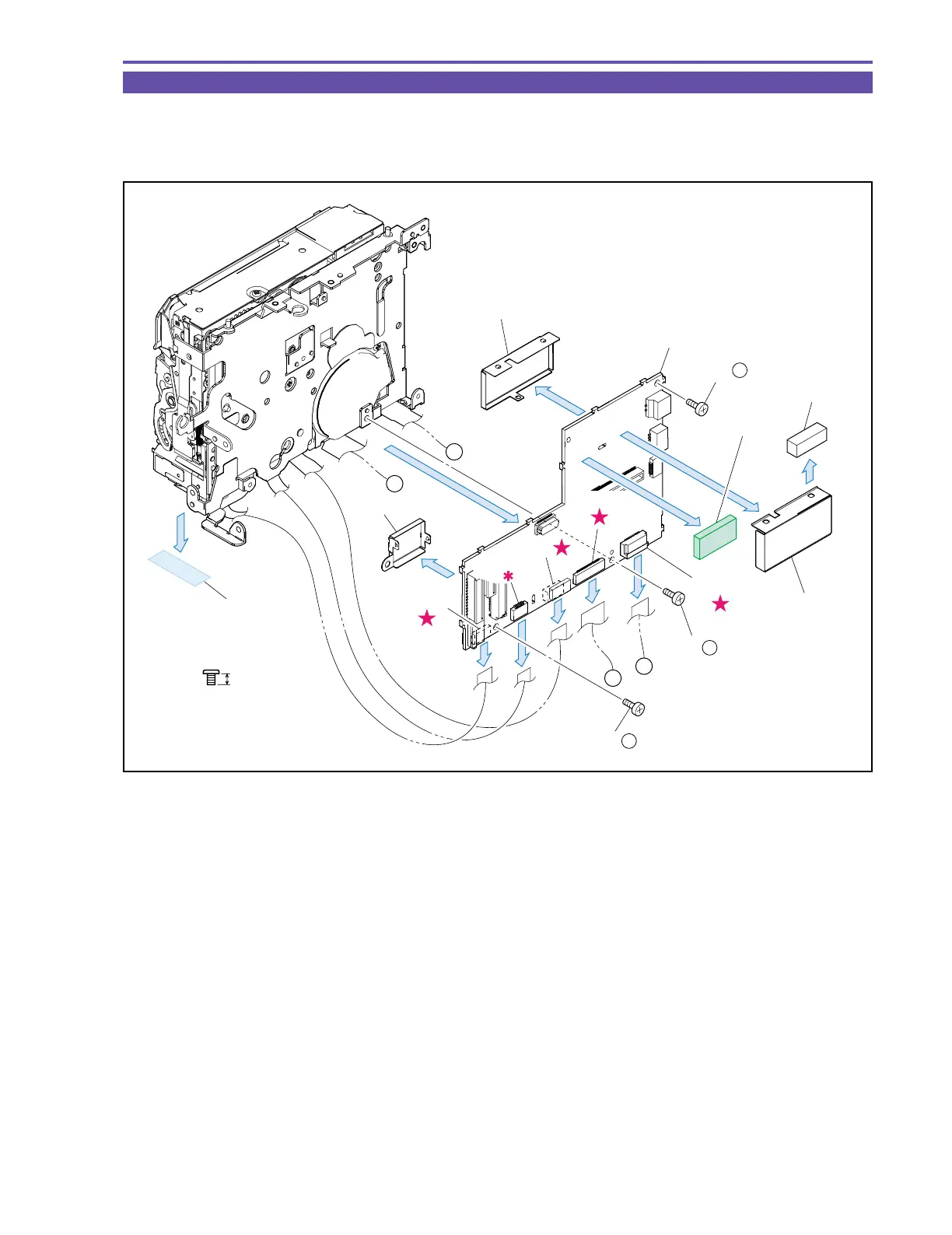
1-13 Separation of MAIN P.C.B.
(1) Remove three screws (k × 3), UL Tape, and disconnect the CN300, CN301, CN302, and CN2000. Then, detach the MAIN P.C.B.
(2) Detach the HA Shield, Shielding Rubber, PM1 Shield and PM2 Shield, from the MAIN P.C.B.
(3) Detach the Core Cushion
Fig. 13
k
2.5mm
Metal
M1.7
(2)
(2)
(2)
(2)
(3)
(1)
(1)
PM2 Shield
HA Shield
PM1 Shield
MAIN P.C.B.
CN2000
CN303
CN302
CN300
CN301
A
B
A
B
Core
Cushion
(1) - k
(1) - k
(1) - k
Shielding
Rubber
UL Tape
(9
×
20)



 To Next Page