MVX250i E, MVX200i E, MVX200 E
DISASSEMBLING
33
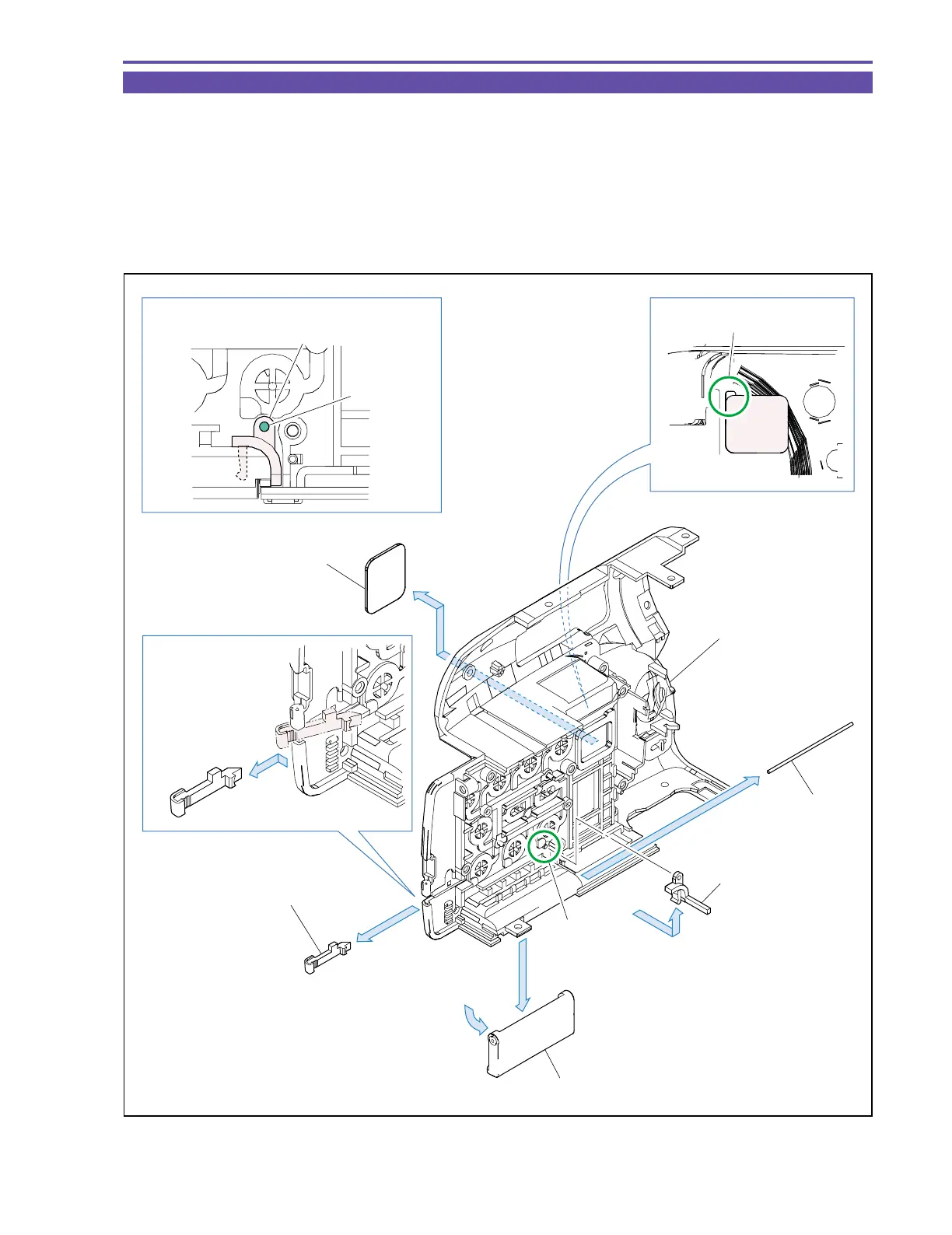
1-24 Disassembly of Right Cover Unit
(1) Detach the LED Guide.
(2) Open the Card Cover, disengage the dowel A, and detach the Card Cover Hook.
(3) Pull out the Shaft, and detach the Card Cover.
Note : Take sufficient care not to lose the Shaft.
(4) Introduce tweezers of thin end into the part B, and detach the Blindfold Sheet.
<Note on Reassembling>
(1) Attach the Card Cover Hook as illustrated below.
Fig. 30
Note on Reassembling (1)
(1)
(2)
(2)
(3)
(3)
LED Guide
Shaft
Card Cover
Card Cover Hook
Card Cover Hook
Dowel A
Dowel A
Press in, and then pull out
Part B
(4)
Right Cover Ass'y
Blindfold Sheet
Blindfold Sheet



 To Next Page