MVX250i E, MVX200i E, MVX200 E
DISASSEMBLING
19
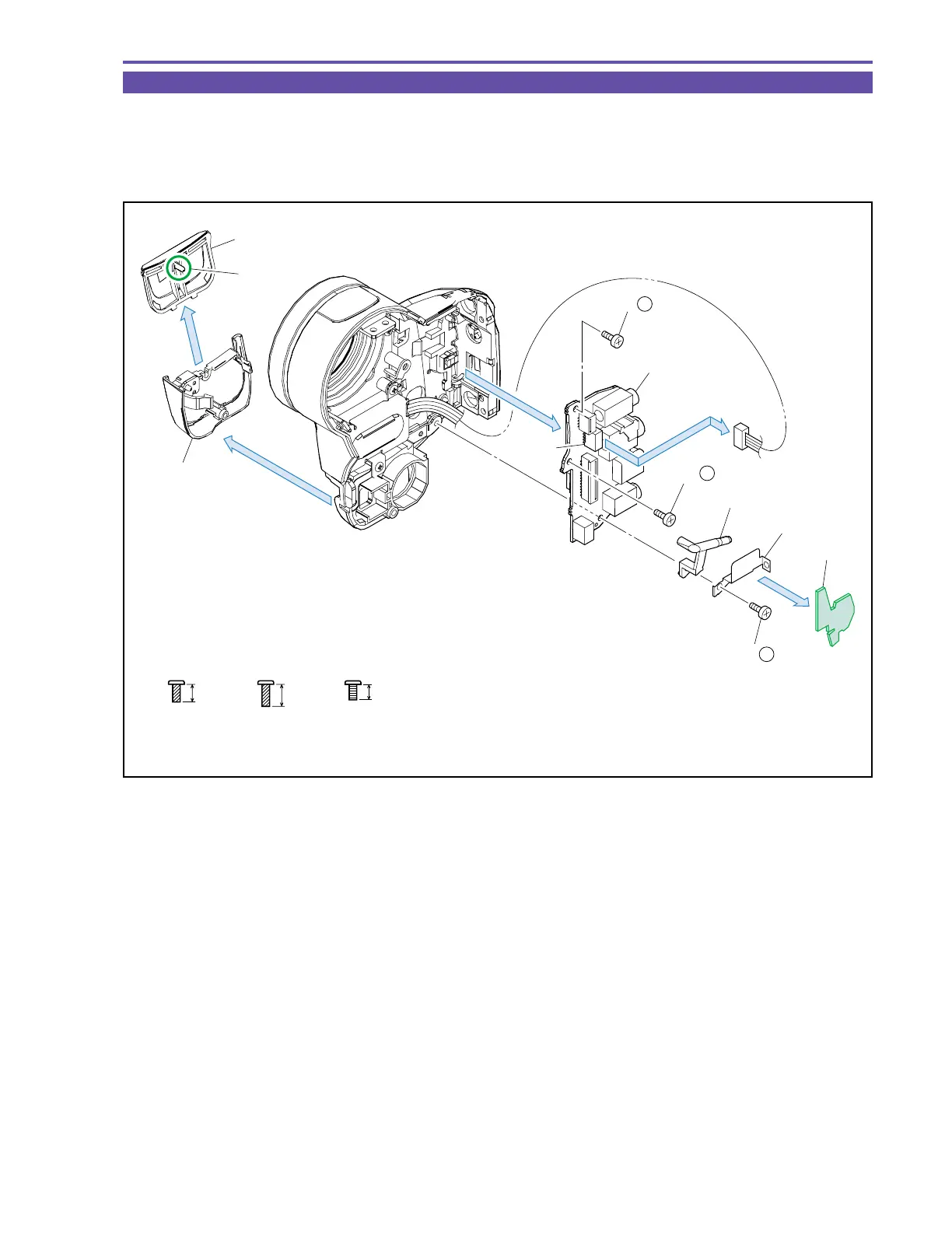
1-15 Disassembly of Front Cover Unit - 1
(1) Detach the Jack2 Cover.
(2) Disconnect the CN43, and remove three screws (e × 1, f × 1, h × 1). Then, detach the Cushion, GND Plate, LED Window, and
JACK1 P.C.B.
(3) Slide the Jack2 Panel in the arrow direction to disengage the dowel A, and detach the Jack2 Panel.
ef
4mm
Metal
M1.7
(self tap)
5mm
Metal
M1.7
(self tap)
3.5mm
Metal
M1.7
h
Jack2 Cover
Jack2 Panel
(3)
Dowel A
JACK1 P.C.B.
LED Window
GND Plate
Cushion
(2)
(2)
(1)
CN43
(2) - h
(2)
(2) - e
(2) - f
Fig. 16



 To Next Page