MVX250i E, MVX200i E, MVX200 E
DISASSEMBLING
30
1-21 Disassembly of R-LCD Unit - 1
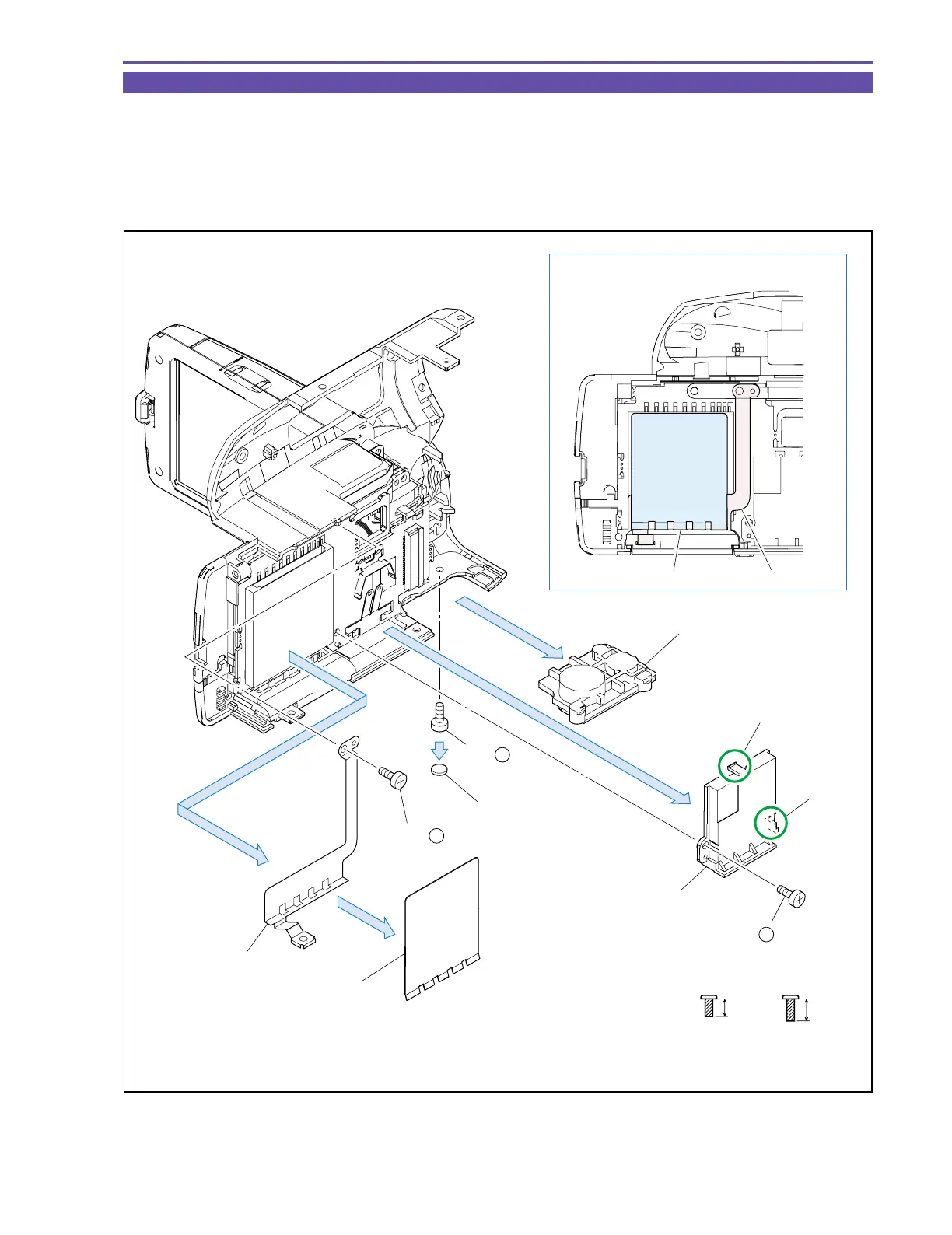
(1) Remove one screw (f × 1), and detach the Rubber Insulation and the Tripod Base.
(2) Remove one screw (e × 1), and detach the Hold Label and the GND Plate.
(3) Remove one screw (f × 1), disengage the claws A and B, and detach the LI Case.
<Notes on Reassembling>
(1) Attach the Hold Label to the position indicated in the figure below.
Fig. 27
ef
4mm
Metal
M1.7
(self tap)
5mm
Metal
M1.7
(self tap)
Note on Reassembling (1)
(1)
Tripod Base
(1)
(2)
(2)
(3)
Craw B
GND Plate
Craw A
LI Case
(2) - e
(3) - f
GND Plate
(1) - f
Rubber Insulation
Hold Label
Hold Label



 To Next Page