MVX250i E, MVX200i E, MVX200 E
DISASSEMBLING
24
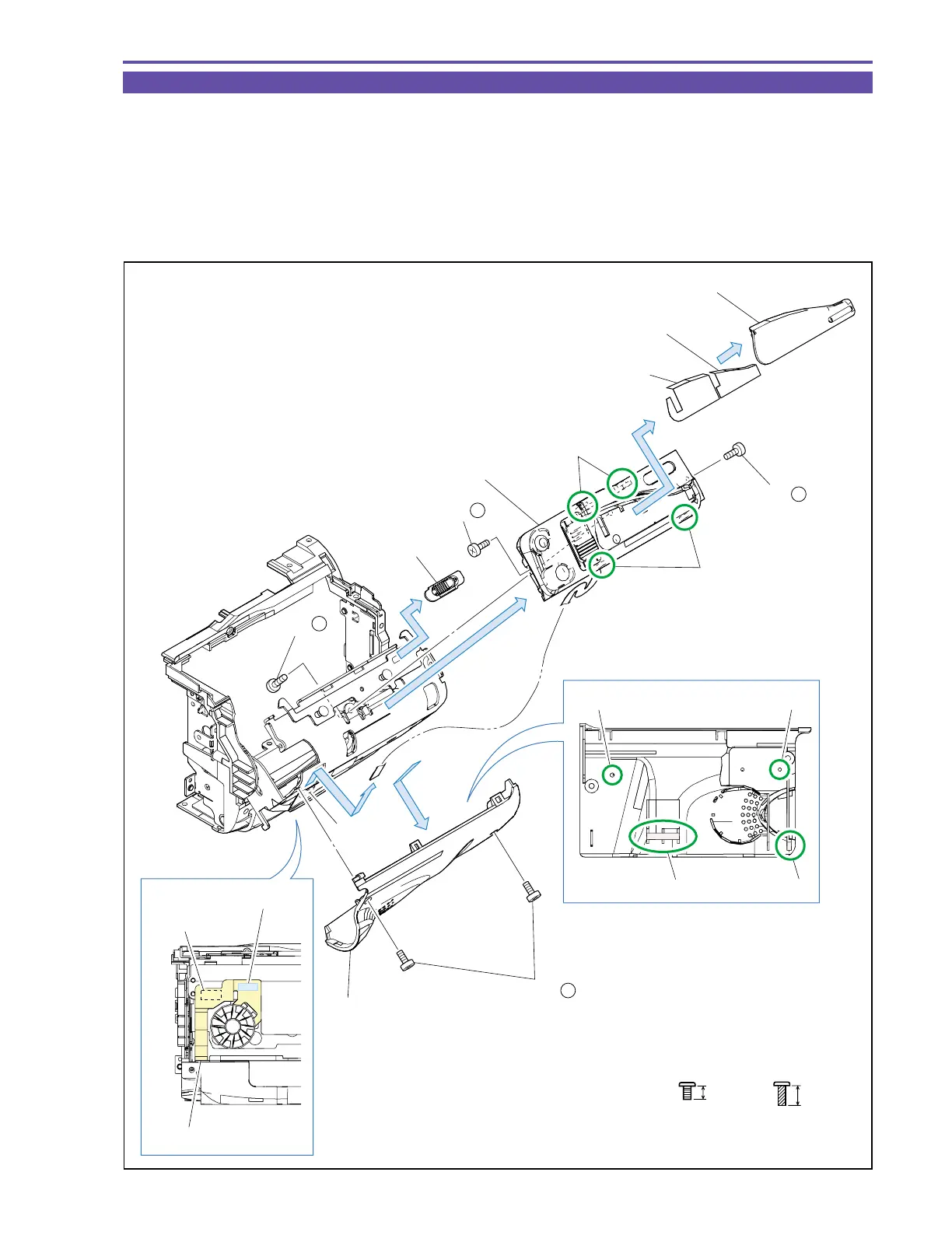
1-18 Disassembly of Left Cover Unit - 1
(1) Remove five screws (d × 4, t × 1).
(2) Disengage two claws A and two dowels B of the Zoom Photo Key Ass’y. Then, with the Zoom Photo Key Ass’y unseated, detach
the Open Knob.
(3) Slide the claws C and D and the dowels E and F downward, remove the Double Sided Tape from the SPEAKER FPC, and detach
the Cassette Cover.
(4) Disconnect the connector from the SPEAKER FPC Unit, and detach the Zoom Photo Key Ass’y.
(5) Detach the Zoom Top Cover and the Zoom Top Cover Tape1, 2.
Fig. 21
3mm
Metal
M1.7
d
Black
M1.7
(self tap)
4.5mm
t
Double Sided Tape
Dowel E Dowel F
Dowel B
Claw C
Claw A
Claw D
Connector
Connector
SPEAKER FPC
Zoom Top Cover
Zoom Photo Key Ass'y
Zoom Top Cover Tape 1
Zoom Top Cover Tape 2
Open Knob
Cassette Cover
(5)
(5)
(2)
(4)
(3)
(4)
(1) - d
(1) - d
(1) - d
(1) - t



 To Next Page