MVX250i E, MVX200i E, MVX200 E
DISASSEMBLING
40
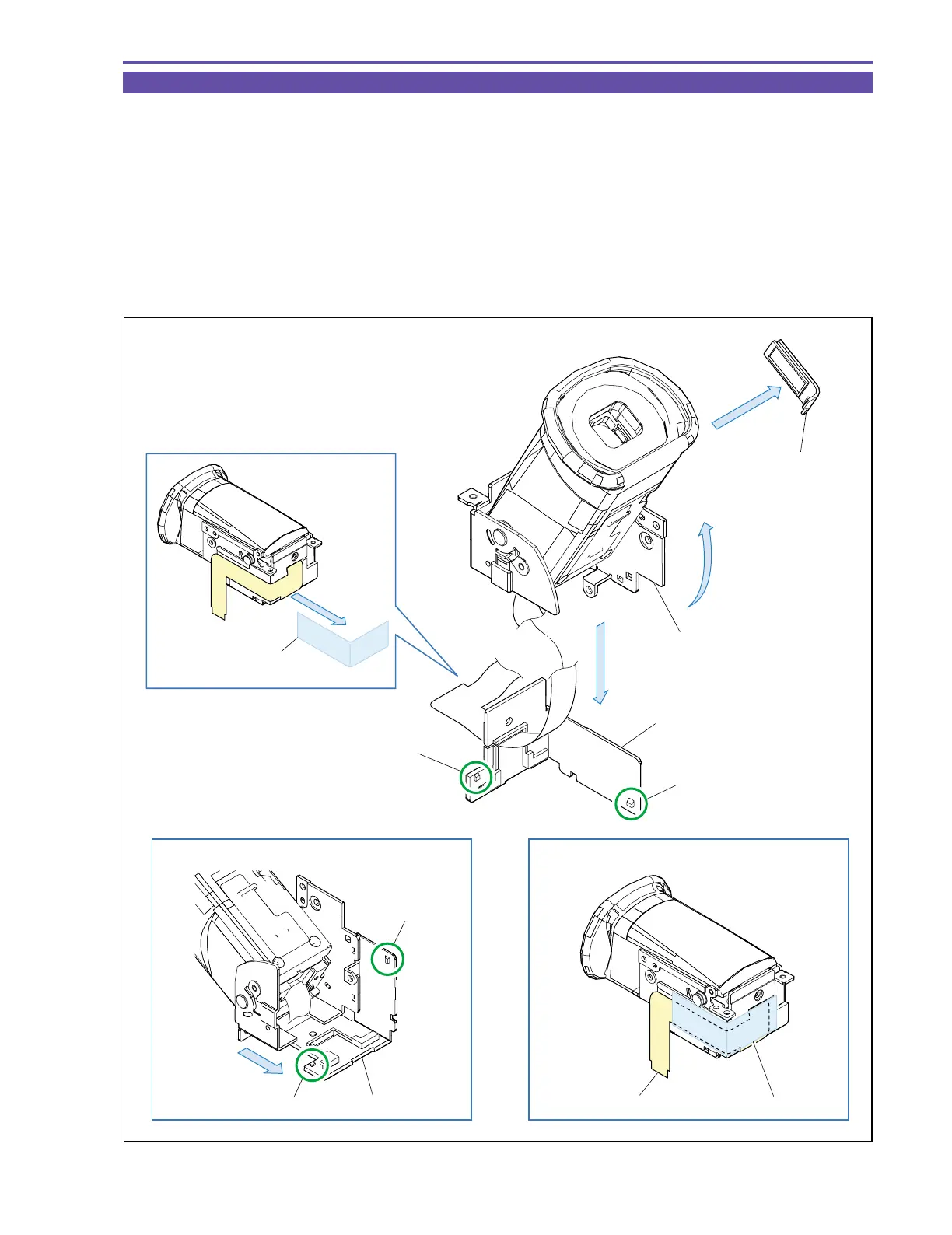
1-30 Disassembly of CVF Unit - 1
(1) Detach the UL Tape from the CAV-CVF FPC, and turn up the CVF.
(2) Detach the FPC Holder.
Note : When detaching the FPC Holder, take the following steps.
1. Disengage the claw A.
2. Using tweezers or the like, disengage the claw B from the back side. Detach the FPC Holder while sliding it.
At this step, take care not to damage the flexible cable.
(3) Detach the Dust Cover.
<Note on Reassembling>
(1) Secure the CAV-CVF FPC with the UL Tape as illustrated below.
Fig. 37
Note
Note on Reassembling (1)
FPC Holder
Claw B
Claw A
Claw B
Claw A
CAV-CVF FPC
UL Tape (13 × 50)
Dust Cover
CVF Hinge Ass'y
(3)
(1)
(2)
UL Tape (13 × 50)
FPC Holder



 To Next Page