MVX250i E, MVX200i E, MVX200 E
DISASSEMBLING
39
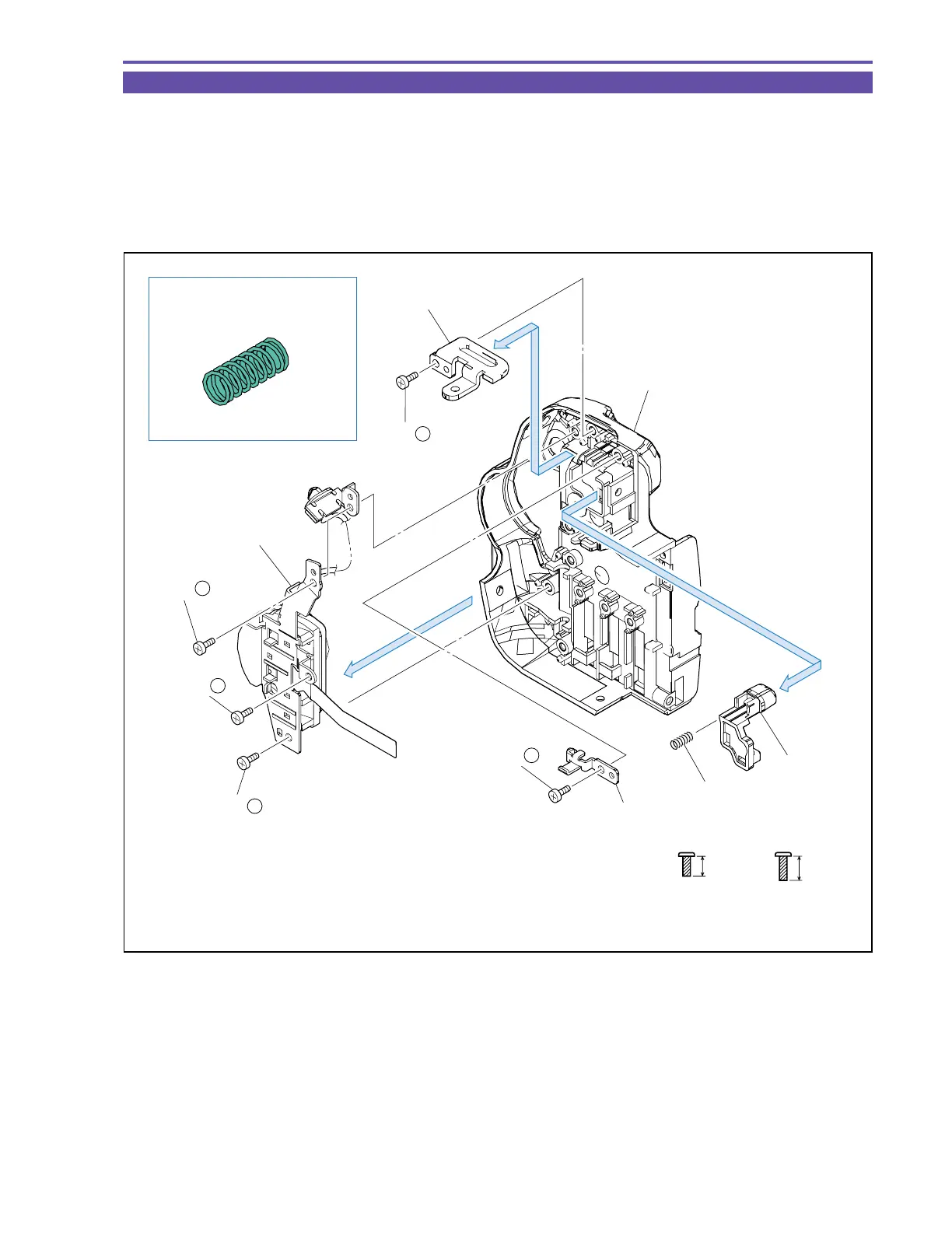
1-29 Disassembly of Rear Cover Unit - 2
(1) Remove three screws (n × 2, q × 1), and detach the Power Switch Ass’y.
(2) Remove one screw (n × 1), and detach the Strap Plate.
(3) Remove one screw (n × 1), and detach the Eject Holder, the Spring, and the Eject Knob.
Note : Take care not to lose the Spring.
<Instruction for Supply>
Entire surface of Spring : Hanal FL-778 (DY9-3026-010)
Fig. 36
Metal
M1.7
(self tap)
4.5mm
qn
5.5mm
Metal
M1.7
(self tap)
Spring
Rear Cover
Power Switch Ass'y
Eject Holder
Eject Knob
(1)
(3)
(2)
Strap Plate
Instruction for Supply
Hanal FL-778
(3) - n
(2) - n
(1) - n
(1) - n
(1) - q
Spring



 To Next Page