MVX250i E, MVX200i E, MVX200 E
DISASSEMBLING
37
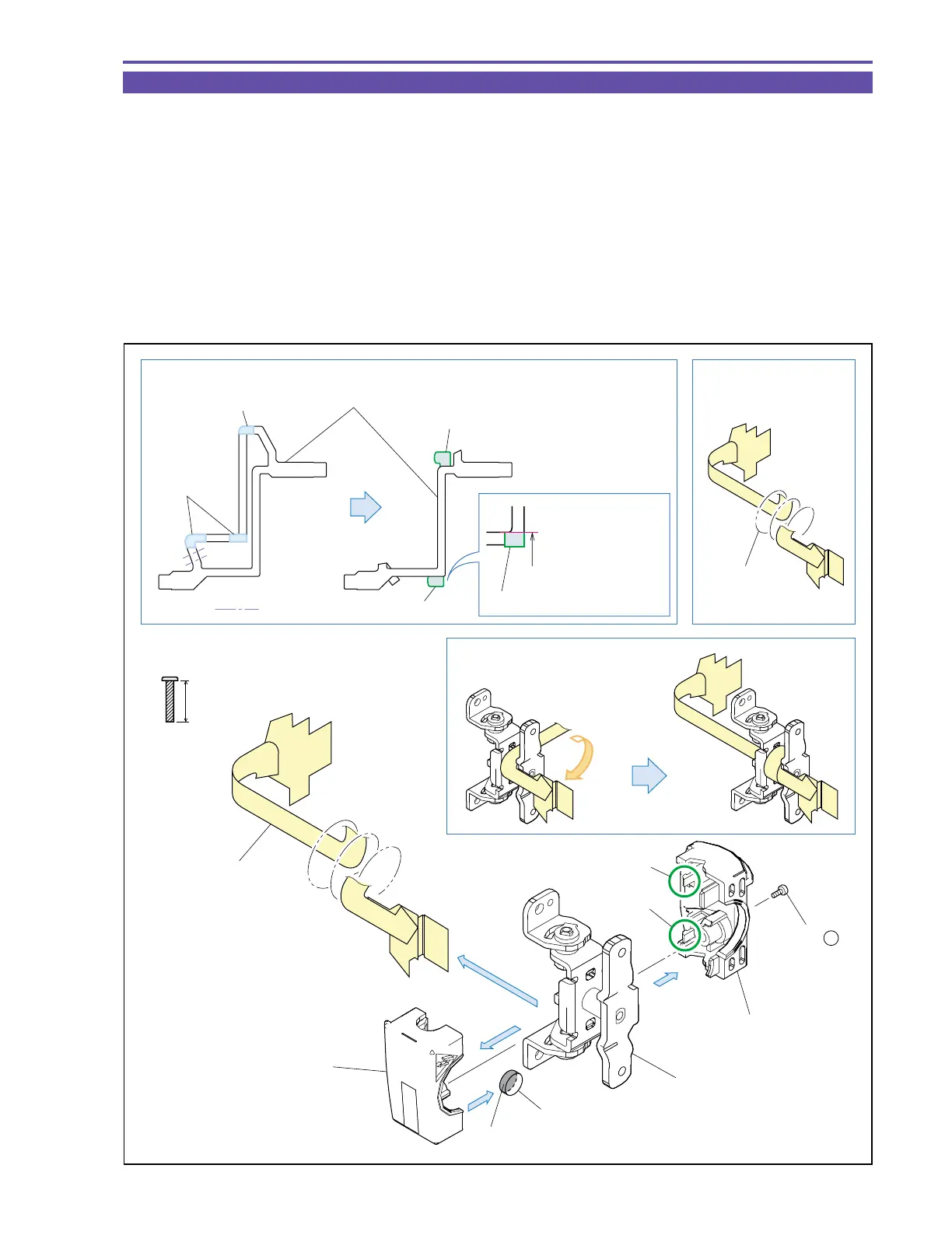
1-27 Disassembly of LCD Hinge Unit
(1) Remove one screw (o × 1), disengage the claws A and B, and detach the Hinge Top Cover, the Hinge Bottom Cover, and the Magnet.
(2) Detach the LCD-KEY FPC from the LCD Hinge Ass’y.
<Note on Reassembling>
(1) When using the service part LCD-KEY FPC, put “1” and “2”, “3” and “4”, and “5” and “6” on each other in a paired form, and
secure them with the Double Sided Tape on the FPC. Then, fold “7” and “8”, and secure them with the Double Sided Tape on the
FPC.
(2) Wind the LCD-KEY FPC 2 and 1/4 turns from the state illustrated below.
(3) Attach the Magnet so that the painted side (black) will be oriented as shown in the figure below.
<Instruction for Supply>
LCD winding part : Hanal FL-778 (DY9-3026-010)
Fig. 34
9mm
Metal
M1.7
(self tap)
o
Note on Reassembling (1)
Note on Reassembling (2)
(1)
(1)
(2)
(1)
Claw A
Claw B
LCD-KEY FPC
LCD Hinge Ass'y
Hinge Top Cover
Hinge Bottom Cover
Instruction for Supply
Hanal
FL-778
Wind 2-1/4 turns
Fold line
Folded part
Allowable deviation
of attachment from
outline: ±0.5 mm.
LCD-KEY FPC
5
3
1
6
2
4
8
7
(1) - o
Double Sided Tape
Double Sided Tape
Double Sided Tape
Double Sided
Tape
Magnet
Paint side (Black)



 To Next Page