MVX250i E, MVX200i E, MVX200 E
GENERAL DESCRIPTION OF PRODUCT
31
6-8-7 Card format Formats using format command in the main unit menu. Operation is not guaranteed with PC
formats as problems can occur with some OS.
6-8-8 Usable memory card
SD memory card San Disk : 8 MB, 16 MB, 32 MB, 64 MB, 128 MB, 256 MB
Matsushita Electric : 8 MB, 16 MB, 32 MB, 64 MB, 128 MB, 256 MB, 512 MB
Toshiba : 8 MB, 16 MB, 32 MB, 64 MB, 128 MB, 256 MB, 512 MB
MultiMediaCard San Disk : 8 MB, 16 MB, 32 MB, 64 MB
Hitachi : 16 MB, 32 MB, 64 MB
(However, this does not mean that the operation of all these memory cards is guaranteed.)
6-9 Digital feature playback function The following modes are provided : Fader, Effect, Multi-screen.
· Can be executed once when Fader mode is displayed in conjunction with pressing the button
(the mode display disappears when Fader ends).
· Effects : Effect continues until mode is turned OFF.
· Multi-screen : Loads and displays multiple screens at set interval or manually. Displayed until
mode is turned OFF.
6-9-1 Fader Audio synchronized Fader
Same as in recording mode. Auto Fade (Japanese model: Fade to white, Overseas model : Fade to
black), Wipe, Corner Wipe, Jump, Flip, Puzzle, Zigzag, Beam, Tide
Fade time Approx. 4 sec
6-9-2 Effects Same as in recording mode. Art, Black and White, Sepia, Mosaic, Ball, Cube, Wave, Color
Mask, Mirror (only in Tape mode)
Effect function turned ON / OFF from D. Effect button. Toggle operation
6-9-3 Multi-screen
a. Number of screens 4 (2 × 2), 9 (3 × 3), 16 (4 × 4)
b. Screen capture speed Manual, Fast (4 frames), Normal (6 frames), Slow (8 frames)
6-9-4 Card mix Not available
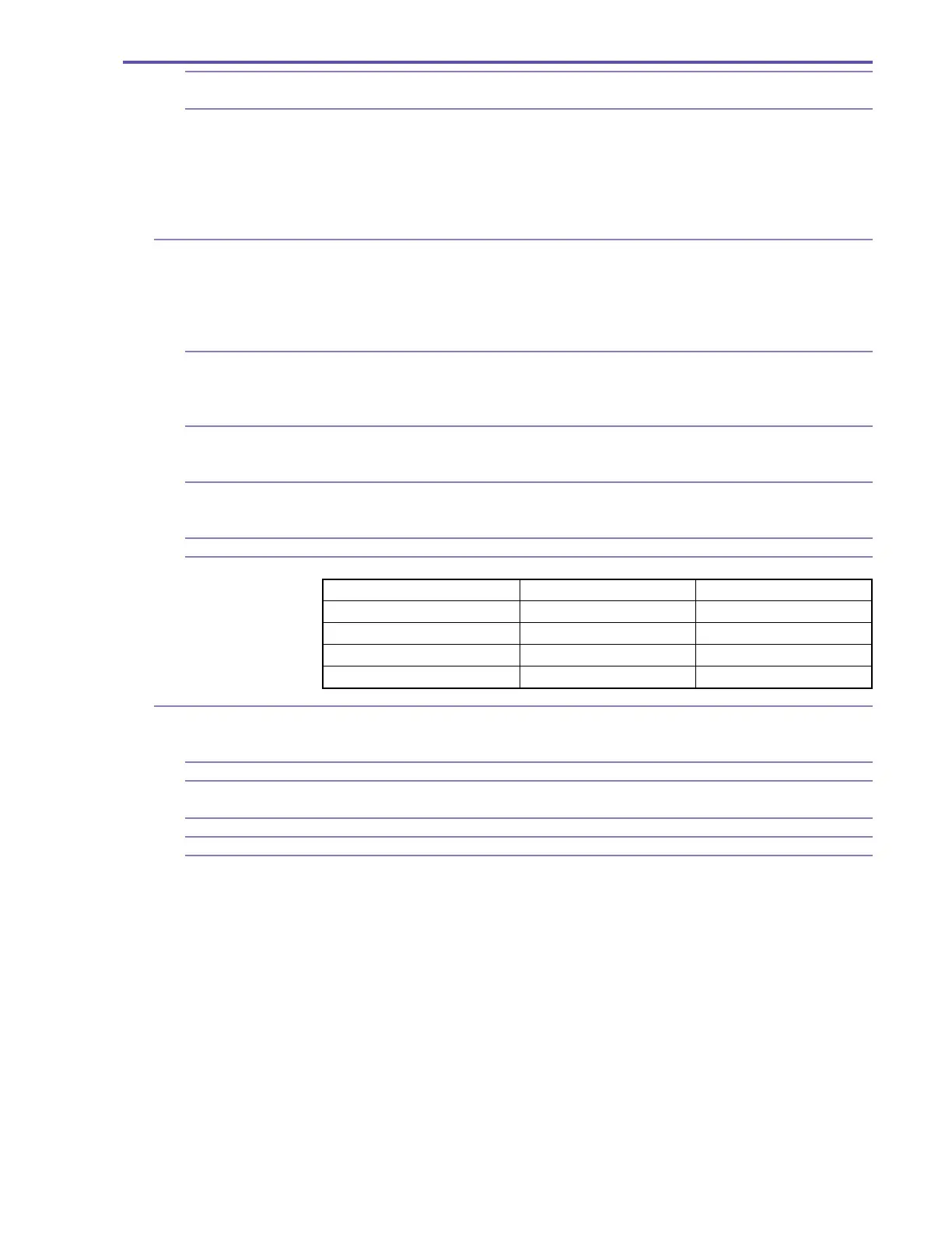
6-9-5 Availability in operation modes
6-10 Direct print Still images recorded on memory cards can be easily printed by connecting to (sold separately)
card photo printers CP-200/300, Camera Direct Printer compatible BJ printers PIXUS 470PD/
JP450i with supplied IFC-300PCU interface cable. DPOF print setup support (max. 200images)
6-10-1 Printable images Only the still images which have been recorded on the SD memory cards or MultiMediaCards.
6-10-2 Print format Single image/8-image print (layout of 8 pictures of same image : only when the card size paper
tray has been installed in the CP200/300). Printing not available from index screen.
6-10-3 Trimming Possible
6-10-4 Date printing Possible (when connected to PictBridge compatible printer except for the CP-200/CP-300.)
6-10-5 Number of print copies Easy Print : 1 to 99 sheets
DPOF printing : Max. 200 images, 1 to 99 each
Playback (VCR / Tape) Card playback
Fader ● ×
Effects ● ×
Multi-screen ● ×
Card Mix ××



 To Next Page